




















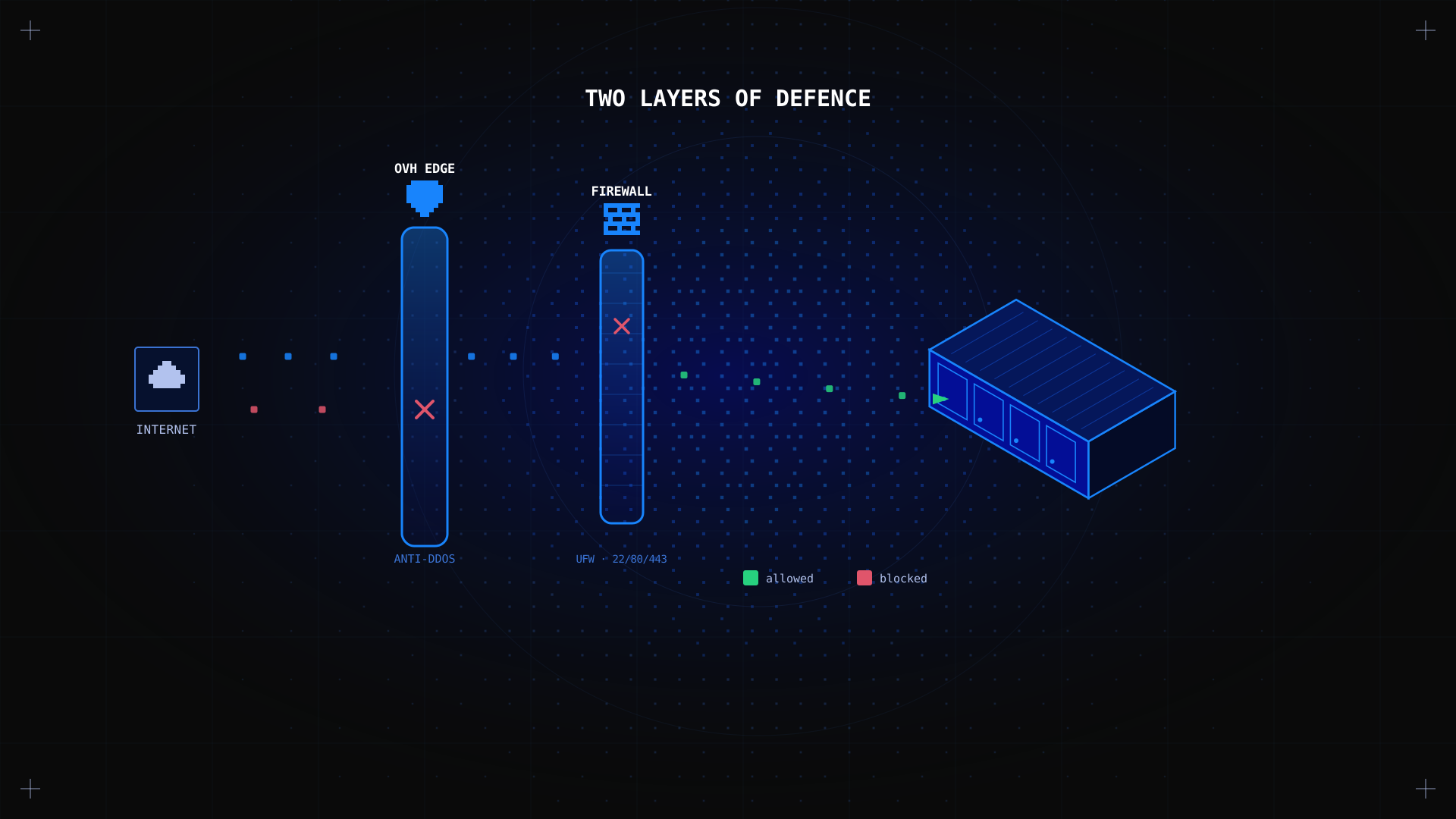
A firewall is the first line of defence for any dedicated server connected to the internet. Without one, every port on your server is potentially reachable by anyone, anywhere. A properly configured firewall controls which network traffic is allowed to reach your server, blocks unauthorized access attempts, and significantly reduces your server's attack surface. This guide explains what a dedicated server firewall is, how to set the right rules, which ports to open, and how firewalls differ from one another.
Key Takeaways
- A dedicated server firewall controls incoming and outgoing network traffic based on a rule set you define. It is the primary mechanism for preventing unauthorized access to your server.
- UFW (Uncomplicated Firewall) is the standard tool for Ubuntu/Debian servers. firewalld is used on AlmaLinux/RHEL systems. Both sit on top of the Linux kernel's iptables netfilter framework.
- The default rule set should be: deny all incoming traffic, allow all outgoing, then explicitly open only the ports your services require.
- All Kimsufi dedicated servers include OVHcloud's network-level DDoS protection at no extra cost, which operates at the infrastructure level independently of your server's firewall.
What Is a Dedicated Server Firewall?
A dedicated server firewall is software (or hardware) that monitors and controls network traffic reaching your server based on a predefined rule set. Each incoming packet of data is checked against the rules: if the traffic matches an allowed rule, it passes through; if not, it is dropped or rejected.
On a Linux dedicated server, the firewall is typically implemented using iptables (a kernel-level packet filtering framework) managed through a higher-level tool like UFW (Ubuntu/Debian) or firewalld (AlmaLinux/RHEL). On Windows Server, the built-in Windows Firewall handles the same function through a graphical interface or PowerShell.
A server-level firewall is distinct from a network-level firewall operated by your hosting provider. Kimsufi's infrastructure includes OVHcloud's anti-DDoS and edge network protection, which operates before traffic even reaches your server. Your server-level firewall adds a second layer of control for application-specific access rules.
Why Do You Need a Dedicated Server Firewall?
Without a firewall, every service running on your server is exposed to the public internet by default. A fresh Linux installation with a web server and database running would expose ports 80, 443, and 3306 to anyone who knows your IP address. The firewall ensures that only the traffic you intend to allow can reach your services.
- Block unauthorized access: automated bots continuously scan the internet for open ports and known vulnerabilities. A firewall drops this traffic before it reaches your applications.
- Protect sensitive data: database ports (MySQL 3306, PostgreSQL 5432) should never be open to the public internet. A firewall restricts access to specific trusted IP addresses only.
- Reduce attack surface: every open port is a potential entry point. Closing unused ports limits the number of ways an attacker can target your server.
- Compliance requirements: PCI DSS, HIPAA, and GDPR all require network access controls. A configured firewall is a core component of compliance for any server handling sensitive data.
What Are the 5 Types of Firewalls?
| Firewall type | How it works | Best for |
|---|---|---|
| Packet filtering | Inspects individual packets based on source/destination IP and port. Stateless. | Basic access control on trusted networks. |
| Stateful inspection | Tracks connection state. Allows return traffic for established connections automatically. | General server protection. Used by UFW/iptables. |
| Application (WAF) | Inspects HTTP/HTTPS traffic at the application layer. Blocks SQL injection, XSS, and other web attacks. | Web servers and APIs exposed to the public internet. |
| Proxy firewall | Acts as an intermediary for all traffic, masking the server's IP. | High-security environments requiring full traffic inspection. |
| Next-gen (NGFW) | Combines stateful inspection with deep packet inspection, IDS/IPS, and application awareness. | Enterprise environments with complex compliance requirements. |
For a dedicated server, stateful inspection (via UFW/iptables) combined with DDoS protection at the network level covers the vast majority of use cases. Web servers handling public traffic benefit from an additional application-level WAF (Web Application Firewall) such as ModSecurity or Cloudflare.
What Is the Difference Between a Shared and Dedicated Firewall?
A shared firewall is a network-level appliance managed by the hosting provider that protects multiple customers' servers simultaneously. Rules are typically predefined and limited. A dedicated firewall is either a physical appliance or server-level software exclusively protecting a single server or network segment. It gives you complete control over the rule set, logging, and configuration.
On Kimsufi dedicated servers, you have both: OVHcloud's network-level protection (shared infrastructure) handles DDoS and volumetric attacks, while your server's own firewall (UFW, iptables, or firewalld) gives you dedicated, granular control over application-level access.
How to Configure a Dedicated Server Firewall (UFW on Ubuntu/Debian)
UFW is the recommended firewall tool for Ubuntu and Debian servers. If you have not set it up yet, our Linux server configuration guide covers the full server hardening process. Here is the essential firewall setup:
Step 1: Install UFW (if not already present)
sudo apt install ufw -yStep 2: Set default rules
sudo ufw default deny incoming

sudo ufw default allow outgoing
Step 3: Allow SSH before enabling (critical)
⚠️ Warning Add the SSH rule before enabling UFW. Missing this step will lock you out of the server. Use the Kimsufi KVM console to recover if this happens.
sudo ufw allow OpenSSHStep 4: Add rules for your services
sudo ufw allow 80/tcp    # HTTP

sudo ufw allow 443/tcp   # HTTPS

# Database: restrict to specific IP only

sudo ufw allow from 203.0.113.10 to any port 3306
Step 5: Enable and verify
sudo ufw enable

sudo ufw status verbose
✅ Expected result UFW is active. Status shows your rules: SSH, HTTP, and HTTPS allowed. All other inbound traffic is blocked.
How to Configure a Firewall on AlmaLinux (firewalld)
sudo systemctl enable --now firewalld

sudo firewall-cmd --permanent --add-service=ssh

sudo firewall-cmd --permanent --add-service=http

sudo firewall-cmd --permanent --add-service=https

sudo firewall-cmd --reload

sudo firewall-cmd --list-all
What Ports Should I Open for My Firewall?
Open only the ports your services actively require. This table covers the most common services on dedicated servers:
| Service | Protocol | Port | When to open |
|---|---|---|---|
| SSH | TCP | 22 | Always. Change to a non-standard port for added security. |
| HTTP | TCP | 80 | Web servers. Required for Let's Encrypt certificate validation. |
| HTTPS | TCP | 443 | Web servers with SSL/TLS. |
| MySQL | TCP | 3306 | Only if remote database access is required. Restrict to trusted IPs. |
| PostgreSQL | TCP | 5432 | Only if remote database access is required. Restrict to trusted IPs. |
| Minecraft | TCP | 25565 | Game servers running Minecraft Java Edition. |
| Ark Survival | UDP | 7777 | Game servers running Ark Survival Evolved. |
| Palworld | UDP | 8211 | Game servers running Palworld. |
| RDP | TCP | 3389 | Windows Server remote desktop. Restrict to trusted IPs only. |
As a general rule: if a port does not need to be publicly accessible, restrict it to specific IP addresses or close it entirely. Database ports in particular should never be open to the public internet without IP-based access controls.
Common Firewall Configurations
Web server (LAMP/LEMP stack)
sudo ufw allow OpenSSH

sudo ufw allow 80/tcp

sudo ufw allow 443/tcp
Game server (Ark Survival Evolved)
sudo ufw allow OpenSSH

sudo ufw allow 7777/udp

sudo ufw allow 27015/udp   # Steam query port
Database server (restricted access)
sudo ufw allow OpenSSH

sudo ufw allow from YOUR_APP_SERVER_IP to any port 3306
Does a Server Need a Firewall?
Yes, without exception. Every server connected to the public internet needs a firewall. The question is not whether to have one, but how to configure it correctly. Even if your hosting provider offers network-level DDoS protection (as Kimsufi does via OVHcloud), a server-level firewall is still essential for controlling application-specific access and protecting sensitive services like databases and admin panels.
Is UFW a Real Firewall?
Yes. UFW (Uncomplicated Firewall) is a front-end interface for iptables, which is the Linux kernel's built-in packet filtering framework. UFW does not add a new firewall layer: it simplifies the management of iptables rules through a cleaner command-line interface. The actual packet filtering happens at the kernel level via netfilter. For advanced use cases requiring very granular rule sets, you can interact with iptables or nftables directly.
FAQ
What does a dedicated firewall do?
A dedicated firewall inspects incoming and outgoing network packets and allows or blocks them based on a configured rule set. It controls which IP addresses and ports can access your server, preventing unauthorized access, blocking malicious traffic, and limiting exposure to network-based attacks.
How do I secure a dedicated server beyond the firewall?
Firewall configuration is one component of server security. A complete security posture also includes: SSH key authentication (disable password login), Fail2ban for brute-force protection, regular OS and software updates, strong access control policies, and encrypted backups.
Our dedicated server maintenance guide covers the full ongoing security checklist.
What is the difference between a firewall and DDoS protection?
A server-level firewall controls application-level access based on rules you define. DDoS protection operates at the network level, detecting and mitigating volumetric attacks (flood traffic designed to overwhelm your server's network connection) before they reach your server. Both are necessary: DDoS protection handles large-scale network attacks; the firewall handles unauthorized access to specific services.
Can I use a WAF with a dedicated server?
Yes. A Web Application Firewall (WAF) inspects HTTP and HTTPS traffic at the application layer, blocking SQL injection, cross-site scripting, and other web-layer attacks that a network firewall cannot detect. Tools like ModSecurity (integrates with Nginx and Apache) or Cloudflare's WAF service can be combined with your server-level firewall for layered protection.
Conclusion
A properly configured dedicated server firewall is one of the most important security measures you can implement. Set the defaults to deny all incoming traffic, open only the ports your services require, restrict sensitive ports (databases, admin panels) to trusted IP addresses, and review your rules regularly. Combined with OVHcloud's built-in DDoS protection on all Kimsufi servers, this gives your infrastructure solid, layered network security.
For the complete server setup process, see our guide on how to configure a Linux server.
Secure your dedicated server today Kimsufi servers from $11.10/month include built-in DDoS protection, root access, and KVM over IP. Browse KS, SYS, and RISE ranges.