


















Crossplay lets players on different platforms (PC, Xbox, PlayStation, mobile) connect to the same game server. Setting up crossplay on a dedicated server unlocks a larger player community and eliminates the frustration of platform-divided friend groups. Whether you are running Minecraft, Ark Survival Evolved, or another title, this guide covers what crossplay requires, which platforms support it, how to enable it, and how to install Geyser for Java/Bedrock crossplay.
What is required for Crossplay?
Crossplay requirements vary by game, but the general prerequisites for running a crossplay-enabled dedicated server are:
- A dedicated server with root access: crossplay configuration often requires installing additional software or editing server configuration files that are not accessible on managed or shared hosting.
- The game's dedicated server software: many games offer crossplay only through their official dedicated server builds, not through peer-to-peer or listen servers.
- Platform-specific ports open in the firewall: crossplay often requires additional ports beyond the standard gameplay port. Xbox and PlayStation connections may require different endpoints than PC.
- A stable internet connection and public IP: all platforms need to reach the server. A Kimsufi dedicated server provides a stable public IP and low-latency connectivity from data centres in Europe, North America, and Asia-Pacific.
What platforms support Crossplay?
Crossplay support depends entirely on the game developer's implementation, not the server hardware. The server hardware simply provides the infrastructure; the game software handles cross-platform protocol translation.
- Minecraft: Java Edition (PC) and Bedrock Edition (Windows Store, Xbox, PlayStation, mobile) are separate versions that do not natively support crossplay. Geyser (a proxy plugin) enables Java servers to accept Bedrock clients.
- Ark Survival Evolved / Ark Survival Ascended: supports crossplay between PC (Steam) and Xbox. Enable with the -crossplay launch parameter. PlayStation crossplay has platform-specific requirements.
- Palworld: supports crossplay between PC (Steam) and Xbox through the Xbox Developer Mode server option or via the official crossplay server configuration.
- 7 Days to Die: added official crossplay support in recent versions, enabling PC and console players to join the same server. Check the official 7 Days to Die crossplay server requirements page for current configuration details.
Can Java and Bedrock Players play together?
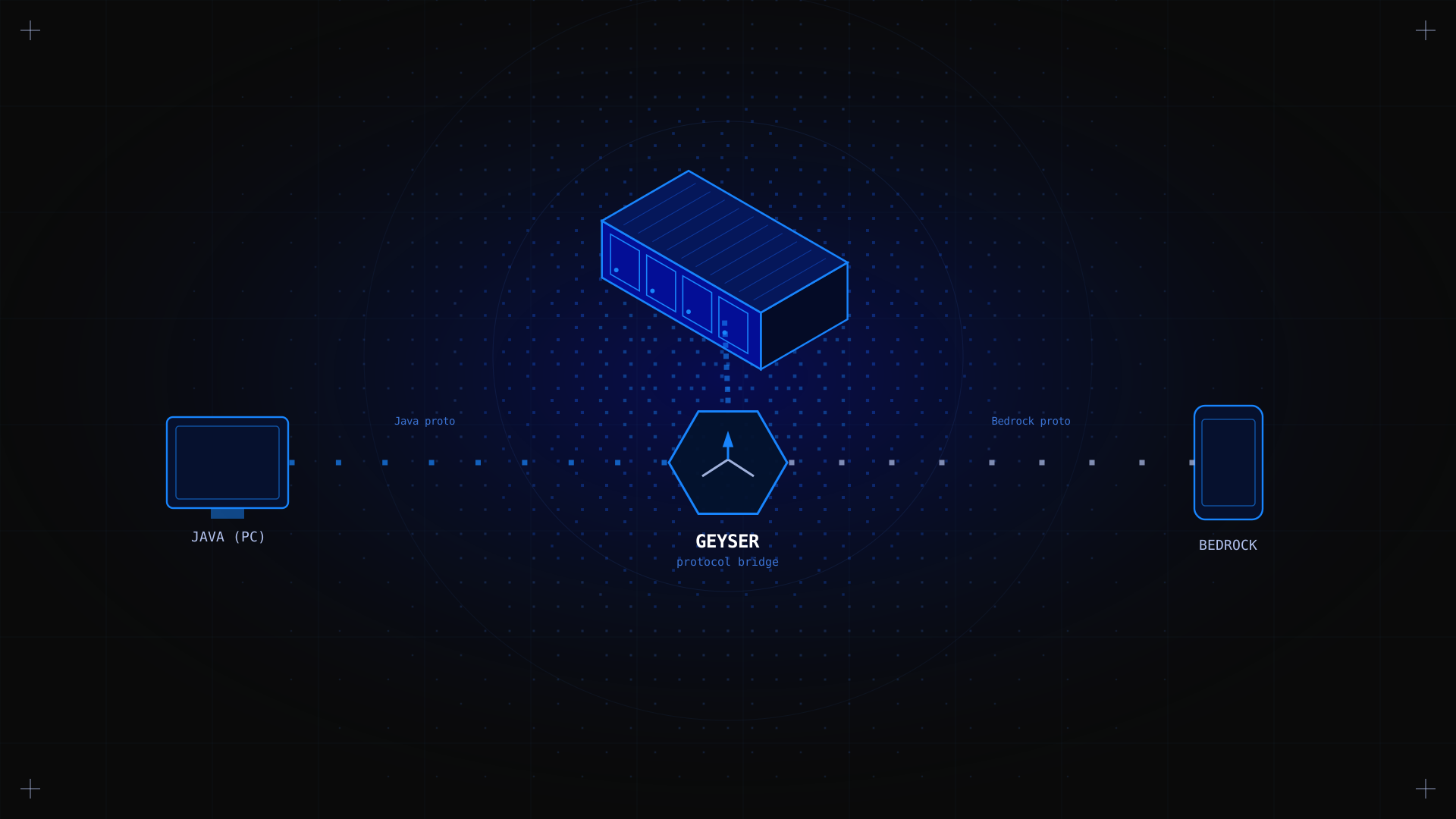
Not natively: Java Edition and Bedrock Edition use different network protocols. However, the Geyser plugin (combined with Floodgate) acts as a proxy that translates Bedrock protocol to Java protocol, allowing Bedrock clients to connect to a Java server. The Java server sees Bedrock players as standard clients; Bedrock players connect using the server's IP and the Bedrock port (UDP 19132).
How to Install Geyser for Minecraft Crossplay
Geyser is a Paper/Spigot plugin that enables Bedrock clients to connect to a Java Minecraft server. Here is how to set it up on a Linux dedicated server.
Step 1: Set up your Java Minecraft server
Install Paper or Spigot (the recommended Java server software for plugin support). If you are running vanilla server.jar, switch to PaperMC for plugin compatibility.
wget https://api.papermc.io/v2/projects/paper/versions/1.21/builds/latest/downloads/paper-1.21-latest.jar -O server.jarjava -Xmx4G -jar server.jar nogui
Step 2: Download and install Geyser
Download GeyserMC-Spigot.jar from geysermc.org/download and place it in your server's /plugins directory. Restart the server to generate Geyser's configuration files.
Step 3: Configure Geyser
Edit plugins/Geyser-Spigot/config.yml to set the address (0.0.0.0 to accept connections on all interfaces) and port (19132 UDP by default):
bedrock:
address: 0.0.0.0
port: 19132
clone-remote-port: false
Step 4: Open the Bedrock port in your firewall
sudo ufw allow 19132/udpStep 5: Install Floodgate (optional but recommended)
Floodgate allows Bedrock players to join without a Java account. Download Floodgate-Spigot.jar from geysermc.org and place it in the /plugins directory. Configure Geyser to use Floodgate authentication by setting auth-type: floodgate in the Geyser config.
✅ Expected result Java players connect on port 25565/TCP as normal. Bedrock players (Xbox, mobile, Windows Store) connect on port 19132/UDP using the server's IP address.
How to Enable Crossplay on Ark Survival Evolved
For Ark Survival Evolved, add -crossplay to the server launch parameters. This enables PC and Xbox players to join the same server. In your systemd service file, update the ExecStart line:
ExecStart=/home/steam/ark/ShooterGameServer TheIsland?listen -crossplayRestart the server and verify that crossplay is active by checking the server settings in-game. Xbox players must have the Xbox app or Xbox Game Pass and connect using the server's IP address in the game's join settings.
Troubleshooting Crossplay Issues
- Bedrock players cannot connect (Minecraft): verify that UDP port 19132 is open in your firewall and that Geyser is running (check /plugins/Geyser-Spigot/logs). Confirm the Bedrock client is using UDP, not TCP.
- Xbox players cannot see the server (Ark): confirm -crossplay is in the launch parameters and that the server is publicly reachable. Xbox crossplay requires the server to be accessible from Xbox's network infrastructure.
- Version mismatch: crossplay typically requires all clients to be on the same game version. Update both the server and all clients to the latest version.
FAQ
Can I enable crossplay on an existing server?
Yes. Enabling crossplay is typically a configuration change (adding a launch parameter or installing a plugin) rather than a fresh install. Back up your server data before making changes, and test with a small group before announcing the change to your community.
What are the best crossplay server hosts?
For full crossplay configuration control, a dedicated server with root access is essential. Kimsufi KS servers from $11.10/month give you the root access, dedicated hardware, and stable public IP needed to configure crossplay correctly for any supported game.
Conclusion
Setting up crossplay on a dedicated server brings your community together regardless of platform. The exact process depends on your game: for Minecraft Java/Bedrock crossplay, Geyser handles the protocol translation. For Ark and Palworld, a single launch parameter enables Xbox crossplay. The common foundation for all of these is a dedicated server with root access and correctly configured firewall ports. Kimsufi dedicated servers from $11.10/month provide exactly that, with the unmetered bandwidth and DDoS protection your crossplay community needs.