























Docker packages an application and its dependencies so it runs the same way anywhere. On a dedicated server, that portability comes with the whole machine behind it: every core, all the RAM, and the local NVMe SSD belong to your containers. This guide covers the install on Ubuntu, CentOS, and Debian, then the post-install configuration a production server needs. Kimsufi dedicated servers start at $11.10/month.
Key takeaways
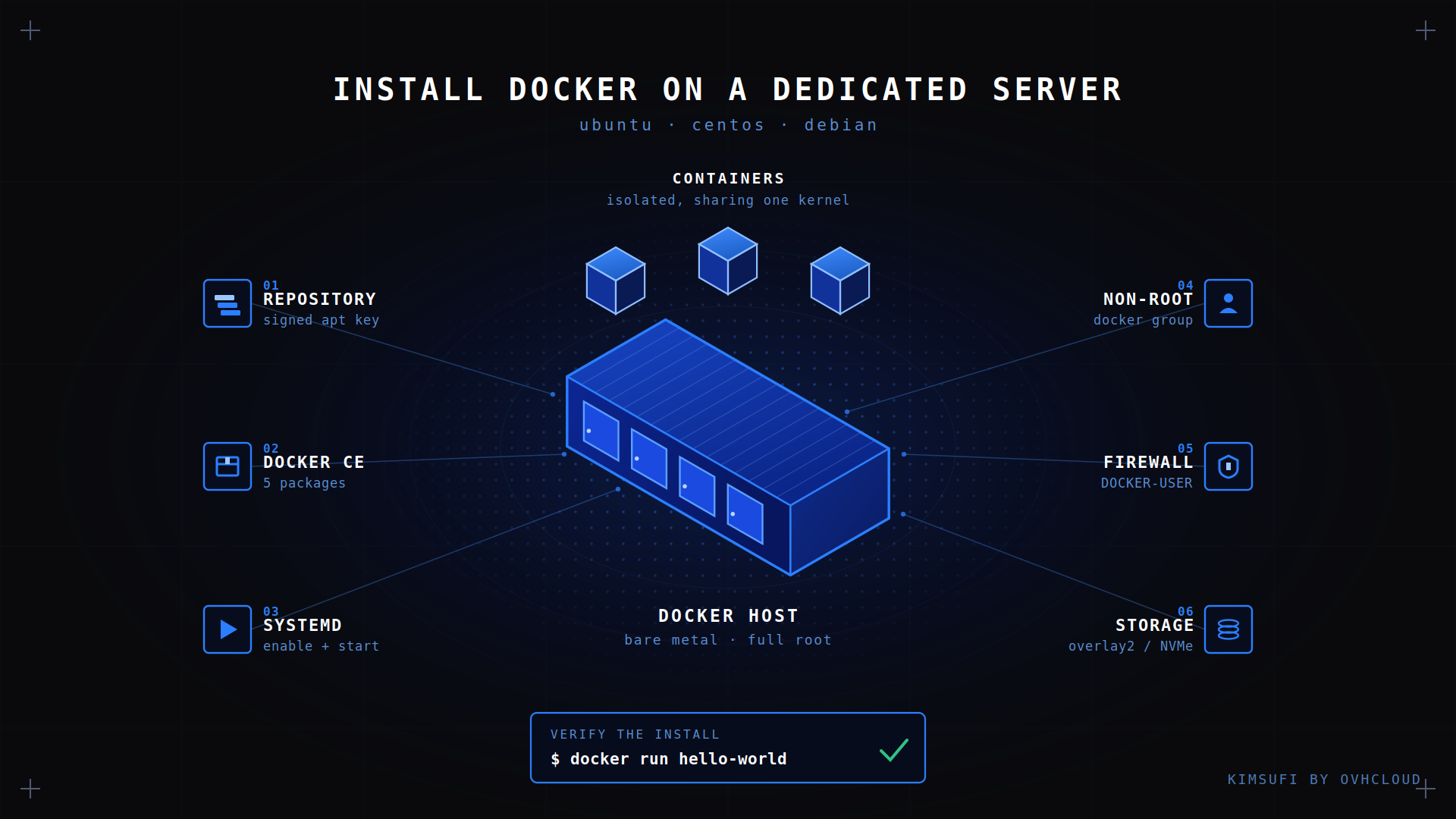
- Install the engine from Docker's own apt repository, not the distribution package. The distro version lags several releases behind stable.
- One command installs the whole platform: engine, CLI, containerd, Buildx, and Compose.
- Commands are the same on Ubuntu, Debian, and RHEL family systems. Only the package manager changes.
- Adding a user to the docker group grants administrative rights on the server.
- Docker writes its own firewall rules and bypasses ufw. Publish deliberately, or you expose an application to the internet.
What is Docker and why use it on a dedicated server?
Docker is a container platform that bundles an application, its runtime, and its libraries into one image. A Docker container then runs that image as an isolated process, sharing the server's kernel instead of booting a guest operating system, so it starts in about a second.
Hardware is where the platform choice pays off. A virtual machine pays a hypervisor tax, and containers inside one pay it twice. A dedicated server can host Docker workloads with no such layer: on physical hardware the cores are yours directly. You also get full root, which a shared platform rarely allows. Images build faster, and a Docker container keeps predictable disk latency, because no other tenant competes for the same SSD.
Prerequisites: OS versions, root access, and network requirements
Check four things first.
- Operating system. A 64-bit release Docker still supports: Ubuntu 22.04, 24.04, or 26.04 LTS, Debian 12 or 13, CentOS Stream 9 or 10, RHEL 9 or 10, or Fedora. Architectures include amd64 and arm64. Version 7 gets no packages.
- Privileges. Root or a sudo account.
- Storage. 2 GB of RAM is a realistic floor, and images pile up fast. A dedicated Intel server with NVMe SSD gives you the space and IOPS that image layers need.
- Network. Outbound HTTPS on port 443, so the server can download from download.docker.com and your registry.
Remove any distro-shipped Docker or Podman packages first, or the install fails.
How do you install Docker Engine on a dedicated server?
Four steps: add the official package source, install the packages, start the engine, run a test image. Five minutes of setup on a fresh server.
Add Docker's official APT/YUM repository
The packages are signed, so the download key goes in first. On Ubuntu:
sudo apt install -y ca-certificates curl

sudo install -m 0755 -d /etc/apt/keyrings

sudo curl -fsSL https://download.docker.com/linux/ubuntu/gpg \
-o /etc/apt/keyrings/docker.asc
sudo chmod a+r /etc/apt/keyrings/docker.asc

echo "deb [arch=$(dpkg --print-architecture) \
signed-by=/etc/apt/keyrings/docker.asc] \
https://download.docker.com/linux/ubuntu \
$(. /etc/os-release && echo "$VERSION_CODENAME") stable" \
| sudo tee /etc/apt/sources.list.d/docker.list > /dev/null
sudo apt updateThe stable channel is the one you want. Test and nightly channels exist alongside it and are not meant for production.
Install Docker Engine on Ubuntu
The Community Edition is free. Install it with the CLI, containerd, Buildx, and Compose:
sudo apt install -y docker-ce docker-ce-cli containerd.io \

docker-buildx-plugin docker-compose-plugin
Dropping the last two is a common mistake. Without them, docker compose and buildx are missing, and the CLI reports an unknown command.
Install Docker Engine on CentOS / RHEL
These use dnf and a .repo file, so there is no keyring step:
sudo dnf -y install dnf-plugins-core

sudo dnf config-manager --add-repo \
https://download.docker.com/linux/centos/docker-ce.repo
sudo dnf -y install docker-ce docker-ce-cli containerd.io \

docker-buildx-plugin docker-compose-plugin

sudo systemctl enable --now docker
On dnf5, the second line becomes dnf config-manager addrepo --from-repofile=<url>. It does not launch by itself here, hence --now.
Install Docker Engine on Debian
Identical to Ubuntu: swap debian for ubuntu in both URLs, then rerun the last four commands from the Ubuntu setup. If the packages cannot be found, your codename resolved wrong. Print $VERSION_CODENAME and compare it with the amd64 listing you can download from that URL.
Verify the installation and basic commands
Three commands confirm a working installation:
sudo docker run hello-world

docker compose version

sudo docker info | grep -i "storage driver"
The storage driver should read overlay2. Anything else means an unsupported filesystem under /var/lib/docker.
✅ Expected result hello-world prints a confirmation message and exits. The engine runs, the docker.sock socket answers, and the registry is reachable.
What should you set up after installation?
The engine runs, but it is not ready for production traffic. Three configuration items matter.
Post-install: run Docker as a non-root user
Add your account to the docker group to drop the sudo prefix:
sudo usermod -aG docker $USERnewgrp docker
💡 Tip: the docker group is root-equivalent. Anyone in it can mount the server's filesystem and read anything. Grant it only where you would grant administrator rights, and use rootless mode on shared servers.
Configure firewall and storage for Docker
The engine inserts its own iptables rules ahead of yours, so a published port stays reachable even when ufw reports it as blocked. Do your firewall filtering in the DOCKER-USER chain, and bind anything non-public to the loopback address:
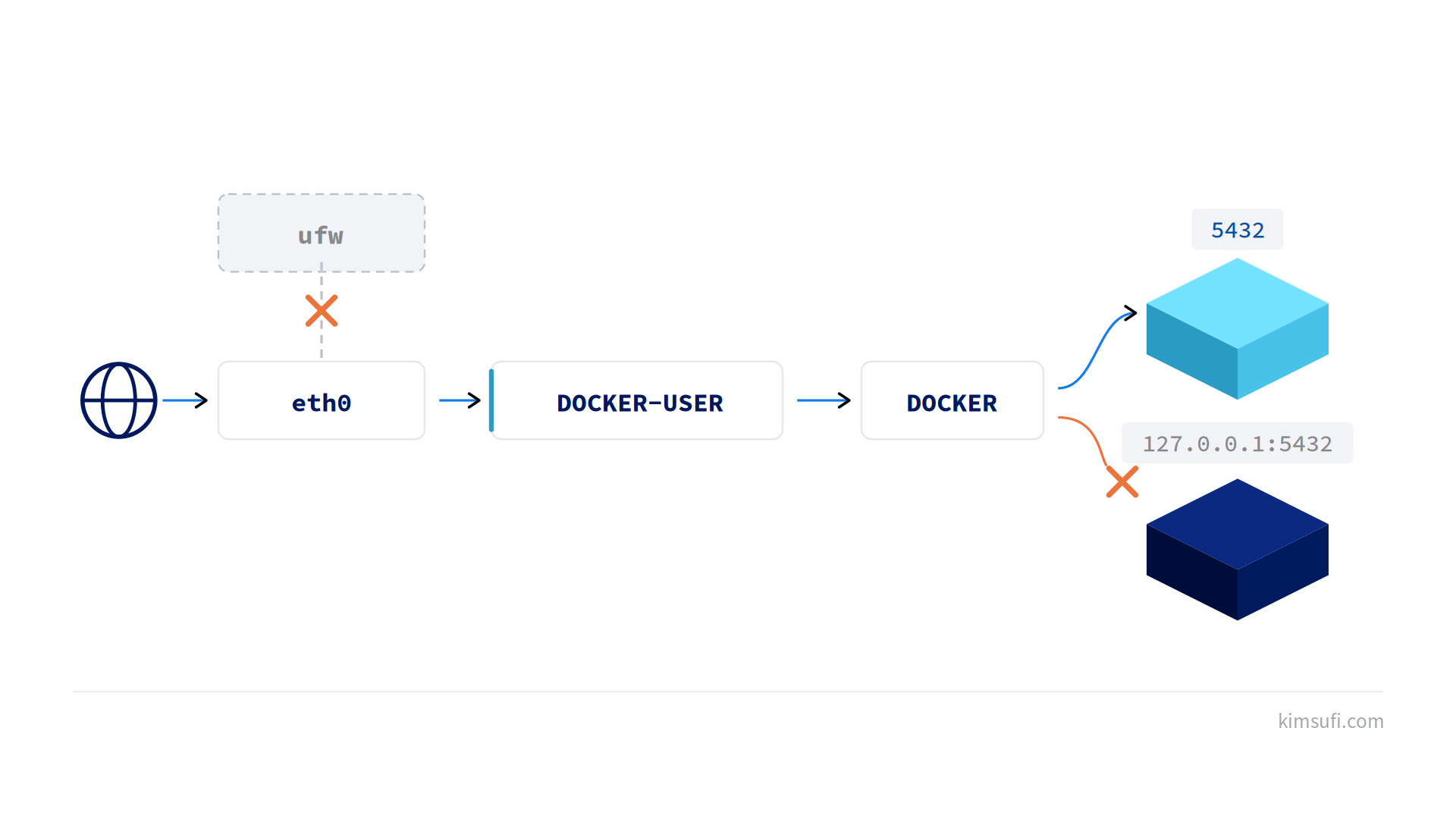
docker run -d -p 127.0.0.1:5432:5432 postgres:17

sudo iptables -I DOCKER-USER -i eth0 ! -s 203.0.113.0/24 -j DROP
Two firewall habits worth keeping: publish only what an app serves, and never expose that socket. For storage, keep /var/lib/docker on fast local disk. Images, writable layers, and every named volume live there, and a busy server fills tens of gigabytes in a week. Keep application data in a docker volume, not the container layer, and reclaim space with system prune -a. A SYS range server with NVMe SSD from $33.20/month absorbs registry pulls and concurrent builds.
Enable and start Docker service with systemd
The service must survive a reboot:
sudo systemctl enable dockerEngine settings belong in /etc/docker/daemon.json, not the unit file. Log rotation is the setting most often forgotten, and one chatty workload will fill the disk without it:
{ "log-driver": "json-file",
"log-opts": { "max-size": "10m", "max-file": "3" } }
Apply it with a service restart.
How do you upgrade or uninstall Docker Engine?
Upgrade Docker Engine safely
Because you installed from the apt repository, an upgrade is a normal package operation. Refresh the package index, then move all five together, or the CLI and engine land on incompatible API versions:
sudo apt install --only-upgrade -y docker-ce docker-ce-cli \containerd.io docker-buildx-plugin docker-compose-plugin
The service restarts and stops your containers unless live restore is on. Read the release notes, test the upgrade on a staging server, then pick a maintenance window.
Uninstall Docker completely
An uninstall leaves images and volumes behind on purpose. As the superuser, purge the packages and remove the data directories:
apt purge -y 'docker*' containerd.io

rm -rf /var/lib/docker /var/lib/containerd
Common issues and troubleshooting tips
| Symptom | Cause | Fix |
|---|---|---|
| Cannot connect to the Docker daemon | Service not running | Start the service, then read journalctl -u docker -n 50 |
| Permission denied on docker.sock | User not in the docker group | Add the user, then reconnect the session |
| Unable to locate the package | Repository missing or wrong codename | Re-add it, then update |
| No space left on device | The data directory is full | Prune unused images, move it to a larger volume |
| Address already allocated | Another process holds it | Find it with ss -tulpn, publish a different one |
Prefer a web console to the CLI? Portainer runs as a container on the same host and covers most day-to-day management. For a language runtime alongside the engine, our guide on installing Go on a dedicated server uses the same apt repository pattern.
Conclusion
Installing Docker on a dedicated server takes five minutes. What matters more is the configuration that follows: the docker group treated as a real privilege, firewall rules that survive the engine's own, log rotation before the disk fills, and a data directory on a disk that keeps up. Get those four right and the server runs your applications for years without attention.
Deploy Docker on bare metal today Browse the Kimsufi KS range from $11.10/month for a first host, or the Rise range from $72.00/month when builds and databases need headroom. Every server includes full root access, unmetered bandwidth, and DDoS protection. Contact our sales team for help sizing your deployment.
FAQ
How do I install Docker on my server?
Add the official repository, install the engine with the CLI, containerd, and both extras, then run hello-world to confirm the service answers.
Why are people moving away from Docker?
Some teams changed the runtime, not the format. Kubernetes dropped the Docker shim in 2022 and containerd took over. The image format is an open standard, so nothing is locked in.
Is Docker still relevant in 2026?
Yes. It is still the default tool for building and sharing Docker container images. The tooling around it moved more than the tool itself.
Is Docker better than a VM?
For one application, usually: no guest kernel, a start measured in seconds, far less RAM. A virtual machine wins when you need a different kernel or hard tenant isolation.
How can I run Docker commands without sudo?
Run usermod -aG docker $USER, then open a new session. This grants administrative access, so keep the group small.
What is the recommended way to upgrade Docker Engine?
Upgrade all five packages in one transaction so the CLI and engine stay on matching versions. Turn on live restore if containers must survive the restart.
How do I configure Docker storage drivers on a dedicated server?
Keep the default overlay2 driver. Set the data directory and driver options in daemon.json, restart the service, and confirm with docker info.
What firewall ports need to be opened for Docker?
None to install. Open only what your containers publish, filter in the DOCKER-USER chain, and keep the socket off the network.
How can I troubleshoot 'docker daemon not running' errors?
Check the service status, then read journalctl -u docker. A malformed daemon.json is the usual cause: a syntax error stops it silently.