
























Unpacking Go from the official tarball takes five minutes and gives you the current release, not whatever your distribution froze two years ago. This guide covers the download, the extraction, the environment variables that trip most people up, and a first program to prove the toolchain works. Every step runs the same on Ubuntu, Debian, Rocky and Fedora, with notes for macOS and Windows.
Key takeaways
- Take the tarball from go.dev, not your package manager. Distribution packages lag several releases behind.
- Extract to /usr/local, then add the toolchain's bin directory to PATH. That single step makes the go tool available.
- GOPATH defaults to ~/go and no longer needs setting for module work. One variable controls where compiled tools land.
- Verify with go version and a Hello World program before you trust the setup.
- Use GVM or asdf when a project pins an older release and you need two versions side by side.
Prerequisites
Four things to check first.
- A 64-bit Linux machine. Any current distribution works. Check the platform with uname -m, which prints x86_64 on Intel and AMD, aarch64 on Arm.
- Privileges. Extraction writes to /usr/local, so you need sudo there.
- Network access. Outbound HTTPS on port 443 to go.dev and, later, to the module proxy at proxy.golang.org. No inbound port needs opening for the install itself.
- Around 1 GB of free disk. The toolchain is roughly 250 MB extracted; the cache and modules grow from there.
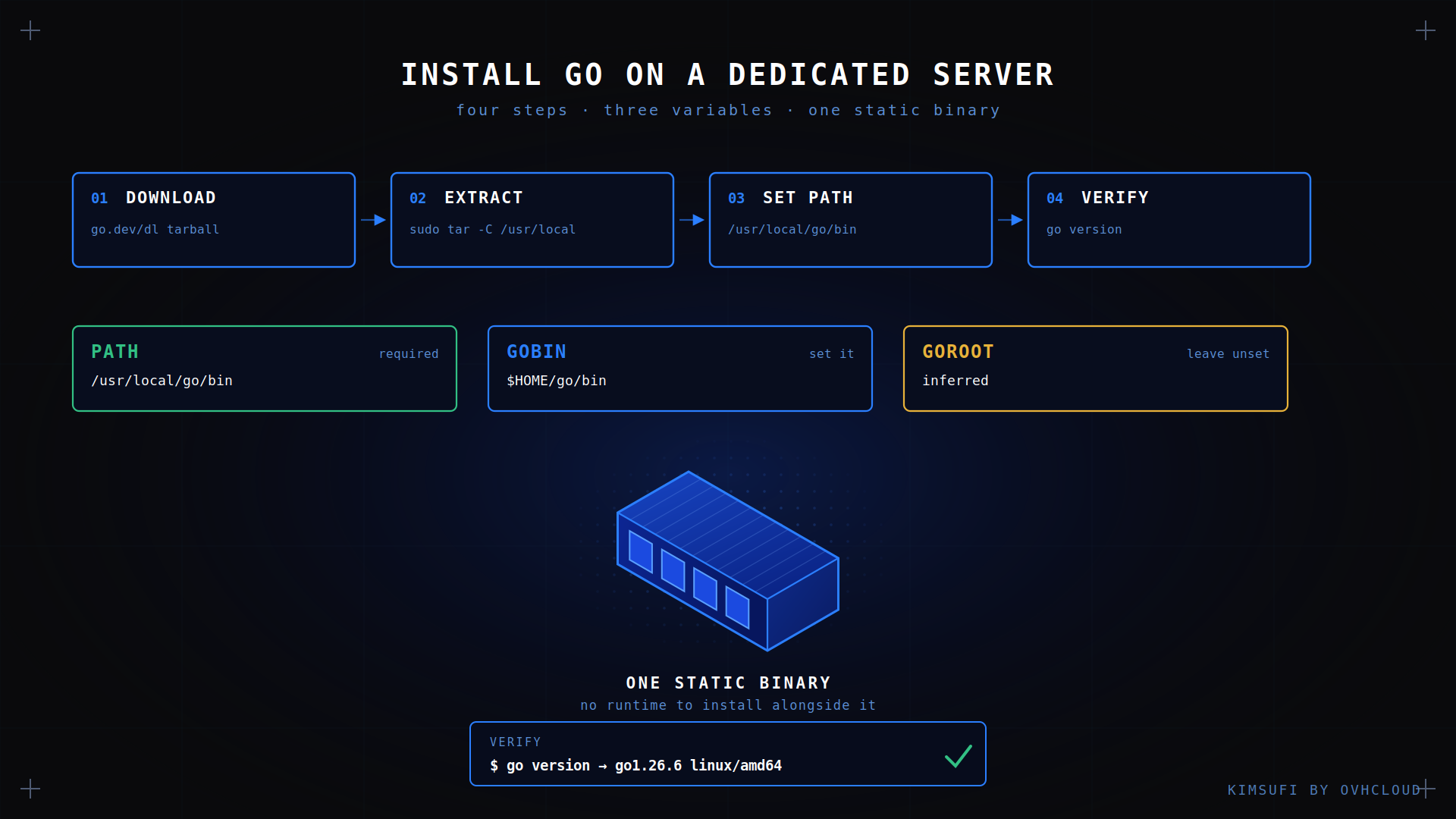
No compiler is needed: the tarball ships a complete toolchain. The whole procedure is four steps.
Download the Go binary
Pin the version or let the download resolve the current release. The second ages better:
GO_VERSION=$(curl -sL 'https://go.dev/VERSION?m=text' | head -1)
echo "$GO_VERSION"
curl -sLO "https://go.dev/dl/${GO_VERSION}.linux-amd64.tar.gz"
At the time of writing that resolves to go1.26.6, so the archive arrives as go1.26.6.linux-amd64.tar.gz at around 64 MB. On arm64 hardware, swap the architecture in the filename. On macOS take the darwin-arm64 archive, and on Windows the MSI installer from the same page.
Verify the download before you extract it. A truncated tarball produces confusing errors much later:
curl -sLO "https://go.dev/dl/${GO_VERSION}.linux-amd64.tar.gz.sha256"
sha256sum -c "${GO_VERSION}"*.sha256
Extract and install Go
Remove any previous installation first, then unpack into /usr/local:
sudo rm -rf /usr/local/go
sudo tar -C /usr/local -xzf "${GO_VERSION}.linux-amd64.tar.gz"
The rm -rf matters. Extracting over an existing tree leaves stale files from the old release, and the resulting version mismatches are hard to diagnose. Repeat that process before every upgrade, and the same process covers a downgrade.
The toolchain now sits under /usr/local/go and works immediately by full path:
/usr/local/go/bin/go versionConfigure environment variables (GOROOT and GOPATH)
Three variables matter, and only one of them is mandatory.
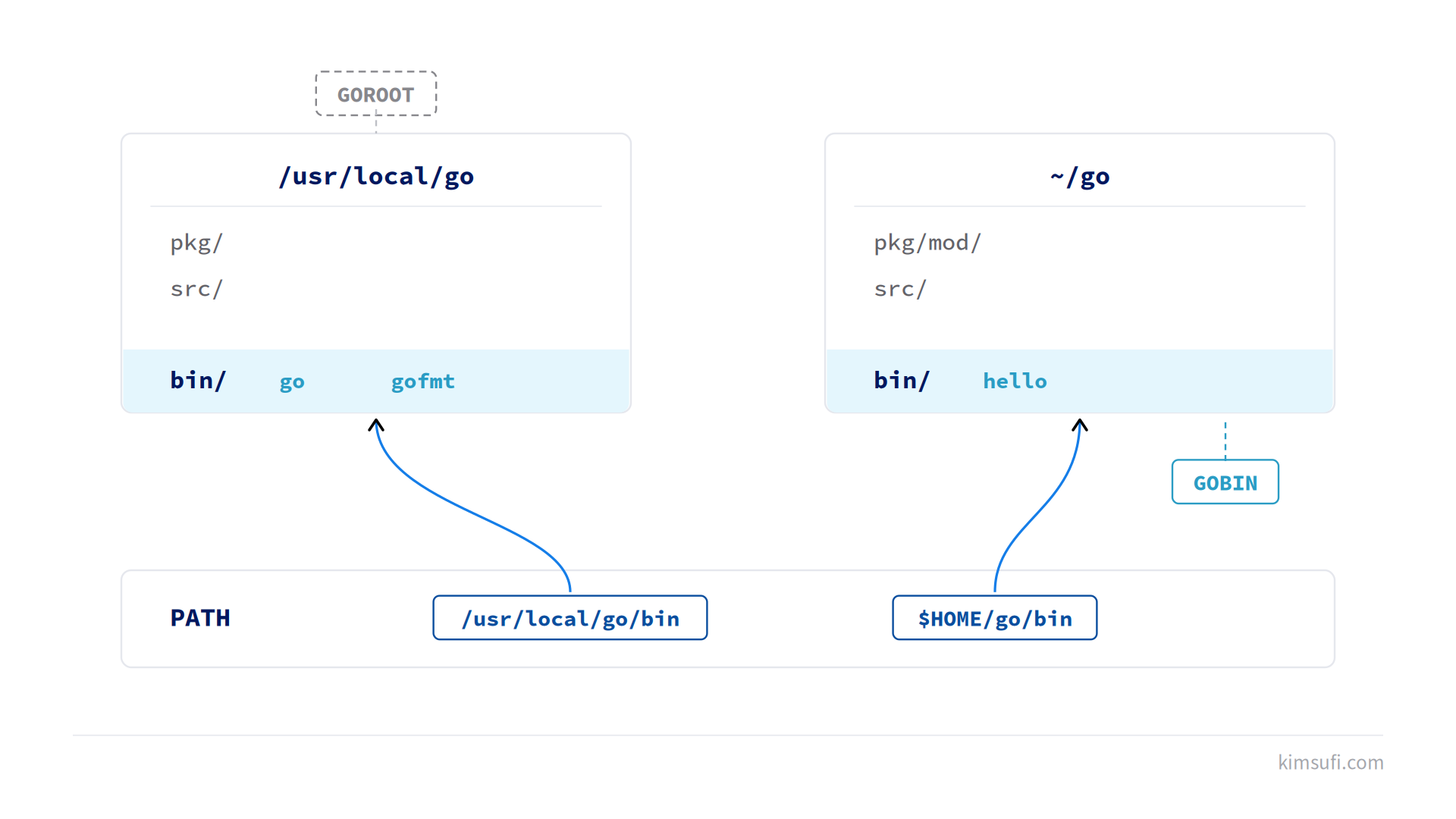
PATH needs the toolchain's bin directory so the go tool resolves without a full path. Add these environment variables to your shell profile:
echo 'export PATH=$PATH:/usr/local/go/bin' >> ~/.bashrc
echo 'export GOBIN=$HOME/go/bin' >> ~/.bashrc
echo 'export PATH=$PATH:$GOBIN' >> ~/.bashrc
source ~/.bashrc
GOROOT points at the toolchain itself. Leave it unset: the go tool infers it from its own location, and a wrong value is a common cause of a broken setup.
GOPATH defaults to ~/go. Modules made it far less important, but it still holds three directories: pkg for the module cache, src for legacy source trees, and bin for compiled executables. GOBIN overrides that last one, and it is the variable worth setting deliberately, because go install writes the executable there and you want it on PATH.
Check the resulting configuration at any point:
go env GOPATH GOMODCACHE GOPROXY💡 Tip: a system-wide configuration belongs in /etc/profile.d/go.sh rather than one user's ~/.bashrc, so every account and every systemd service loads the same PATH and file permissions stay predictable.
Verify the installation
Two commands confirm a working toolchain:
go version
go env GOROOT GOPATH
The first prints the release and platform, with output such as go version go1.26.6 linux/amd64. The second reports GOROOT and GOPATH so you can confirm their status.
✅ Expected result go version reports the release you downloaded. If the shell says "command not found", your PATH change has not been applied to this session.
Create a Go workspace
Modules removed the requirement to keep a workspace inside GOPATH, so a project lives wherever you want:
mkdir -p ~/projects/hello && cd ~/projects/hello
go mod init example.com/hello
That writes a go.mod file recording the module path and the Go version. Each dependency resolves through the module proxy and caches under GOPATH/pkg/mod, shared across every project on the machine, so a second build downloads nothing.
If you maintain older code that predates modules, GOPATH/src is where that source tree still belongs, and src is the only directory that matters there. New work should not go there.
Write and run a Hello World program
Create the file main.go in the workspace directory. Every Go program needs a package main:
package main

import "fmt"

func main() {
    fmt.Println("Hello from Go")
}
Then run it, build it, and install it:
go run main.go
go build -o hello
go install
go run compiles the program to a temporary location and executes it. go build leaves a build artefact named hello in the current directory. go install copies that executable into GOBIN, which is why having that directory on PATH is convenient. The func main in package main is the entry point the linker looks for.
The result is a single static executable with no runtime dependency, which makes Go convenient for self-hosting your own applications: copy one file, run it. The same application runs unchanged on any machine of the same platform, with no network dependency at start-up.
Optional: install Go via package manager (yum, apt, dnf)
One command, at the cost of an older release:
sudo apt install -y golang-go      # Debian, Ubuntu

sudo dnf install -y golang         # Fedora, Rocky, RHEL
Debian 13 ships Go 1.24 and Ubuntu 24.04 ships 1.22, both well behind current. Fedora tracks more closely. Either is fine for a scripted tool and a problem for any project whose go.mod requires something newer.
Do not use both methods. Mixing the packaged binary with the tarball gives inconsistent go version output depending on PATH order. Pick one, and if you switch, remove the package first.
Managing multiple Go versions with GVM or asdf
Two tools solve this. GVM is Go-specific; asdf manages many languages with one interface, which is the better choice if you already use it:
asdf plugin add golang
asdf install golang 1.26.6
asdf set golang 1.26.6
There is also a built-in option needing no extra tool. A toolchain line in go.mod makes the go command download and enable that exact release automatically, which is often enough to avoid a version manager entirely.
Common issues and troubleshooting
| Symptom | Cause | Fix |
|---|---|---|
| go: command not found | Toolchain directory missing from PATH | Re-source your profile, or open a new session |
| Executables compile but will not run | GOBIN not on PATH | export PATH=$PATH:$HOME/go/bin |
| go: cannot find main module | Not inside a module directory | Run go mod init or cd into the project |
| Module downloads hang | Proxy or firewall blocking outbound HTTPS | Check go env GOPROXY, allow proxy.golang.org |
| Wrong version reported | Two installs on PATH | which -a go, remove the distribution package |
If a compile fails after an upgrade, clear the cache with go clean -cache -modcache and repeat the steps. That is safe, and it rules out stale artefacts before you chase a harder issue. Two more issues: a permission denied there usually means another user owns it, and a hung go get is almost always the proxy, not your code.
For a container-based alternative to installing the toolchain directly, our guide on installing Docker covers the same ground for image builds.
Conclusion
The setup itself is two commands. What causes trouble is the environment: PATH missing the toolchain's bin directory, that variable unset so compiled tools vanish, or a distribution package shadowing the tarball. Get those three right and the toolchain stays out of your way for years.
Ready to deploy your first Go application? Kimsufi dedicated servers start at $11.10/month, with full root access and Anti-DDoS included.
FAQ
What is the minimum RAM required to run Go on a dedicated server?
The toolchain compiles comfortably in 1 GB, and a typical compiled service idles in tens of megabytes at runtime. Compilation is the demanding part: linking a large executable can peak above 2 GB, so size the machine for that step rather than for the finished application.
Can I install multiple Go versions on the same machine?
Yes. Use asdf or GVM, or add a toolchain directive to go.mod and let the go command fetch what each project needs. Keep one release under /usr/local as the default for everything else.
How do I set the GOPATH correctly on a Linux dedicated server?
Usually you do not need to. GOPATH defaults to ~/go and that is correct for module work. If you do override it, export it in /etc/profile.d rather than one user's shell, and set the bin target alongside it so go install has a predictable destination.
Is it safe to run Go applications as root?
No, and there is no reason to. Compile as an unprivileged user, then run the executable from a systemd service with its own service account and minimal file permissions. Grant CAP_NET_BIND_SERVICE if the service must bind a low port, which is safer than full privileges. The same control applies to game hosting and any other public workload.
How do I update Go to the latest version on a dedicated server?
Repeat the download and extraction, starting with sudo rm -rf /usr/local/go. Your modules and GOPATH stay untouched, so nothing needs to be configured again. Run go version afterwards to check the status, then recompile your applications against the new toolchain.