








Kubernetes vs Docker is the wrong fight. Docker builds and runs containers on one machine; Kubernetes is an orchestration platform scheduling those same containers across many. The real question is whether your workload has outgrown one machine, and this comparison answers it with a decision matrix, not a feature list.
Key takeaways
- Docker and Kubernetes are not competitors. Docker packages an app into a portable image; Kubernetes runs it at scale.
- Kubernetes removed its Docker runtime shim in v1.24, but your Docker images still run there, because both follow the OCI standard.
- Docker Compose handles multiple containers on one machine. A scalable cluster earns its complexity at the second.
- A Kubernetes control plane costs real resources: kubeadm asks for 2 CPUs and 2 GB RAM per node before you deploy.
- For small teams, Compose is faster to operate and cheaper than any cluster.
What is Docker?
Docker is a containerization tool that packages an application, its runtime and dependencies into one image. That image runs identically anywhere the Docker engine exists, which is the portability argument.
Three pieces do the work. A Dockerfile describes the build. The resulting Docker image is an immutable, layered artefact you push to a registry. The Docker daemon runs that image as an isolated process sharing the host kernel, so it starts in about a second, not the minute a virtual machine needs.
Docker Compose extends Docker to multiple containers on one machine. One YAML file declares your app, its database and cache, and docker compose up starts all three. For many production workloads that is the whole design, running on dedicated hosting for your own stack.
Docker also ships a client, a build tool and image tooling in one package, which is why developers reach for it first.
What is Kubernetes?
Kubernetes is an orchestration platform that runs containers across multiple machines and keeps them running. You declare desired state in YAML, and the orchestration layer reads that YAML continuously to make reality match. That control loop is the whole idea behind Kubernetes.
A Kubernetes cluster has two halves. The Kubernetes control plane holds the API server, etcd, the scheduler and the controller manager. Each Kubernetes node runs a kubelet and a container runtime. When a node dies, the scheduler moves its workload elsewhere unattended. That availability guarantee is what people buy the tool for.
The unit of deployment is a pod, not a container. A Kubernetes Deployment manages replicas of that pod, a Service gives them a stable address, an Ingress routes traffic in. That indirection enables self-healing and rolling updates, and it is why the Kubernetes learning curve is real.
Core architectural differences
| Dimension | Docker | Kubernetes |
|---|---|---|
| Scope | One machine | Multiple machines |
| Unit | Container | Pod |
| Configuration | Dockerfile, Compose file | Declarative YAML manifests |
| Scaling | Manual | Automatic, by policy |
| Self-healing | Restart policy | Reschedules onto healthy nodes |
| Networking | Bridge per machine | Cluster-wide, pods routable |
| Setup | Minutes | Hours to days |
The underlying architecture differs one way: control loops in the Kubernetes architecture. That one architecture choice explains the rest. Docker executes a command and stops. The orchestration platform runs controllers that compare desired state against actual state forever, then act on the gap. That is why the cluster recovers from a failed node on its own, and why the orchestration platform needs a quorum datastore to remember what "desired" means.
Docker has no equivalent architecture, because it was never designed to manage more than the machine it runs on.
When to use Docker
Docker alone is the right choice more often than the industry admits.
Use Docker when you run one machine, or a handful managed independently: local development, CI builds, any app whose traffic fits one box, where a scalable cluster is overkill. A Compose file a new developer reads in two minutes has real value in daily operation. On one server, installing Docker Engine takes a handful of package commands.
The honest test: if you cannot name a concrete failure that Kubernetes would have prevented, you do not need Kubernetes yet.
When to use Kubernetes
Kubernetes earns its complexity under specific conditions.
You need capacity across multiple machines and want the platform to place work. You run microservices with independent release cycles, the microservice workload Kubernetes was built for. Each microservice scales on its own. You need to deploy with zero downtime as routine. Or traffic is spiky and you want the scheduler to add pods on demand.
Multi-tenancy is another trigger. Kubernetes namespaces, resource quotas and network policies give an organization a supported way to isolate teams on shared hardware. Docker Compose has no answer for that.
Container lifecycle: build, ship, run
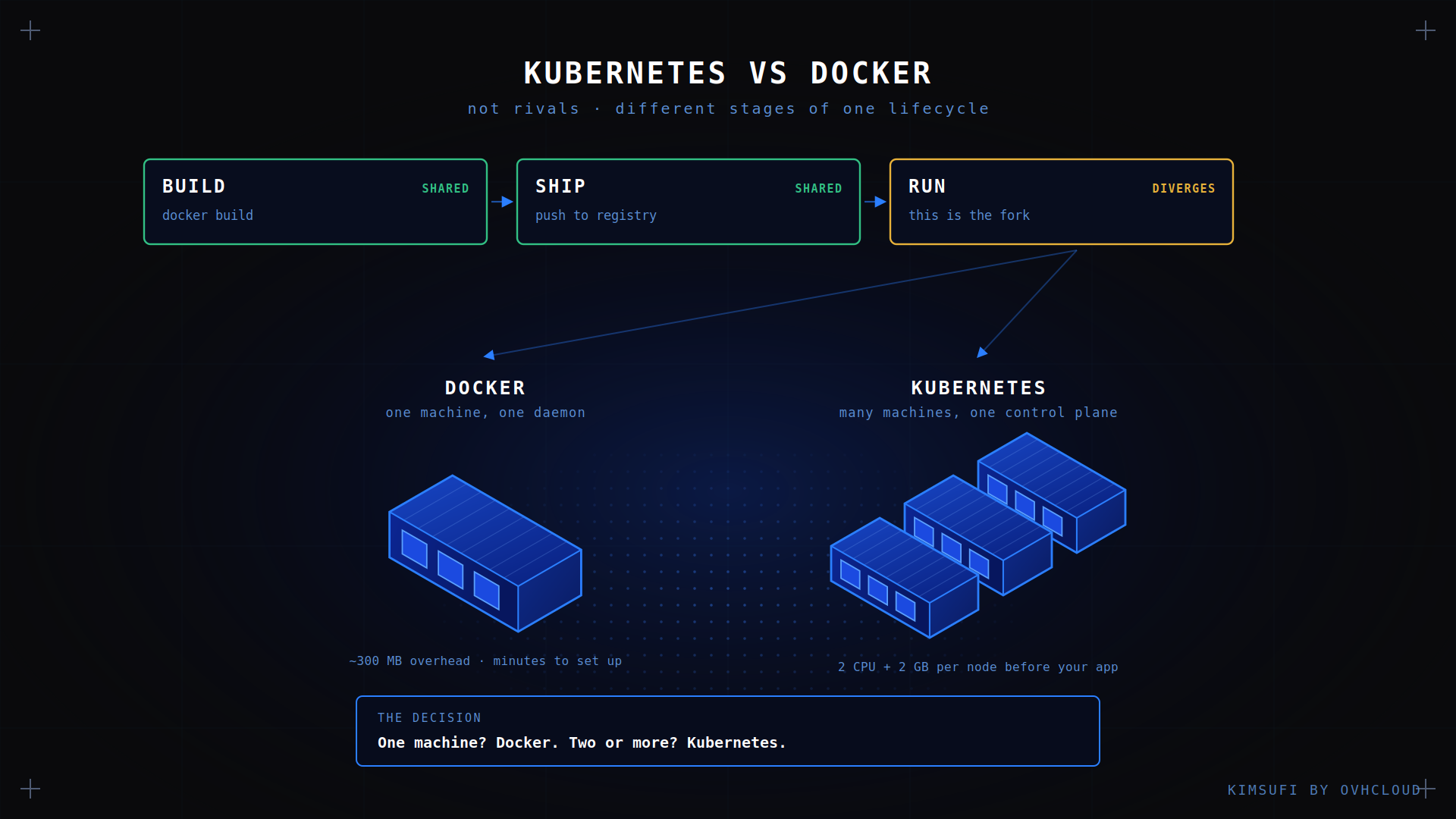
The container lifecycle is identical on both, which is the clearest evidence they are not rivals.
Build. docker build turns a Dockerfile into an image. Kubernetes has no build step at all; it consumes images that Docker or another tool produces.
Ship. You push the image to a shared repository. Both tools pull from the same place, and one image tag works for either.
Run. Docker runs the container directly. Kubernetes schedules a pod onto a node, whose runtime pulls and starts it.
Only the run stage differs. That is the whole comparison in one sentence, and it explains why teams adopt orchestration without changing how Docker packages anything.
Orchestration and scaling capabilities
Scaling with Docker is manual: you start more containers and decide where. Compose can scale a service on one machine, but nothing rebalances when it fills up.
Kubernetes scales along three axes. The Kubernetes Horizontal Pod Autoscaler adds replicas when CPU or custom metrics cross a threshold. The Kubernetes Cluster Autoscaler adds nodes when pods cannot be placed. The Vertical Pod Autoscaler adjusts requests and limits per pod. Together they automate capacity work Docker leaves you.
The Kubernetes scheduler makes this work: it reads each pod's resource requests and places it on a node with room, respecting affinity and taints. Getting requests wrong is the commonest cause of a Kubernetes cluster that looks full while its machines idle, and it is the scalability challenge teams hit first.
Deployment workflows and CI/CD integration
A Docker deploy pipeline is short. Build the image, run tests, push it upstream, then pull the new tag on the machine. Docker Compose makes the last step one command. That pipeline is simple to support, and the tradeoff is a brief gap where the old container has stopped and the new one has not.
The Kubernetes pipeline ends differently, and the deploy step in that pipeline is where they diverge. Build and push are the same, then the platform updates a manifest and rolls pods gradually, watching readiness probes. If the new version fails its probe, the rollout stops itself. Continuous delivery into Kubernetes is safer by default than the equivalent Docker workflow.
GitOps takes the workflow further: manifests live in Git as code, and a controller reconciles the cluster to the repository. That integration gives an audit trail and a rollback that is a simple revert, a real advantage over imperative deployment.
Security and compliance considerations
Both tools share a base: containers are processes, not virtual machines, sharing a kernel.
With Docker, security is mostly machine hygiene: do not expose the daemon socket, drop capabilities, run as non-root, scan images before you ship. The attack surface is small enough to reason about.
Kubernetes adds surface and controls in equal measure. Kubernetes RBAC governs who does what. Network policies restrict pod-to-pod traffic, left default-open until configured. Kubernetes Pod Security Standards replace the old policy admission. Kubernetes Secrets are base64-encoded, not encrypted, unless you enable encryption at rest.
The compliance angle cuts both ways. Orchestration gives consistent, auditable policy across every workload, applied consistently. It also gives auditors far more components to ask about, a real cost for a small team.
Performance, resource usage and cost
This is where the comparison gets concrete, and where most vendor pages go quiet.
Container runtime performance is effectively identical. Both use the same kernel primitives, and since v1.24 Kubernetes talks to containerd directly, not through Docker.
The difference is what each platform consumes itself. A Docker machine runs one daemon in a few hundred megabytes. A Kubernetes control plane wants 2 CPUs and 2 GB RAM minimum, plus a kubelet, kube-proxy and CNI agent per node. Across three machines, Kubernetes can take a fifth of your capacity before you deploy anything.
| Setup | Platform overhead | Practical minimum |
|---|---|---|
| Docker with Compose | One daemon, ~300 MB | 1 machine, 2 GB RAM |
| k3s single node | ~600 MB | 1 machine, 2 GB RAM |
| Full cluster | Control plane and agents | 3 machines, 4 GB RAM each |
k3s is the middle path many teams miss: a certified, lightweight Kubernetes distro in one binary, same Kubernetes API on far less hardware. On an AMD multi-core machine you can run a realistic setup on one box, and the Rise range has the core counts for multi-node work.
Choosing the right tool: decision matrix
Choose the tool matching your scale, not your ambition.
| Your situation | Choose |
|---|---|
| One app, one host | Docker |
| Several services, one host | Docker Compose |
| Learning containers | Docker first, always |
| Two or more hosts, shared workload | Kubernetes |
| Microservices, independent releases | Kubernetes |
| Spiky traffic, scalable on demand | Kubernetes |
| Small team, limited operations time | Docker Compose, or k3s |
| Multi-tenant isolation required | Kubernetes |
Conclusion
Pick Docker until you can name the problem Kubernetes solves for you. Most teams running one application on one machine are better served by a Compose file they fully understand than a cluster they partly do. When the second machine arrives, or deployment must be routine and zero-downtime, orchestration pays for itself.
Ready to build your container platform? Kimsufi dedicated servers start at $11.10/month, with root access and support for virtualization and container workloads.
FAQ
Can I learn Kubernetes in 2 days?
You can learn the Kubernetes vocabulary in two days: pods, deployments, services, ingress. Running Kubernetes in production takes months, because the hard parts are networking, storage and failure modes, not the API. Start with a single-node k3s install of Kubernetes.
Does NASA use Docker?
Public detail on specific systems is limited, so treat any confident claim carefully. What is verifiable is that OCI container images are a standard across research, aerospace and finance computing. The useful question is whether containers are production-grade. They demonstrably are.
Is Kubernetes becoming obsolete?
No. Kubernetes is at v1.37 with a quarterly release cadence and remains the default platform for multi-machine container workloads. What changed is that teams now say it is overkill for their scale, which is maturity, not decline.
Is Kubernetes replacing Docker?
No, though the confusion is understandable. Kubernetes removed dockershim in v1.24, so the Docker engine is no longer the runtime inside the cluster. Your Docker images are unaffected: portable OCI artefacts, run natively by containerd.
Which platform is better for small teams?
Docker Compose, in most cases, rather than Kubernetes. One file, one machine, no Kubernetes control plane to maintain. Move to k3s when you need self-healing, and to a full cluster when one machine cannot hold the workload.
How do Docker and Kubernetes differ in resource consumption?
At container runtime, barely at all. At platform level, substantially: the Docker daemon costs a few hundred megabytes, a Kubernetes control plane plus per-node agents consume gigabytes before your app starts.
Can Docker and Kubernetes be used together effectively?
Yes, and that is the normal arrangement. Build with Docker locally, push the image, let Kubernetes run the result. Docker and Kubernetes sit at different stages of one supported workflow.