








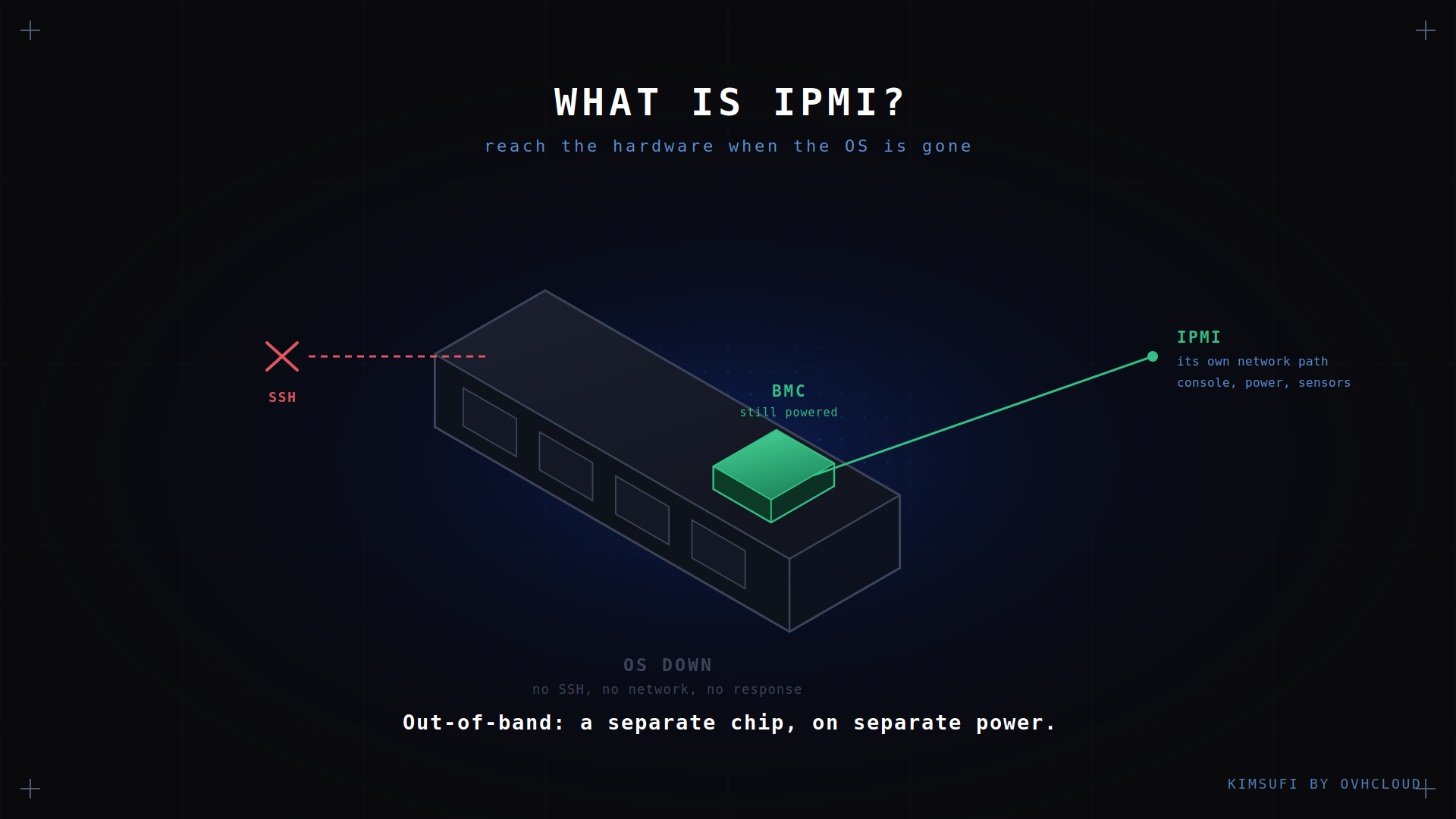
IPMI is a standard that lets you access a server's hardware even when the operating system is gone. It runs on a dedicated chip on the motherboard, powered independently of the machine, so you can watch sensors, cycle power and open a remote console on a box that will not boot. This guide covers how IPMI works, its main features, and how to keep it secure.
Key takeaway
- IPMI is the protocol. The BMC is the chip it runs on. They are not the same thing.
- Out-of-band means independent of the OS: the BMC has its own processor, firmware and network access.
- Core capability is remote access: a KVM session, power control, sensor readings and virtual media.
- Never expose an IPMI network interface to the internet. This is the single biggest mistake.
- Redfish is the modern successor, but IPMI keeps vendor support for backward compatibility.
How IPMI works: architecture and core components
The Intelligent Platform Management Interface is a specification, not a piece of software. IPMI defines how a management client talks to hardware, and the chain has three links.
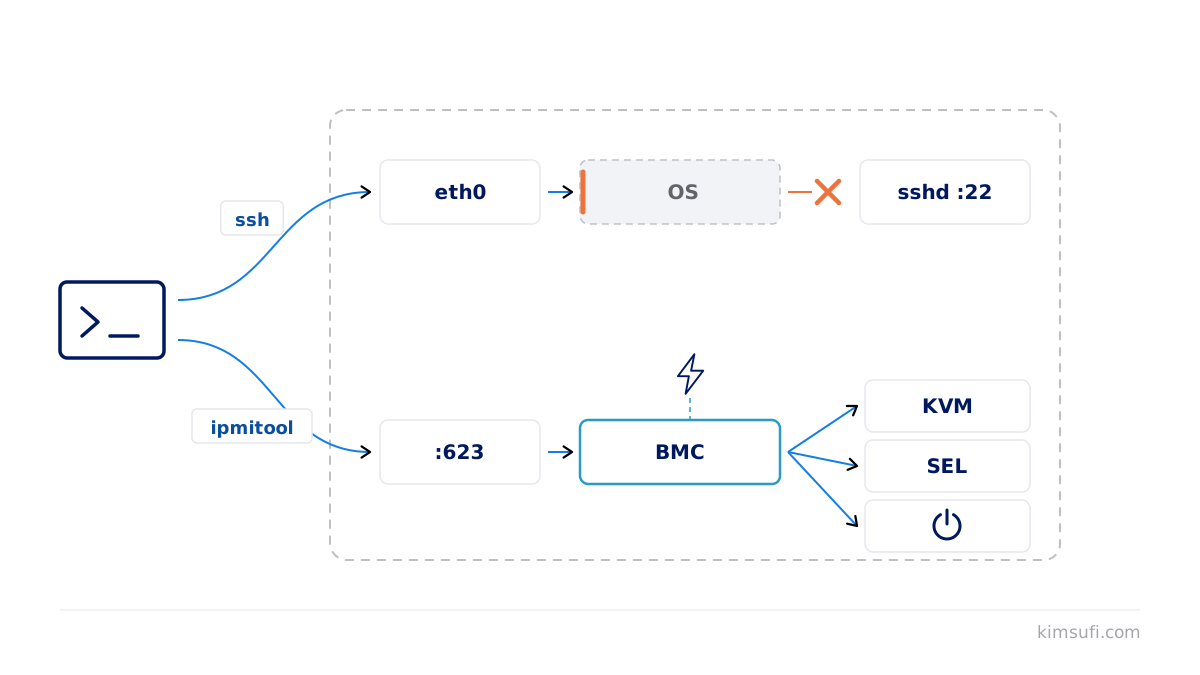
The BMC. A baseboard management controller is a small chip soldered to the motherboard, with its own processor, memory and firmware. It draws standby power, so it stays awake while the server is off.
The sensors. The BMC reads temperature, fan speed, voltage and power draw over internal buses, and writes anything notable to the System Event Log.
The network path. The controller has its own IP address on a dedicated network port, or shared with the first onboard NIC. That is what you access, and it answers whether or not the main OS is running.
Above that sit the tools: a web interface served by the BMC, a command-line client such as ipmitool, or an API. Each speaks the same IPMI language to the same controller.
Key features of IPMI
Remote console. Keyboard, video and mouse redirection, so you see the BIOS and boot messages exactly as if you were at the rack.
Power control. Power on, power off and hard reset, independent of any service the OS might be running.
Hardware monitoring. Live sensor data plus the event log, where you find the thermal warning that preceded a service outage.
Virtual media. Mount an ISO from your own machine and install an operating system remotely.
Serial over LAN. Redirect a text session over the network, lighter than video and well suited to headless Linux administration.
Benefits of using IPMI for server administrators
The value is what you can do without visiting the datacentre. A kernel panic, a bad fstab entry, a degraded RAID array that will not boot, a firewall rule that locked out SSH: each leaves a machine reachable by IPMI and nothing else.
IPMI also shortens the diagnostic loop. Instead of asking whether a machine is up, an administrator reads the sensors and event log directly, so a failing fan surfaces before it becomes an outage.
On Kimsufi dedicated servers, console access is available from the OVHcloud Control Panel, which launches a browser-based KVM session. Availability and the exact feature set vary by product line, so check the comparison page for your model before relying on it.
IPMI vs. other management interfaces (BMC, iDRAC, Redfish)
These terms get used interchangeably and should not be.
| Name | What it is |
|---|---|
| BMC | The physical controller on the motherboard |
| IPMI | The open standard for talking to that controller |
| iDRAC | Dell's build, IPMI-compatible plus extras |
| iLO | HPE's equivalent |
| Redfish | The modern, more secure REST and JSON replacement |
iDRAC and iLO are proprietary implementations. Both follow the IPMI standard and both add a richer interface, extra licensing tiers and features it never defined.
Redfish is the genuine successor. Where IPMI uses a binary format designed in 1998, Redfish is a REST API returning JSON over HTTPS, far easier to script and to secure. The DMTF publishes it, most current hardware has support for both, and IPMI stays enabled mainly so existing software keeps working.
Security considerations and best practices
IPMI has a difficult security history, and it deserves candour. In 2013 the US cybersecurity agency published an advisory on IPMI risks, covering weak default credentials and flaws still present in the standard.
Three things matter more than the rest.
Keep it off the public network. A BMC belongs on a secure management network or behind a VPN, never on a routable public address. An exposed controller gives an attacker hardware-level access below the operating system, where none of your OS hardening applies.
Replace the defaults. Shipped credentials are widely published. Change them, and disable any account you are not using.
Patch the firmware. BMC firmware is rarely updated and frequently vulnerable. Treat it as part of your patch cycle and routine server maintenance.
Also disable cipher suite 0 where your implementation offers it, since it allows authentication to be bypassed entirely.
Common issues and troubleshooting tips
| Symptom | Likely cause | Fix |
|---|---|---|
| Session will not open | Browser blocking the applet | Try the HTML5 client, or update Java |
| No route to the BMC | Wrong VLAN or a shared NIC in use | Confirm the management address and port |
| Login rejected | Credentials changed or account locked | Reset the BMC user from the control panel |
| Sensors read nothing | Firmware fault | Cold-reset the controller, then update firmware |
| Virtual media disconnects | Slow upload or an idle timeout | Use a local ISO and keep the session active |
If the device stops answering entirely, a cold reset via ipmitool mc reset cold usually recovers access without touching the running OS.
How to connect to IPMI: remote console and serial over LAN
Three options, in rough order of convenience.
Browser session. Most modern controllers serve an HTML5 KVM. Log in to the BMC address, open the session, done. Older hardware may still require a Java applet.
Command line. ipmitool speaks the protocol directly over the network:
ipmitool -I lanplus -H <bmc-ip> -U <user> -P <pass> chassis power status
ipmitool -I lanplus -H <bmc-ip> -U <user> -P <pass> sdr list
Text over LAN. Redirect a terminal session with no video overhead:
ipmitool -I lanplus -H <bmc-ip> -U <user> -P <pass> sol activate
Serial over LAN needs redirection enabled in the BIOS and the right kernel boot parameter, typically console=ttyS1,115200.
Implementing IPMI on your server: step-by-step guide
- Find the management address. Read it from the BIOS setup, or from the provider's control panel on a rented machine.
- Put it on the right network. A dedicated management VLAN, or a VPN. Never a public address, whichever option your provider offers.
- Set credentials. Replace the defaults and create one account per administrator.
- Test it. Open the remote console and confirm you can see POST output before you need it.
- Set up Serial over LAN. Configure BIOS redirection and the kernel parameter now, not during an incident.
- Record the details. Address, credentials and access route belong in a runbook stored somewhere that does not depend on the server.
💡 Tip: test access on a healthy machine. Discovering that virtual media does not work while a Xeon dedicated server sits at a boot prompt is an expensive way to learn.
IPMI specifications, standards, and vendor implementations
Intel published IPMI 1.0 in 1998 with Dell, HP and NEC. Version 2.0 arrived in 2004, adding Serial over LAN plus stronger authentication, and remains what almost every implementation targets. Development stopped long ago, which is why IPMI looks dated next to Redfish.
In practice you meet the plain implementation on a Supermicro or ASRock Rack board, iDRAC on Dell, iLO on HPE, XClarity on Lenovo. All support ipmitool for the common operations, so one script works everywhere. Differences appear in the web software, in licensing tiers, and in the extras each maker layers on top.
For most workloads on a SYS dedicated server, you never touch any of it directly: the provider's control panel wraps the same IPMI service in a simpler interface.
Conclusion
IPMI is the reason a dedicated server is recoverable rather than a trip to the datacentre. Learn the access route before you need it, keep the device off the public network, and treat its firmware as part of your patching.
Want a machine you can always reach? Kimsufi dedicated servers start at $11.10/month, with console access from the control panel and full root access.
FAQ
Is IPMI the same as BMC?
No. IPMI is the interface that runs on a server's baseboard management controller. The BMC is the hardware device; IPMI defines how you communicate with it. Saying "the IPMI" when you mean the device is common shorthand, but the distinction matters when reading the documentation.
How do I connect to IPMI?
Use a web browser or a client such as ipmitool to reach the BMC's IP address, then log in with administrator credentials. That gives you access to the KVM session, sensor data and power controls. On a rented machine the provider usually launches it from a control panel.
Is IPMI the same as iDRAC?
No. iDRAC is Dell's proprietary implementation of out-of-band management. It follows the IPMI standard but adds Dell-specific tools and a different interface. Functionally they overlap; iDRAC simply offers more, some of it behind a licence.
Is IPMI deprecated?
Not deprecated, but no longer where development happens. Redfish is gaining ground for richer REST-based management, and most makers ship both. IPMI keeps support for backward compatibility with existing software, and it will be around for years.