




















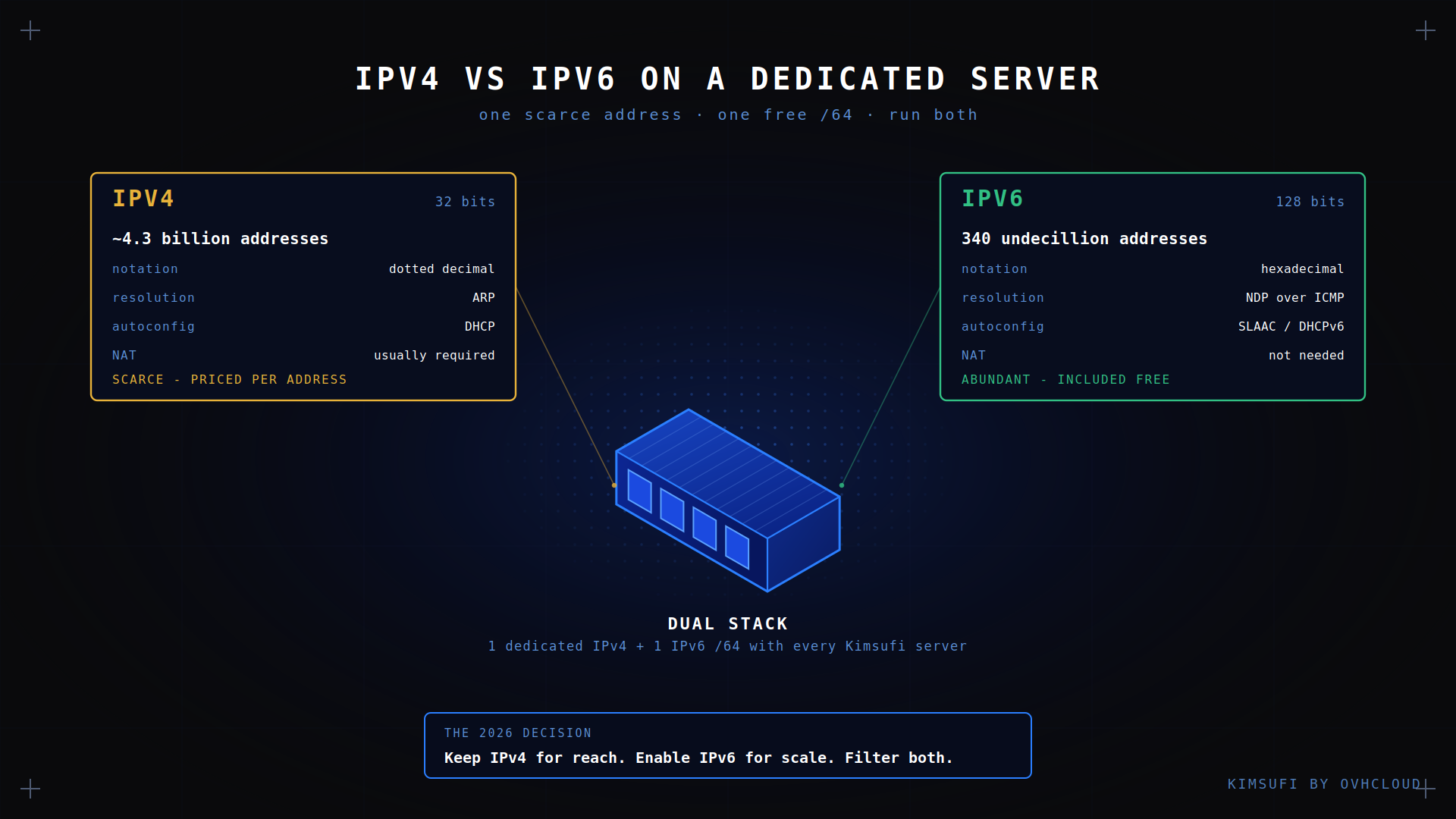
Every Kimsufi cheap dedicated server ships with one dedicated IPv4 and one IPv6 /64, so the question is not IPv4 or IPv6 but which you turn on and when. IPv4 is the scarce, priced resource; IPv6 is abundant and included. This guide compares them on performance, security, cost and compatibility, then gives a matrix for your own case.
Key takeaways
- IPv4 uses 32-bit IP addresses, about 4.3 billion. IPv6 uses 128-bit IP addresses, an effectively unlimited pool.
- Dual stack is the 2026 default: run both IP versions, let each device choose.
- IPv6 removes NAT, so every device is reachable from the internet and your firewall carries the load.
- IPv4 is the cost line: addresses trade at a monthly price per IP. The IPv6 subnet costs nothing.
- Never drop all ICMP on IPv6. Neighbour discovery and other link-local operations depend on it.
IPv4 vs IPv6: 2026 snapshot
| Attribute | IPv4 | IPv6 |
|---|---|---|
| IP address length | 32 bits | 128 bits |
| Notation | Dotted decimal | Hexadecimal, colon-separated |
| IP pool | ~4.3 billion | 340 undecillion |
| Address resolution | ARP | NDP over ICMP |
| Autoconfiguration | DHCP | SLAAC or DHCPv6 |
| NAT | Common, often required | Not needed |
| Included with Kimsufi | 1 unique IP | 1 /64 subnet |
The difference is scarcity. An IPv4 address is a tradeable asset with a price, which is why the internet meters it. An IPv6 /64 is a rounding error.
How IPv4 and IPv6 work: core technical differences
IPv6 is not IPv4 with a longer IP version. The header is a fixed 40 bytes with no checksum, so routers forward with less work per packet, and a flow label identifies a stream without inspecting higher layers.
Routers no longer fragment traffic. Hosts handle it through path MTU discovery, an ICMP operation, which is why ICMP must reach your machine. ARP is gone too, replaced by neighbour discovery over ICMP. There is no broadcast: what once shouted at the segment uses a multicast group.
Extension headers are where the two versions diverge most. IPv4 crammed options into a variable-length header every router had to parse. IPv6 keeps the core header fixed and chains anything optional behind it, so intermediate hops read only what they need. Some middleboxes handle long extension chains badly, which is worth testing before you depend on IPv6 for critical paths.
Addressing, subnetting and formatting (IPv4 vs IPv6)
IPv4 writes four decimal octets, as in 203.0.113.10 with a /24 mask. IPv6 writes eight groups of 16 bits in hexadecimal, allowing one run of zeroes to be compressed:
2001:0db8:85a3:0000:0000:8a2e:0370:7334 becomes 2001:db8:85a3::8a2e:370:7334
Two rules matter. A /64 is the standard subnet size for one segment and SLAAC assumes it, so do not carve yours smaller. And one /64 holds 18 quintillion addresses, so a virtualization host gives every guest a unique IP, with no NAT.
Performance, latency and throughput comparison
Latency is set by the routing path, not the IP version. A packet is no faster for a 128-bit IP, so performance is not the deciding factor.
One difference runs the other way: an IPv6 header is 40 bytes against IPv4's 20, so on small payloads you carry marginally more overhead per IP packet. It does not show up in real IPv6 traffic. Where the newer version helps is the work each end avoids: no NAT lookup, no translation state, a simpler header. Where it loses is peering maturity, since some paths take more hops. On a well-connected network the answer is parity, with gains on carriers using CGNAT.
Security implications: firewall, NAT and multicast
NAT was never a security control, but it hid hosts by accident. Under IPv6 every address is reachable from the internet, so the firewall does the whole job.
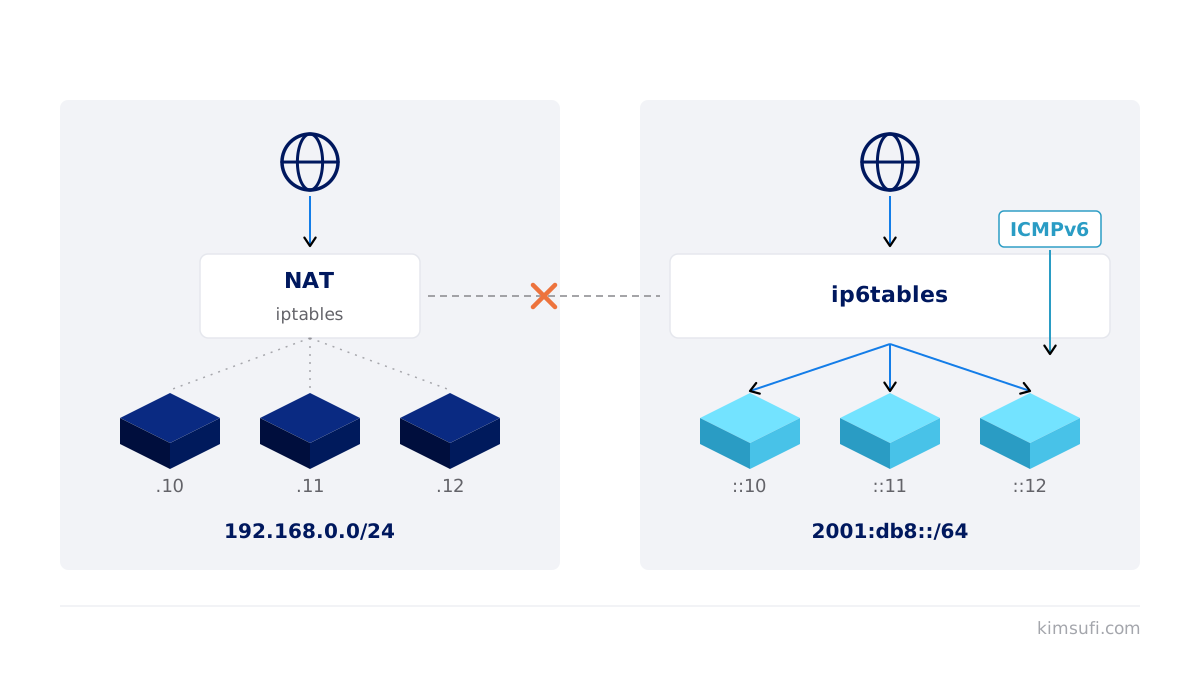
Three rules. Write both policies: an iptables rule does nothing for IPv6, so mirror it in ip6tables or use nftables. Default-deny inbound, then open only what you serve. And do not drop all ICMP, since neighbour discovery and duplicate address detection need it.
Check what services bind to: a daemon on 0.0.0.0 is IPv4-only, while the same tool on :: may accept an IPv6 connection your rules missed.
Separate internal services from internet-facing ones early. A database that only answers the application on the same machine should bind to loopback or an internal IPv6 range, not a global one, because IPv6 gives every service a routable address the moment you enable it. Link-local and unique-local addressing exist for that internal traffic, and using them holds your attack surface to the ports you publish on purpose.
Cost, availability and IPv4 leasing options
Here the protocols stop being equivalent. The internet registries ran out of IPv4 allocations years ago, so new internet addresses come from a secondary market, leased monthly. That cost sits on any cloud provider's sheet, then on yours.
IPv6 has no such market. With Kimsufi both your IPv4 and your /64 arrive with the machine, so IPv6 is free internet capacity you own. The gap widens: IPv4 lease rates move one way only, while the IPv6 allocation you hold costs the same forever. Building many internet endpoints on IPv6 avoids the per-IP bill and stays scalable as usage grows.
Dual stack deployments: when and why they make sense
Dual stack means both protocols on one interface, each with its own address, routes and rules. A client resolves a name, gets an A and an AAAA record, and Happy Eyeballs races the two, so the user gets whichever connection answers first.
It is the right choice for anything on the internet. Legacy devices keep working over IPv4 while IPv6-only mobile networks reach you natively, so your deployment covers the whole internet. The cost is operational: two filtering policies, two DNS records, two checks.
Migration path: enabling IPv6 on your dedicated server
Five setup steps, none needing downtime:
- Read your prefix. Take the IP, prefix and gateway from your control panel; the gateway usually ends in ff:ff:ff:ff:ff.
- Configure the interface. Add the address and prefix, then the default route, via netplan or systemd-networkd.
- Mirror your filtering rules. Cover IPv6 before you publish anything.
- Publish an AAAA record. Until it exists, nothing reaches you over the newer protocol.
- Test externally. Check connectivity from an IPv6 network, not the box, before calling the deployment done.
Verify from outside before announcing anything. An online reachability test tells you whether the internet sees your IPv6 address, which a local ping cannot. Confirm the AAAA record resolves, check the IP answers on the published ports, and run the same tests over IPv4 so you can tell a protocol fault from an application one. Online suites cover both IP versions in one pass and confirm your IPv6 support is active.
💡 Tip: SLAAC handles addressing itself. DHCPv6 is only needed when you must decide centrally which IP a device receives. On one machine a static setup is simpler.
Compatibility with popular platforms and applications
Modern software is compatible. Nginx, Apache and Postfix support IPv6 out of the box, and every mainstream distribution ships support for it, so vendor support rarely blocks a rollout.
Docker will not enable IPv6 for containers unless you ask, so it needs an explicit daemon setting. Some SaaS APIs, payment gateways and licence platforms still publish IPv4-only endpoints, so an outbound IPv4 route stays necessary. An old app may bind IPv4 only, where an upgrade is the only fix. None of this blocks a dual stack rollout, but it explains why an IPv6-only setup stays rare.
At the application layer the usual failure is not the protocol but the code around it: an IP address validated by a regex written for four octets, or a column sized for 15 characters. Those bugs surface on the first IPv6 connection, not before.
Future-proofing: IPv6 adoption trends and IPv4 exhaustion
IPv4 exhaustion is not a forecast. The internet registries hit their limits and moved to waiting lists, and carriers responded by running IPv6 internally with NAT64 and tunnel gateways at the edge. That is the current picture, and why adoption climbs while nobody switches IPv4 off.
Most of the internet's growth now arrives over IPv6, because that is what mobile and residential internet providers hand out. If your service is IPv4-only those users still reach you, but through carrier translation, and you inherit its overhead and its logging blind spots.
For a dedicated machine the consequence is simple: IPv4 gets slowly more expensive, IPv6 stays free. Turning it on now is a cheap way to future proof. The same limit applies in one rack or a whole data center, since every data center buys from the same market.
Quick decision matrix: choose IPv4, IPv6 or dual stack
| Your situation | What to decide |
|---|---|
| Public website, app or API | Dual stack |
| Mail relay | Dual stack, correct reverse DNS on both |
| Game hosting for consumer devices | Dual stack, IPv4 mandatory |
| Private cloud or virtualization server | IPv6-first, a unique IP per guest |
| Legacy app with fixed dependencies | Keep it, add IPv6 at the edge |
| Many internet endpoints on a budget | IPv6 for scalability, IPv4 at the front door |
Conclusion
There is no IPv4 versus IPv6 decision left for most projects, only a sequencing one. Keep IPv4 for the clients and APIs that need it, switch on the IPv6 /64 you pay nothing for, and write both firewall policies before publishing. The compatibility work grows every year.
Ready to build on both protocols? Kimsufi machines start at $11.10/month, with one dedicated IPv4, an IPv6 /64, Anti-DDoS and root access included.
FAQ
Is it better to run IPv4 or IPv6 on a dedicated server?
Run both. IPv4 still serves most devices and your provider supports IPv6 free, so a dual stack deployment gives full reach for two filtering policies.
Is it good to prefer IPv4 over IPv6?
Only where a specific dependency lacks IPv6 support. If a payment API has no support for it, that path stays on IPv4. Otherwise, preferring IPv4 means paying for a scarce resource.
Is there a downside to using IPv6?
Two. Every device is reachable from the internet, so a weak firewall is exposed at once. And some internet services lack IPv6 support, so you cannot drop IPv4.
Is IPv6 faster than IPv4?
Usually the same. IPv6 avoids NAT and parses a simpler header, but the route decides. Gains show up on mobile networks where IPv4 passes through carrier NAT.
How does IPv4 exhaustion affect dedicated server availability?
Machines stay available; the addresses cost more. Each provider holds a finite IPv4 pool, so extras are billed per unit while IPv6 stays free. See the SYS range for capacity.
Can I run both IPv4 and IPv6 (dual stack) on one machine?
Yes, the normal setup. Both protocols share one link with separate routes and rules, and the device picks whichever connects first. Every current OS supports it.
What are the cost differences between IPv4 leasing and native IPv6?
IPv4 carries a monthly cost per IP on the secondary market. Native IPv6 has none, since the /64 arrives with your machine: a recurring line item versus zero.
How do I enable IPv6 on a Kimsufi dedicated server?
Take the IP, prefix and gateway from your provider's panel, add them to your network settings, mirror the filtering rules, then publish an AAAA record. Any provider offering it works the same way. Intel Xeon servers all include a /64 subnet.