























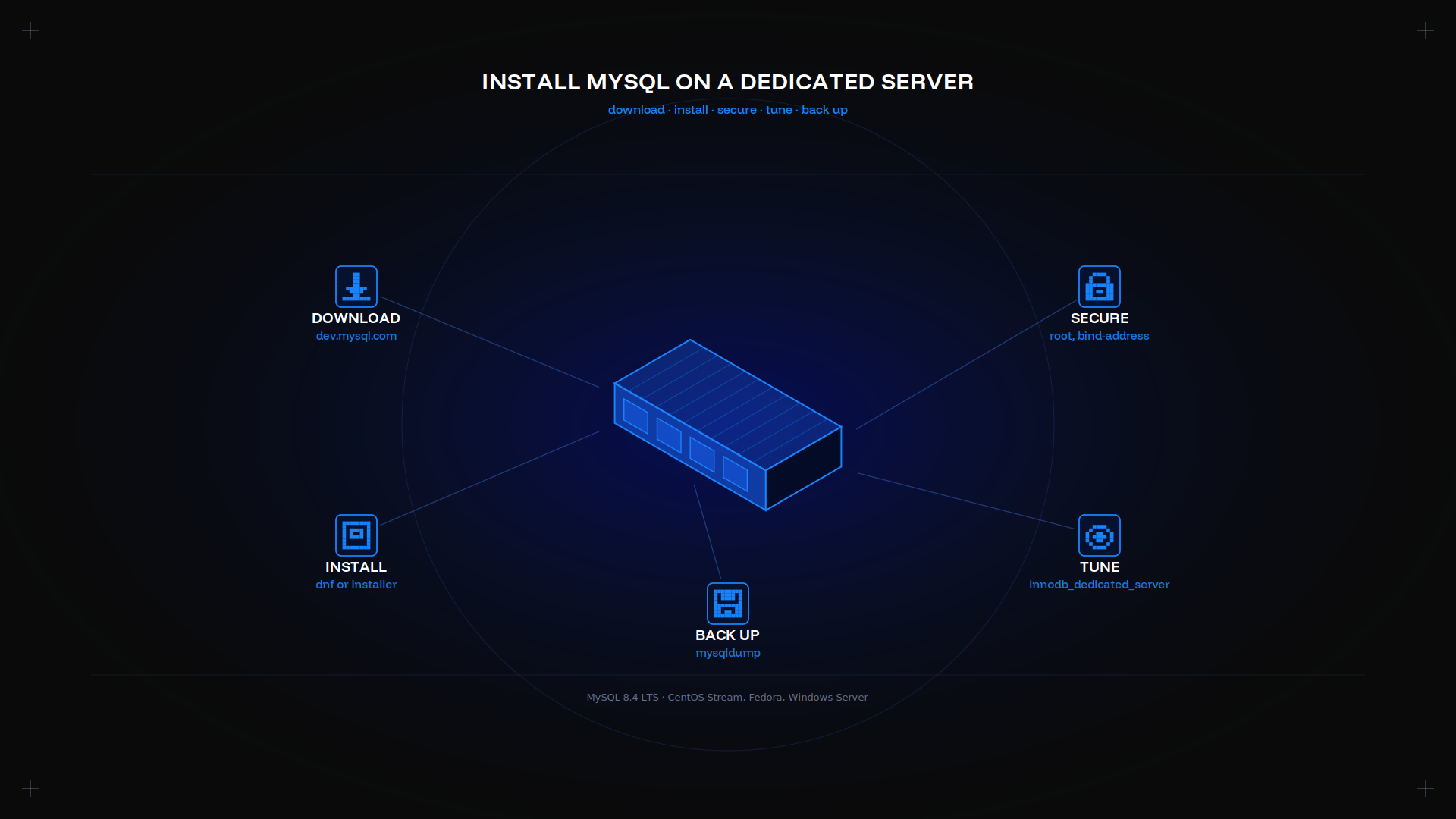
Installing MySQL Server on a dedicated server takes four commands. What matters is what follows: the root password, the bind address, and one InnoDB setting that sizes the buffer pool to the machine.
Key takeaways
- MySQL 8.4 is the first LTS release. Pick it, not an innovation branch, for production.
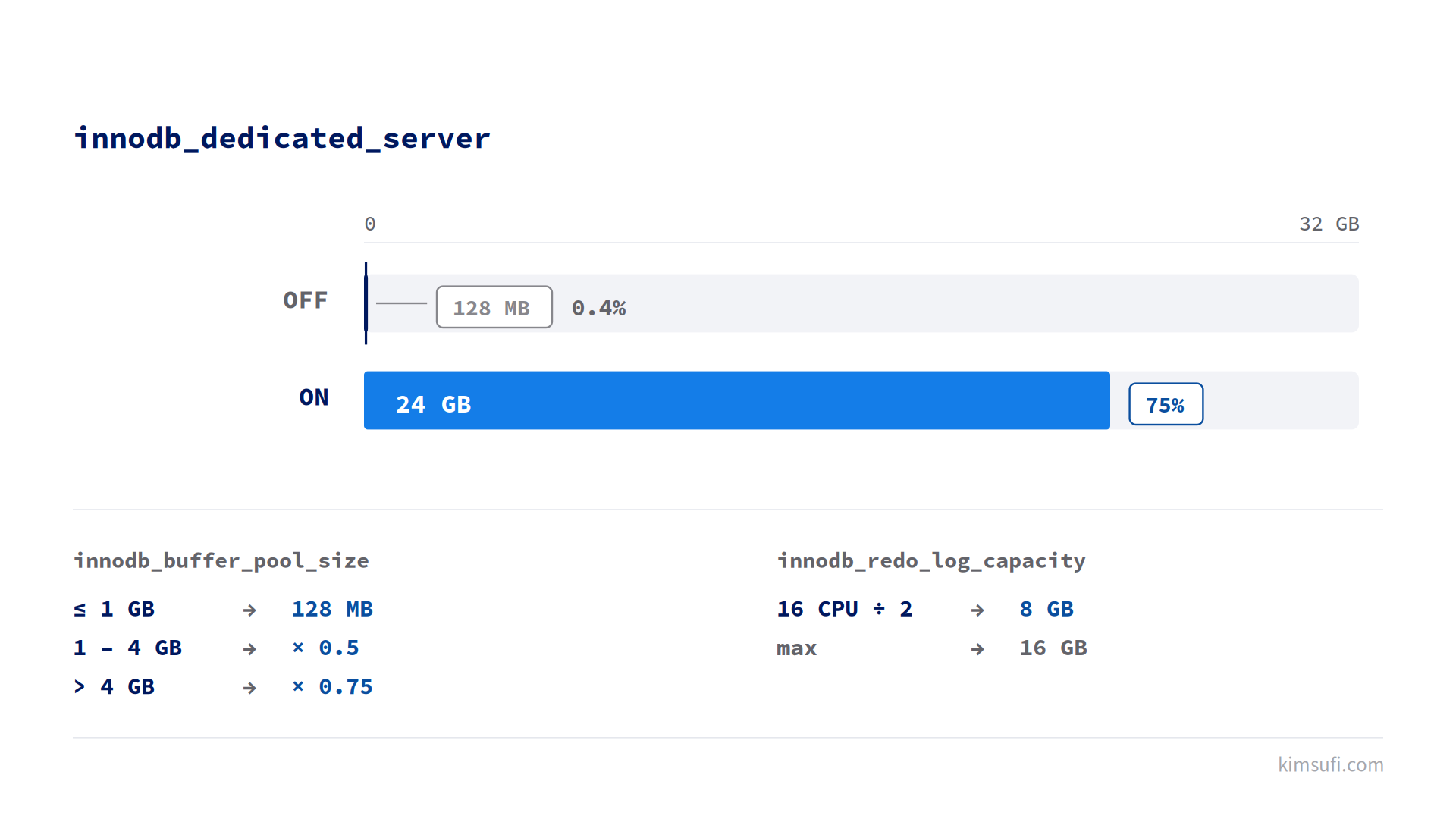
- Turn on innodb_dedicated_server and MySQL sizes the buffer pool and redo log from the hardware it detects.
- The default buffer pool is 128 MB. On a machine of any size that is the worst default to leave alone.
- Never leave MySQL Server bound to every interface. Point it at the primary IP or at localhost.
- In MySQL 8.4, innodb_dedicated_server no longer sets innodb_flush_method. It did in 8.0.
Why choose a dedicated server for MySQL
A database is the workload least tolerant of noisy neighbours. Query latency tracks disk and memory contention directly, so a shared machine gives results you cannot reproduce.
It also unlocks the automatic InnoDB configuration below, which only makes sense when MySQL owns every resource.
Prerequisites and system requirements
| Resource | Minimum | Comfortable |
|---|---|---|
| RAM | 8 GB | 32 GB or more |
| Storage | NVMe, 2× the dataset | NVMe with spare capacity |
| Cores | 4 | 8 or more |
| OS | CentOS Stream 9, Fedora, Windows Server 2022 | Same |
Prepare the machine before you install anything: Administrator access, a firewall you control, and a clear note of which app will talk to the database. One app per user, one user per app. Our firewall configuration guide covers port 3306, the port MySQL Server listens on.
Decide which release to run first. MySQL 8.4 is the LTS version, and software from an innovation branch reaches end of life far sooner.
For sizing, the KS-2 and KS-4 configurators show what each core and memory tier costs. The KS-C and KS-GAME pages cover the higher-core options if you expect heavy concurrency.
Downloading MySQL for Linux and Windows
Oracle publishes every version of the software at dev.mysql.com/downloads. Two downloads matter, one per OS.
For Linux, download the MySQL community repository package rather than a tarball, so patches arrive through the OS package manager. For Windows, download the MySQL Installer, which bundles MySQL Server and the workbench for that OS. Download both from Oracle, never a mirror: this is server software with root-level reach.
Always download over HTTPS from dev.mysql.com, confirm the version, and verify the checksum before unpacking. A tampered download is an install you cannot trust, so verify before you install.
Installing MySQL on Linux (CentOS/Fedora)
On Fedora, MySQL Server sits in the base repository. To install MySQL Server, install the package and launch mysqld:
sudo dnf install mysql-server
sudo systemctl enable --now mysqld
sudo systemctl status mysqld
On CentOS Stream, install the Oracle repository first. That step gives you the option of pinning a release, then installs MySQL Server:
sudo dnf install https://dev.mysql.com/get/mysql84-community-release-el9-1.noarch.rpm
sudo dnf install mysql-community-server
sudo systemctl start mysqld
The Oracle package writes a temporary password to the log. Read it, then enter it at first login:
sudo grep 'temporary password' /var/log/mysqld.log
mysql -u root -p
The Fedora package starts with no root password at all, which is why the next step is not optional.
Installing MySQL on Windows Server
To install MySQL Server on Windows, launch the MySQL Installer and choose Server only. Setup then asks for a config type, and this step is the one most guides get wrong.
The option list offers Development Computer, Server Computer, and Dedicated Computer. On this OS, pick Dedicated Computer: it lets MySQL Server assume the whole machine instead of reserving memory for other applications. Development Computer is the wrong choice, whatever your development habit.
Complete the remaining steps: put the port on 3306, switch the MySQL Server Windows service to start automatically, and give root a password. Confirm the process runs in the Windows Services console before proceeding.
Initial secure configuration
Time to configure MySQL properly. Run the script that secures MySQL immediately after you install it. This step is interactive, and every answer matters:
sudo mysql_secure_installationIt applies a root password, removes anonymous accounts, disables remote login for that account, and drops the test database. Accept all four.
Then configure MySQL to restrict the network. By default it may listen on every interface, so bind it to one address in /etc/my.cnf:
[mysqld]
bind-address = 10.0.0.5
port = 3306
skip-name-resolve = ON
Use the primary IP for app access, or 127.0.0.1 if MySQL and the app share the machine.
Give each app its own account
Create a specific user per app rather than reusing root, and one database per app. An app that only reads should not be able to write, and an app compromised through its own code should not reach another app's data:
CREATE USER 'app'@'10.0.0.%' IDENTIFIED BY 'a-long-passphrase';
GRANT SELECT, INSERT, UPDATE, DELETE ON appdb.* TO 'app'@'10.0.0.%';
Optimizing InnoDB for dedicated environments
This is where the hardware pays for itself. One setting in [mysqld] does most of the work, and it is the main reason to configure MySQL differently here:
[mysqld]
innodb_dedicated_server = ON
The name is literal: the option exists for a server MySQL does not share.
With it enabled, MySQL determines two values from the hardware it detects:
| Detected memory | Buffer pool size |
|---|---|
| Under 1 GB | 128 MB |
| 1 GB to 4 GB | memory × 0.5 |
| Over 4 GB | memory × 0.75 |
InnoDB derives redo log capacity from half the logical core count, in GB, capped at 16 GB. On a 16-core server that is 8 GB. InnoDB stores that log next to the data.
Two details are specific to 8.4. innodb_redo_log_capacity supersedes innodb_log_file_size and innodb_log_files_in_group, both deprecated. And innodb_flush_method is no longer set automatically, as it was in MySQL 8.0, so define it yourself if your storage needs it.
Only apply this where MySQL owns the box. Oracle explicitly advises against the option where MySQL shares resources with other software.
Setting up automatic backups
A dump plus a cron entry covers most cases:
sudo mysqldump --all-databases --single-transaction \
  --source-data=2 > /backup/all-$(date +%F).sql
Store the output off the machine. Where a dump takes hours, use mysqlbackup or filesystem snapshots instead, and test a restore before relying on either.
Monitoring and performance tuning
Start with the InnoDB buffer pool hit rate. Below 99% sustained, the pool is too small for the working set:
SHOW STATUS LIKE 'Innodb_buffer_pool_read%';
SHOW VARIABLES LIKE 'innodb_buffer_pool_size';
Turn on the slow query log to find the queries worth fixing, and modify indexes before you modify any setting. A missing index costs more than any variable in this article.
Troubleshooting common installation issues
mysqld will not start. Read /var/log/mysqld.log. An InnoDB buffer pool larger than available memory is the usual cause, so look there first.
Access denied. On the Oracle package the temporary password is in the log. On Fedora, connect through the local socket instead.
Remote connections refused. Look at bind-address, then the firewall, then the app user's host pattern. All three must allow the app before a session can establish.
Port 3306 already in use. Another mysqld process is running, often left from an earlier install attempt. Stop it, then start mysqld again.
Conclusion
The install is four commands. The value is in the three steps after the installation: a hardened root account, MySQL bound to one address, and InnoDB sizing its own buffer pool from the hardware. Every app you connect afterwards gets its own user.
Kimsufi servers start at $11.10 USD/month, and the KS-5 configurator shows the memory tiers that matter most for a database.
Frequently asked questions
What are the minimum hardware specs for a dedicated MySQL server?
8 GB of RAM, 4 cores, and NVMe storage of roughly twice the dataset. Memory is what matters, since the InnoDB buffer pool should hold the working set.
How do I secure the MySQL root account after installation?
Run mysql_secure_installation right after the installation, give root a long password, disable remote login for it, and create a per-app user for everything else.
Can I install MySQL on both Linux and Windows on the same dedicated server?
Not sensibly on one OS. Dual-booting defeats the point, and running both in VMs removes the exclusive resources that make the InnoDB autoconfiguration work. Install one build, matched to your app stack, and stop there.
What is the best InnoDB configuration for high-traffic dedicated servers?
Turn on the InnoDB autoconfiguration, confirm the buffer pool size, then tune innodb_io_capacity to your NVMe. One variable at a time.
How do I set up automated backups for MySQL on a dedicated server?
A nightly mysqldump --single-transaction written to a directory that replicates off the machine, plus a monthly restore test. The test is the part people skip.