























Server backup software copies your data off the machine that holds it and brings it back when that machine fails. Here are the tools worth shortlisting in 2026, what each costs, and where running your own backup target beats all of them.
Key takeaways
- Pricing models differ more than features. Per workstation, per server, per device, per user, or per GB: the same estate produces very different quotes.
- Acronis Cyber Protect Cloud has no public price. Every figure here comes from resellers, not a vendor rate card.
- Veeam Community Edition is still free, for up to 10 workloads.
- Egress fees and storage tiers are where the advertised price stops being the real price.
- A dedicated server running Borg or Restic is the cheapest backup target per terabyte.
How we compared server backup software
We did not run a test bench. This backup software comparison is built from vendor documentation, public pricing, reseller rates and independent reviews, cross-checked where they disagreed. Pricing here moves constantly and varies by reseller, so treat every figure as indicative.
We applied one set of eight criteria to each backup solution: licensing unit, recovery time, encryption and who holds the key, compliance, platform coverage, backup automation, central management, and what it costs to leave. Use the verdicts as a shortlist, then run a trial against your own data to ensure the fit is real.
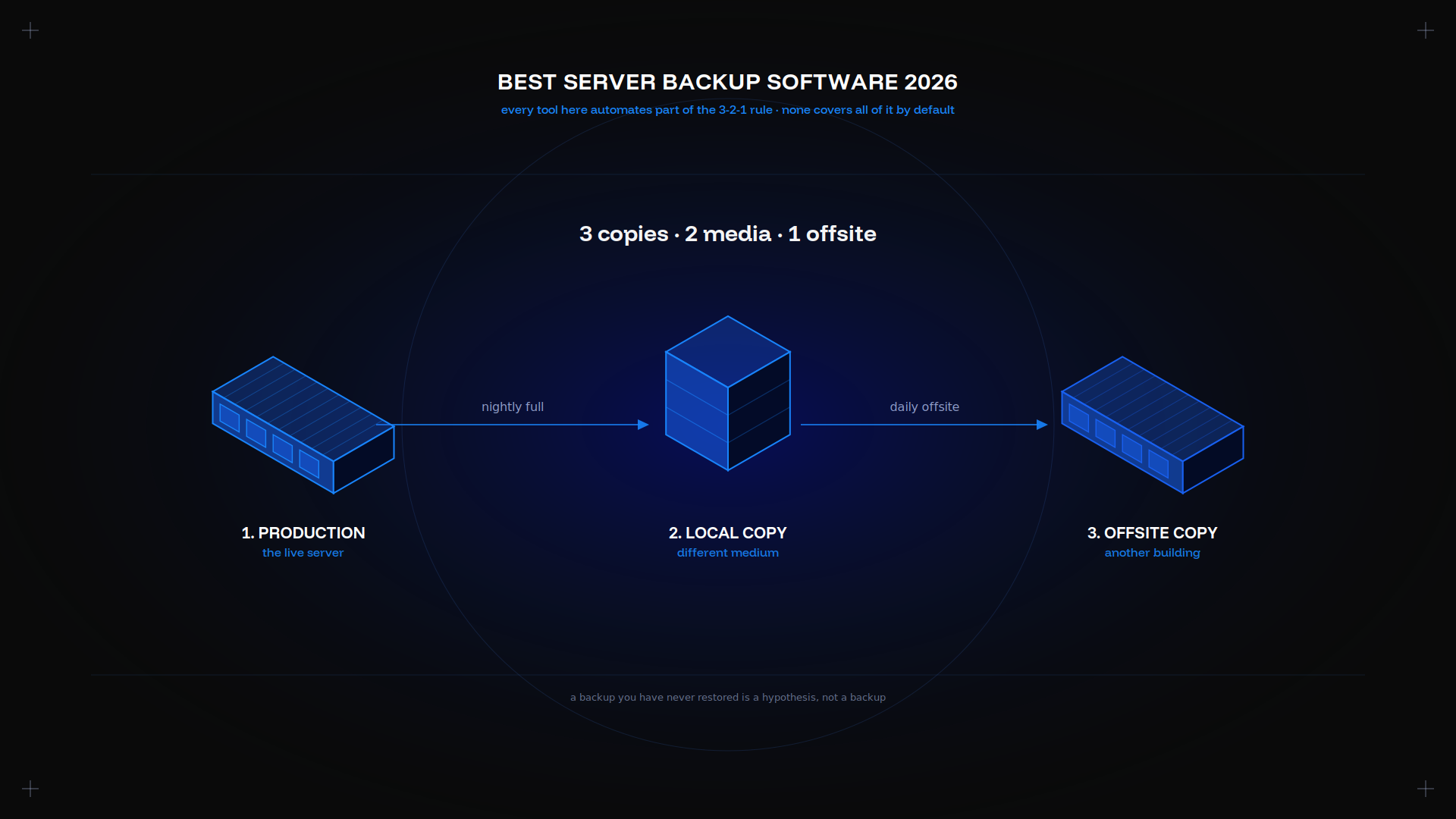
One thing before the reviews. Every backup product here automates part of the 3-2-1 rule: three copies, two media, one offsite. None of them ensure all three backup copies exist unless you set it up that way, and the offsite copy is the one teams skip.
That is the standard we hold each backup tool to below: not what it can do, but what its backup process does once the default schedule is running.
Top 10 server backup tools for 2026
| Tool | Licensing unit | Indicative entry price | Best for |
|---|---|---|---|
| Acronis Cyber Protect | Per workstation or server | about $85/year per workstation | Backup plus endpoint security |
| Veeam Data Platform | Per workload | Free to 10 workloads | Virtual machine estates |
| iDrive Team | Per plan, pooled storage | $99.50/year | Small teams, several machines |
| Backblaze Business | Per computer | $99/year | Simplicity, unlimited storage |
| MSP360 | Per workload, own storage | $6/month | Bring-your-own S3 storage |
| CrashPlan Endpoint | Per user | $8 | Unlimited per-user backup |
| Carbonite Professional | Per plan and tier | $288 to $1,300 | Guided recovery, compliance |
| Livedrive for Business | Per user and storage | Quote on request | UK and EU data residency |
| Restic or Borg | Free, open source | Storage cost only | Self-hosted, deduplicated |
| rsync | Free, open source | Storage cost only | Simple offsite file sync |
Every price in this table is indicative and dated to 2026. Confirm against a current quote before you budget.
Acronis Cyber Protect – features, pricing and verdict
Backup and endpoint security in one agent: anti-malware, patch management and vulnerability assessment alongside image backup. Bare-metal recovery, immutable backup storage on the Advanced tier, and robust, reliable VM backup coverage.
Pricing. No public rate card for the business line. Reseller figures put Standard near about $85/year per workstation and about $595/year per server.
Verdict. The most complete backup software here and the most expensive per workload. Worth it when the security bundle replaces a separate product.
Backblaze Business Backup – pros, cons and cost
Pros. Unlimited backup storage, flat pricing, nothing to set up. Its B2 object storage at $6.95 per terabyte per month also makes a reliable target for other backup software.
Cons. Endpoint-focused. Server coverage and compliance are thinner than iDrive or Acronis, with no central policy management.
Price. $99/year per computer per year.
Verdict. Right for a small team with laptops. Wrong for a server estate with compliance requirements.
iDrive Team – key capabilities and pricing
Servers, databases and laptops in one backup console, with storage pooled across devices rather than metered per device. SQL and Exchange support, sub-accounts, and physical restore shipping for large recoveries.
Pricing. $99.50/year for five computers sharing 5 TB. Budget on the renewal rate, not the first-year promotion.
Verdict. The best value per terabyte here for a mixed estate. Note that iDrive markets HIPAA and SOX help rather than holding certification, which matters if your auditor asks.
MSP360 – enterprise-ready backup overview
MSP360 separates the backup software from the storage: license the agent, then set it to write to your own S3, Wasabi or B2 account. That makes the storage a negotiable line rather than a fixed cost. You negotiate egress and tiering with the storage provider instead of absorbing them into a subscription.
Pricing. Free for one computer and 200 GB, without image backup. Standalone licences from $29.99 per year, managed tiers from $6/month per workload.
Verdict. The most flexible architecture, and the only one here with a genuinely usable free tier.
CrashPlan Endpoint – what it offers
Per-user pricing with unlimited storage, continuous backup and generous version retention. A user with a laptop and a workstation pays once. Server-class backup features are limited: this is endpoint backup, not a server backup solution.
Price. $8 per user per month.
Verdict. Strong for distributed laptop fleets. Look elsewhere for databases or VMs.
Carbonite Professional – strengths and weaknesses
Strengths. Always-on encrypted backup, a secure default, and human-assisted recovery after ransomware. That guided restore is the real product.
Weaknesses. Price climbs steeply with storage, the interface shows its age, and cost per terabyte compares poorly with pooled-storage rivals.
Price. $288 to $1,300 per year by tier.
Verdict. Buy it for the recovery support, not the price.
Livedrive for Business – quick look
The UK-centred option, with data residency in the UK and EU. Pricing is quoted rather than published, so we are not going to estimate it. Shortlist it if residency is a hard requirement.
Key features every server backup solution should have
- Image backup, not just files. A file backup restores documents. An image backup restores a whole server, which is the option you need when the hardware dies.
- Application-aware backup. A database copied while running restores corrupt. A reliable backup tool quiesces it first, to ensure the backup process produces a consistent copy.
- Deduplication. What makes a daily full backup affordable. Without it, backup retention costs multiply.
- Backup retention you set yourself. Daily for 30 days, weekly for 12 weeks, monthly for a year, set once and left alone.
- Immutable backup storage. A backup an attacker can delete is not a backup, however robust the rest of the setup looks. Immutability is how you ensure a ransomware attack cannot erase your backup history.
- Automated verification. A backup nobody has restored is a hypothesis. Robust backup software test-restores on a schedule and reports it, which is how you ensure the copy is reliable.
- Central management. One backup console, or the backup policy drifts per server. A single console is what makes a robust backup solution auditable.
A restore path you have walked. Create a test restore on a spare server before you need one in anger. Any backup tool can create copies; the solution you want is the one that has given a server back.
What to put in the backup
Feature lists distract from the simpler question. Four things belong in the backup process: the data itself, the databases, the configuration under /etc, and a full image if you want bare-metal recovery. A backup of the data without the config restores a server you then have to rebuild by hand.
Databases are the usual gap. A file-level backup catches the database directory mid-write, so every database needs its own backup job with a dump or a snapshot. Anything the backup software cannot quiesce needs a pre-backup hook.
Our guide to backing up a dedicated server covers how these land on one box.
Pricing models and total cost of ownership
| Model | Who uses it | Where it bites |
|---|---|---|
| Per workstation or server | Acronis | Servers cost far more than desktops |
| Per workload | Veeam, MSP360 | VM sprawl inflates the count |
| Per computer | Backblaze | Simple until you add servers |
| Per user | CrashPlan | Cheap for multi-device users |
| Pooled storage | iDrive, Carbonite | Predictable until the tier boundary |
Then the charges nobody quotes. Egress fees when you restore, which is exactly when a surprise hurts. Tier jumps, where 10 GB over a boundary doubles the bill. Renewal pricing after the promotion ends. And the exit cost of moving terabytes to another provider.
Price a full restore of your largest server to ensure the quote is the real number, not just the monthly subscription.
Put a number on downtime first
Every option below looks reasonable until you compare it against what an outage actually does to you. Work out the hourly downtime figure for your busiest service, then judge each backup solution against it. A backup solution that halves your downtime is worth a premium when downtime is expensive, and is not worth a penny when it is not.
That single number also settles arguments about backup frequency. If an hour of downtime matters little, a nightly backup job is a reasonable option. If it costs a great deal, you need continuous replication and a backup tool with instant recovery, and the extra licence is the cheaper solution.
Security, encryption and compliance checklist
- AES-256 in transit and at rest, as the floor.
- Who holds the key. If the provider holds it, the provider can be compelled to hand over your data. Hold it yourself and a lost key means lost backups. Choose deliberately.
- Immutable backup storage, so ransomware cannot delete the copies.
- MFA on the backup console, the account an attacker wants most. A secure backup with an insecure console is not secure.
- Certifications that exist. ISO 27001 and SOC 2 are auditable; "HIPAA-ready" is not.
- Data residency, if EU or UK rules apply.
- Backup audit logs, so you can show who restored what, and when.
Self-hosting changes this: the keys never leave you, and residency is wherever the box sits. Our backup and recovery server page covers a secure setup.
Performance, speed and recovery time objectives
RTO is how long you can be down. RPO is how much data you can lose. A nightly backup gives an RPO of up to 24 hours whatever your RTO, so backup frequency sets your data loss, not your downtime.
What sets RTO in practice is rarely the software, it is the link. Restoring 2 TB over 1 Gbps takes about five hours at line rate, and remote restores rarely hit line rate. That is why physical restore shipping exists.
The backup window matters too. A full backup that runs 14 hours does not fit overnight, which pushes teams to incremental-forever backup with periodic synthetic fulls. Work it out before you commit: your dataset divided by your real backup throughput, not the link's rated speed. For a local restore target, disk type dominates: see our storage options guide.
Ease of setup, management and automation
Ten servers is a script. A hundred is a deployment tool, so check for silent install before you commit. On Windows estates, check the backup window the agent needs and whether it respects a maintenance window you set. Every backup tool here automates a schedule; fewer handle dependencies like quiescing a database first. Ensure backup alerts reach a human, because a failed backup that only writes to a log nobody reads is a failed backup you discover during the restore.
The self-hosted equivalent is a cron entry and a monitoring check:
rsync -aAXH --delete --link-dest=/mnt/backup/latest \
  /var/www/ /mnt/backup/$(date +%F)/
That gives a hard-linked backup snapshot per day on a mounted volume. Borg adds a deduplicated, encrypted backup repository; Restic does the same with remote object storage as a first-class target. Both leave backup retention and verification to you, which is the trade for free software.
Scalability for growing IT environments
Three things break as you grow, and each needs its own solution. The backup licence count, where per-workload pricing that was fine at ten servers becomes your largest line item at a hundred. The backup window, which deduplication and staggered backup schedules fix. And the restore path, because restoring twenty servers after a site failure is a plan, not a procedure.
The fourth thing that breaks is confidence. A backup estate nobody tests degrades quietly: agents stop reporting, a new server never gets added, a backup job fails for a fortnight. A quarterly restore test and a reconciliation between your inventory and the backup console catch all three, and cost an afternoon.
Past a certain size the maths flips and a backup target you own beats any backup subscription per terabyte. Same rent-or-own question as our dedicated server and cloud guide, and for a platform team the SaaS hosting guide covers the architecture around it.
Final recommendation – which tool wins for your needs
Mixed estate with compliance requirements: iDrive, the best-value solution per terabyte with server backup included.
Backup plus endpoint security in one agent: Acronis, accepting the per-workload price.
VM estate: Veeam, a free solution to 10 workloads.
Control of your storage contract: MSP360 pointed at S3, Wasabi or B2.
Laptops and simplicity: Backblaze or CrashPlan endpoint backup.
Lowest price per terabyte: your own backup target, the simplest solution of all. Borg and Restic both give encrypted, deduplicated backup repositories, the keys stay with you, and a remote backup server costs the same however much you store.
Kimsufi servers start at $11.10 USD/month with full root access and unmetered traffic, which makes one a practical offsite backup target for whichever backup software you pick.
Frequently asked questions
Is Veeam still free?
Yes. Veeam Community Edition covers up to 10 workloads with one backup job per device, and it does not expire. That makes it the best free backup software for a small virtual machine estate, and the free tier includes instant VM recovery, which most paid competitors reserve for a higher plan.
The limits are real, though. Ten workloads is the hard ceiling, there is no central management across sites, and you get no vendor support. Paid tiers move to per-workload licensing at roughly $250 to $450 per workload per year depending on edition and reseller. Teams commonly run Community Edition until they hit the workload count, then discover the paid tier is the largest line item in the backup budget. Model that cost before you build a process around the free version.
What is better than Carbonite?
Depends what you disliked about it. If the issue is price per terabyte, iDrive pools storage across devices and comes out cheaper for a mixed estate. If you want backup and endpoint security in one agent, Acronis does both. If you want to own the storage contract and pay published object storage rates, MSP360 points at your own S3, Wasabi or Backblaze B2 bucket.
What Carbonite does that the others do not replicate well is guided recovery. After a ransomware incident, having a human walk you through the restore has real value, and it is why Carbonite persists in regulated small businesses despite the price. If that support is what you are paying for, the alternatives are not straight substitutes.
What are the top 10 data backup software?
For server backup in 2026: Acronis Cyber Protect, Veeam Data Platform, iDrive, Backblaze Business, MSP360, CrashPlan, Carbonite, and Livedrive on the commercial side, plus Restic and BorgBackup among open-source options.
Treat any ranked list, including this one, with suspicion. The order depends entirely on the estate. A ten-person company with laptops and one server ranks these very differently from a fifty-server virtual machine environment with a compliance auditor. Shortlist three that fit your licensing model, then trial them.
What is the best free backup software for Windows servers?
Three genuine options on Windows. Veeam Community Edition is the strongest for virtual machines, up to 10 workloads. Windows Server Backup ships inside Windows Server itself and handles single-server image backup and bare-metal recovery at no charge. It has no central console and no deduplication, so it suits one server rather than a Windows estate, and it cannot stage a copy offsite on its own. MSP360's free tier covers one computer and 200 GB, without image-based backup.
On Linux the answer is different and better: rsync, BorgBackup and Restic are all free with no workload limit at all. The cost moves entirely to the storage and to your own time.
How does cloud backup differ from on-premise server backup?
Cloud backup puts the copy offsite by default, bills monthly, and needs no hardware from you. On-premise backup restores far faster over the local network, needs hardware once, and keeps the data under your control. The restore speed difference is the one people underestimate: pulling 2 TB back from a cloud provider takes hours, while the same restore from a local target takes minutes.
Serious setups run both, which is exactly what the 3-2-1 backup rule describes. A local copy for fast recovery from the common failures, and an offsite copy for the rare one that takes out the building.
What backup frequency is recommended for critical databases?
Continuous transaction log shipping, with a full backup nightly. The log is what gives you a recovery point measured in minutes rather than hours, and no backup schedule alone matches it.
For anything less critical, a daily full is usually enough. The question to answer first is how much data you can afford to lose, because that number sets the backup frequency, not the other way round. Write the answer down and check that your current schedule actually meets it, because a lot of estates discover during an incident that a nightly job means losing a full day of orders.
Can I encrypt backups end-to-end with these tools?
Most of them. Acronis, iDrive, MSP360 and CrashPlan all offer private-key backup encryption, which is the secure option: the provider stores ciphertext and cannot read it, nor be compelled to hand over readable data.
Read the recovery terms before you enable it. With a private key, losing the key means losing every backup it protects, and no provider can help you. That is the trade, and it is a real one. Store the key somewhere that is itself backed up and not on the server being protected. Self-hosted tools such as Borg and Restic encrypt client-side by default, so the same rule applies with no opt-in.
Do these solutions support VM snapshot and restore?
Veeam is the strongest here by a clear margin, with agentless snapshot at the hypervisor and instant recovery that runs a machine straight from the backup repository while it restores in the background. Acronis and MSP360 both back up the main hypervisors properly.
Backblaze and CrashPlan are endpoint backup products. You can protect a virtual machine with them by running an agent inside every guest, but you lose the hypervisor snapshot and the fast whole virtual machine restore, which is most of the point. For a virtual machine estate, pick a backup tool built for it.
What is the typical recovery time (RTO) for each product?
No honest single number exists, and any vendor quoting one is quoting a lab. RTO depends on your data volume and your link speed far more than on the backup software. Restoring 2 TB over a 1 Gbps link takes roughly five hours at line rate, and cloud restores rarely reach it.
What genuinely cuts downtime is instant recovery, which runs the server directly from the backup repository while the real restore proceeds behind it. Veeam and Acronis both offer a version of this. The other lever is physical restore shipping, where the provider couriers a drive, which iDrive and Carbonite both support and which beats any network for a large dataset.
Are there hidden costs such as egress fees or storage tiers?
Yes, and this is the most common backup budgeting mistake in the category. Three charges routinely appear after the contract is signed. Egress fees when you restore, which is precisely the moment you can least afford a surprise invoice. Storage tier boundaries, where going a few gigabytes over doubles the monthly bill. Check where the next boundary sits before you pick a tier. And renewal pricing, because first-year promotional rates end.
Ask any provider three questions before you commit: what a full restore of my largest server comes to, what happens at the next storage tier, and what the renewal rate is after year one. A vendor that will not answer the first question in writing is telling you something.