
























NGINX and Apache both answer HTTP requests, but they handle concurrency in opposite ways. This comparison covers performance, security, configuration, and cost, so you can match a web server to your workload instead of to a popularity contest.
Key takeaways
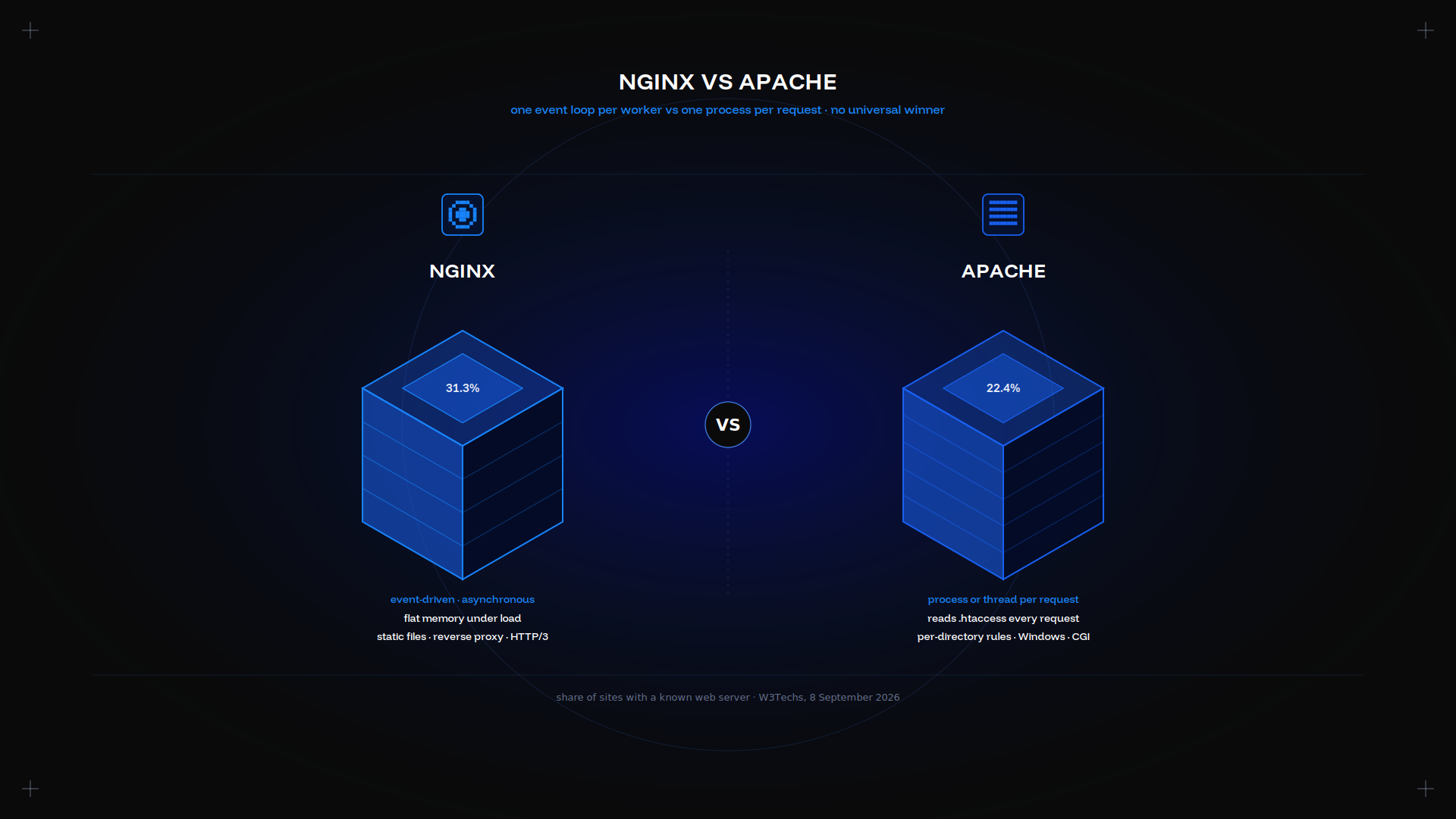
- Apache assigns a process or thread per request. NGINX uses an asynchronous, event-driven approach, which is why its memory usage stays flat as concurrency climbs. That asynchronous model is the single biggest difference.
- W3Techs puts NGINX at 31.3% of sites with a known web server and Apache at 22.4%. The gap widens with traffic: among the top 1,000 sites Apache is at 9.9%.
- Apache reads an .htaccess file on every request. NGINX offers no equivalent, which costs flexibility and buys speed. Base setup is quicker on NGINX as a result.
- HTTP/3 is a real differentiator. NGINX has shipped QUIC since 1.25.0; Apache 2.4.x has no native support.
- Running both is common and sensible: NGINX in front as a reverse proxy, Apache behind it for the application.
Performance: speed and resource usage
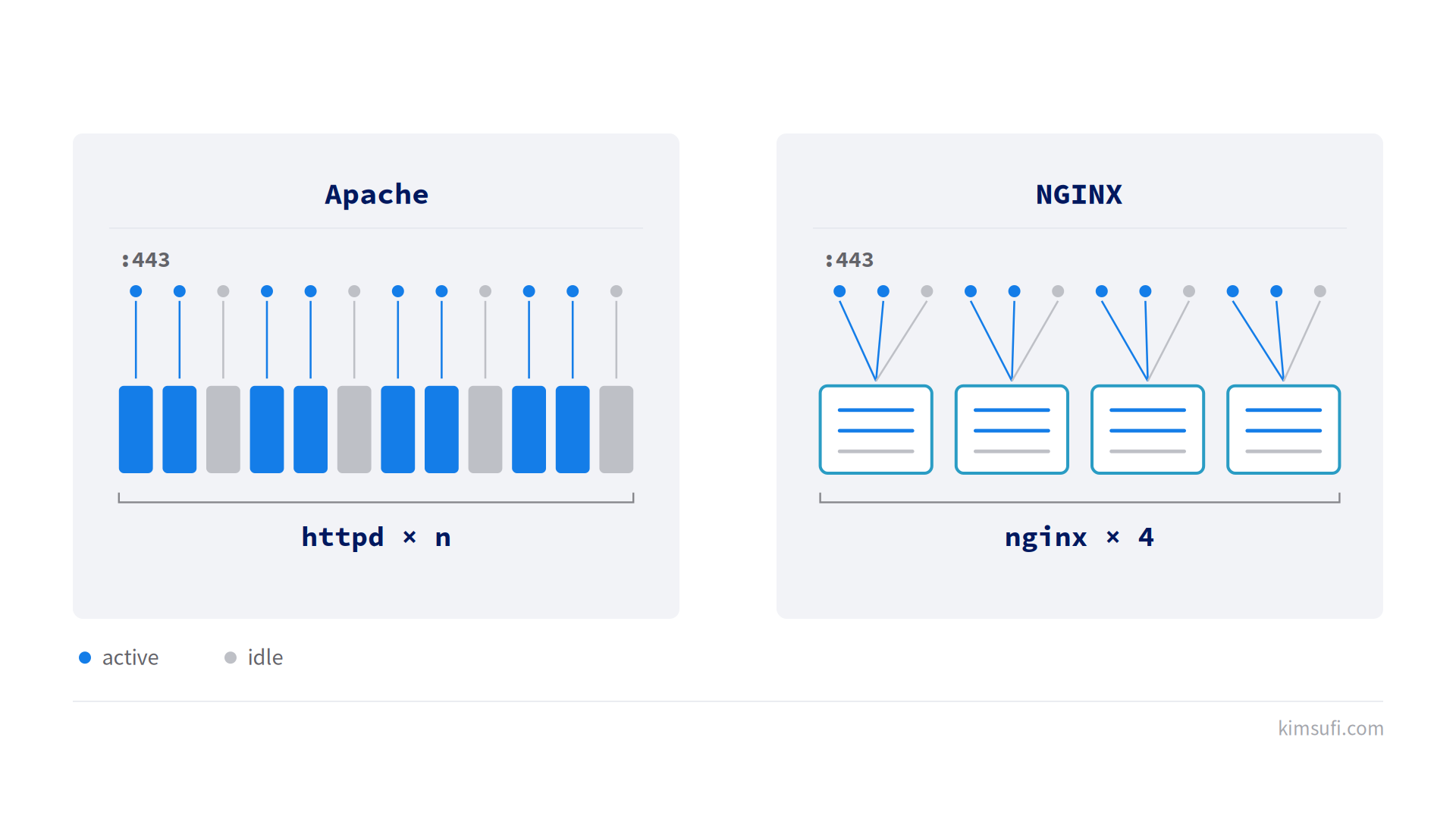
The architecture decides this section, and the difference in request handling is the whole story. Apache's prefork MPM gives each request its own process; the worker and event MPMs utilize threads instead. The prefork model is the oldest of the three. Either approach makes concurrency cost memory.
NGINX runs a small, fixed number of worker processes and handles thousands of active connections inside each one. Nothing blocks, so memory usage tracks the number of workers rather than the number of clients.
Each worker uses its cores efficiently and recycles them efficiently as clients disconnect. NGINX handles every socket in its event loop rather than parking a thread on it, so idle clients cost NGINX almost nothing.
Memory usage under concurrency
| Aspect | Apache | NGINX |
|---|---|---|
| Concurrency model | Process or thread per request | Event loop per worker |
| Memory per client | Scales with connections | Scales with worker count |
| Idle sockets | Hold a worker | Nearly free |
| Out-of-the-box tuning | Conservative, needs work | Close to optimal |
Static content is where the gap is widest. NGINX serves files with fewer syscalls per request, and its default configuration already serves static assets efficiently, and it reuses the kernel page buffers efficiently. NGINX handles the same file count on a fraction of the memory.
Dynamic content narrows it to almost nothing. For dynamic pages, when both servers hand PHP to PHP-FPM over a socket, the interpreter becomes the limit. Benchmarks showing a large gap on dynamic pages typically pit mod_php against PHP-FPM, not Apache against NGINX.
Be sceptical of the request-per-second figures circulating online. Most are unreproducible: no kernel version, no MPM named, no tuning disclosed. Comparison figures published online are typically unrepeatable, so test on your own hardware, with your own content.
💡 Memory usage matters more than peak throughput on a small machine. If you have 8 GB of RAM, our guide to server RAM explains why the process count is what fills it.
Verdict: NGINX. NGINX takes static files and high concurrency; a draw on dynamic content.
Security features and TLS support
Both are mature, both patch quickly, and neither holds a structural security advantage. The differences are in surface area and defaults.
Module surface. A stock Apache install activates more modules than most sites utilize, and each one is code in the request path. NGINX ships a smaller default set, so adding a module typically means recompiling.
Certificates. Both handle TLS 1.3, OCSP stapling, and automatic issuance through Certbot. The syntax differs; the capability does not.
sudo apt install certbot python3-certbot-nginx
sudo certbot --nginx -d example.com
HTTP/3 and QUIC. NGINX has supported QUIC since version 1.25.0, and it ships in the standard Linux binary packages. Apache 2.4.x has no native HTTP/3, so the common approach is fronting it with something that speaks QUIC.
Request filtering. ModSecurity runs on both. Apache's per-directory rules make targeted policies easier; NGINX keeps everything central, which is harder to get wrong. Both approaches are in active development.
Trim what you do not use, on either platform:
sudo a2dismod status autoindex
sudo apachectl -M
Whichever you pick, the web server is not your only control. Our firewall configuration guide covers the layer underneath.
Verdict: a draw. Apache matches it on certificates. Apache also carries the wider module ecosystem, and NGINX pulls ahead only where HTTP/3 is required.
Configuration complexity: .htaccess vs NGINX directives
This is the main dividing line, and it decides more migrations than performance does. Configuration style, not raw speed, is what teams typically argue about.
Apache reads an .htaccess file in the document root and in every directory above the requested path, on every request.
That allows per-directory overrides with no reload, which is why multi-tenant plans run on Apache.
The cost is several filesystem lookups per request. Setting AllowOverride None removes the cost and the feature together.
NGINX has no per-directory override file by design. Rewrite, access, and header rules live in the central config and take effect on reload.
Server block and virtual host, side by side
An NGINX server block, its equivalent of a virtual host:
server {
    listen 443 ssl;
    server_name example.com;
    root /var/www/example;
    location / {
        try_files $uri $uri/ =404;
    }
    location ~ \.php$ {
        fastcgi_pass unix:/run/php/php8.3-fpm.sock;
        include fastcgi_params;
    }
}
Compared to Apache, which nests the same virtual host in container tags:
<VirtualHost *:443>
    ServerName example.com
    DocumentRoot /var/www/example
    <Directory /var/www/example>
        AllowOverride All
        Require all granted
    </Directory>
</VirtualHost>
Both declare a document root, a name, and access rules. Apache nests directives inside container tags; NGINX uses a flat block with inheritance from the parent context.
Neither approach is objectively better, and both are flexible enough for multiple sites on one host.
Activating a new virtual host differs too:
sudo a2enmod rewrite
sudo a2ensite example.conf
sudo systemctl reload apache2
sudo ln -s /etc/nginx/sites-available/example /etc/nginx/sites-enabled/
sudo nginx -t
sudo systemctl reload nginx
The practical test. If an application, control panel, or customer writes rules into an .htaccess file, Apache is the lower-risk choice. If you control the whole configuration, NGINX is less to reason about.
Verdict: Apache wins on flexibility here, NGINX on predictability.
Scalability and load balancing
NGINX was written to solve the C10k problem: ten thousand concurrent connections on one machine. Its architecture is organised around that single constraint.
Igor Sysoev released it publicly in 2004 for exactly that, and the design still shows it. Sysoev's goal was never to replace Apache, only to sit in front of it.
As a load balancer. NGINX offers round-robin, least-connections, and IP-hash options with health checks at no cost, so it is a competent reverse proxy in front of multiple upstream nodes.
upstream app {
    least_conn;
    server 10.0.0.11:8080;
    server 10.0.0.12:8080;
}
Apache can do it too. modproxybalancer has worked for years, but it inherits the process model, so each proxied connection still occupies a worker. Spreading requests across nodes is possible on either, with different overhead.
Scaling up. Both scale vertically with cores and RAM. NGINX gets more out of the same hardware because idle sockets are nearly free, which matters for long-lived connections such as WebSockets.
As concurrency increases, the memory curve is what separates them, and it increases far more slowly on NGINX.
Where concurrent connections are the entire workload, such as a game server, that difference decides it.
Verdict: NGINX, clearly, though Apache can balance requests too.
Compatibility with PHP and dynamic content
Apache's historical advantage was mod_php: the interpreter embedded in the web server process. It was simple, and it made every Apache process carry a PHP interpreter whether it served a script or an image.
Modern practice is PHP-FPM on both servers, over a Unix socket. Content generated dynamically is handled by a separate pool, which you can restart independently:
sudo apt install php8.3-fpm
sudo systemctl start php8.3-fpm
Sites still running php7.4 should treat the upgrade as the main priority, since php7 stopped receiving security fixes in 2022, no php7 branch is supported today, and php7 modules will not load on a current release.
What Apache still does natively. It runs Perl, Python, and legacy CGI through modules, in-process. NGINX proxies to an external service for everything generated dynamically, so anything built dynamically leaves the web server entirely.
What that costs NGINX. One more moving part, and a socket to monitor.
What it buys. The web server stays lean whatever the application does, and a PHP crash no longer takes a worker with it. Dynamic handling sits outside the request path.
A LAMP stack with MySQL behind Apache is still a perfectly good architecture. Where the database is the constraint rather than the web server, a dedicated database server is the fix, not a different web server.
Verdict: a draw on capability, NGINX on isolation.
Static content serving and caching
Static files are NGINX's home ground. sendfile and tcp_nopush move bytes from disk to socket with minimal copying, and the cache directives are short:
location ~* \.(jpg|css|js|woff2)$ {
    expires 30d;
    add_header Cache-Control "public, immutable";
}
NGINX also works as a caching proxy in front of a slower origin, with proxycache storing responses on disk. That cache is configured centrally, not per directory. Apache offers modcache and mod_expires for the same jobs, configured per directory or per virtual host.
The difference is not what each can do but how much configuration it requires, and how the server behaves when the cache is cold and a thousand clients arrive at once.
NGINX survives that thundering herd with a lock on the upstream fetch. Apache needs more tuning, and its handling of a cold start is less forgiving.
Verdict: NGINX.
Operating system support and installation
Both run on every mainstream Linux distribution, on the BSDs, and on macOS, and Linux is where the great majority of installations sit.
Apache has the wider platform reach: it ships a supported Windows build, where NGINX on Windows is explicitly not production-grade. On Windows, IIS is the more common choice anyway, and IIS remains the default on that platform for in-house applications.
On Debian and Ubuntu, the NGINX installation takes four commands. The apt package pulls in a working default site, so it builds a base installation in seconds:
sudo apt update
sudo apt install nginx
sudo systemctl enable --now nginx
sudo nginx -t
The Apache package follows the same shape:
sudo apt update
sudo apt install apache2
sudo systemctl enable --now apache2
sudo apachectl configtest
On RHEL, Rocky, and AlmaLinux the package names differ, and each vendor compiles its own. Apache is httpd there, not apache2:
sudo dnf install nginx
sudo dnf install httpd
sudo systemctl enable --now nginx
sudo systemctl enable --now httpd
Open the ports, UDP included, so QUIC can be enabled later:
sudo ufw allow 'Nginx Full'
sudo ufw allow 443/udp
sudo ufw status
Read the error output and keep the packages current:
sudo tail -f /var/log/nginx/error.log
sudo tail -f /var/log/apache2/error_log
sudo apt list --upgradable
sudo apt upgrade nginx
sudo apt install nginx-extras
Restart cleanly after a config change, and confirm the service came back. Do not start a reload before the config test passes:
sudo systemctl restart nginx
sudo systemctl status nginx
Config lives in /etc/nginx/ and /etc/apache2/ on Debian, /etc/httpd/ on RHEL, and each vendor bases its layout on those paths. The document root defaults to /var/www/html on both, and each writes logs under /var/log/. Both need read access to that root and write access to their own directory.
If you are choosing a platform to run either on, our budget dedicated servers show what the hardware costs.
Verdict: Apache, on breadth of platform support.
Use cases: when to choose NGINX or Apache
Choose NGINX for a reverse proxy or API gateway, static sites and single-page applications, dynamic apps behind a socket, high concurrency on modest hardware, container ingress, and anything needing HTTP/3.
Choose Apache for multi-tenant plans, applications that ship their own override rules, WordPress installs whose plugins write rewrite rules, legacy CGI or in-process Perl, and Windows deployment.
Run both when you want QUIC and TLS termination at the edge but multiple applications expect Apache behind it. NGINX takes the connection, Apache serves the request.
For a reseller platform hosting other people's sites, per-directory overrides are usually not optional. Our reseller hosting guide covers the wider setup.
Verdict: the workload decides, not the benchmark. Apache ends up in plenty of the same racks.
Cost and licensing overview
Both are free and open source. Apache uses the Apache License 2.0, NGINX the two-clause BSD licence. Neither charges per site, per core, or per connection.
Paid tiers exist above both. F5 sells NGINX Plus with clustering, an API for dynamic reconfiguration, and vendor support, which developers on a support contract may value.
Commercial Apache support comes from distributions and third parties rather than one company, a different development model rather than a worse one. Development on both projects remains active.
The real cost sits elsewhere. A server handling the same traffic on less memory is a smaller monthly bill, and every hour spent translating per-directory rules is an hour billed.
Access to the whole configuration is worth something too. Weigh both against a fixed hardware cost.
Verdict: a draw on licence, NGINX on hardware efficiency.
Verdict: which server fits your needs
| Requirement | Better fit |
|---|---|
| Static files and high concurrency | NGINX |
| Reverse proxy or upstream balancing | NGINX |
| HTTP/3 and QUIC | NGINX |
| Per-directory override rules | Apache |
| Multiple tenants on one platform | Apache |
| Windows deployment | Apache |
| In-process Perl or legacy CGI | Apache |
| Lowest memory usage per connection | NGINX |
Work down the list and stop at the first row that is a hard constraint. There is no universally correct option.
If none applies, NGINX is the better default in 2026, and the market share breakdown says the same: Apache holds 22.4% of sites overall but 9.9% of the top 1,000, while NGINX stays close to flat across every traffic tier.
That is not a verdict against Apache. Apache is not in decline where it fits.
Its installed base is concentrated in multi-tenant plans and long-running deployments, which is exactly where its per-directory configuration earns its place. The comparison flatters whichever server matches your traffic shape.
Conclusion
Pick on workload shape. NGINX if you are serving static assets, proxying, or fitting high concurrency onto modest hardware. Apache if per-directory configuration, a shipped module, or Windows support is a requirement you cannot negotiate away.
Both run well on one machine you control. The Kimsufi range starts at $11.10 USD/month, SYS at $33.20 USD/month, and Rise at $64.00 USD/month, with full root access and unmetered traffic.
Frequently asked questions
Is Apache better than NGINX?
Neither is better in general. Apache offers extensive .htaccess flexibility and a mature module ecosystem, while NGINX typically handles higher concurrent connections with lower memory usage. Match the server to the workload, and to how much of the configuration you control.
Are Apache and NGINX the same?
No. Apache is a process-based server; NGINX uses an event-driven architecture. That single difference produces different performance profiles and different configuration models.
Is NGINX or Apache faster?
For static content and high-traffic scenarios, NGINX is generally faster thanks to its non-blocking design. Apache can be optimized to close much of the gap on content built dynamically, using the event MPM and PHP-FPM.
Is there anything better than NGINX?
Alternatives such as Caddy, LiteSpeed, and HAProxy excel in specific niches: automatic HTTPS, commercial support, and request distribution respectively. NGINX remains the most versatile open-source choice.