


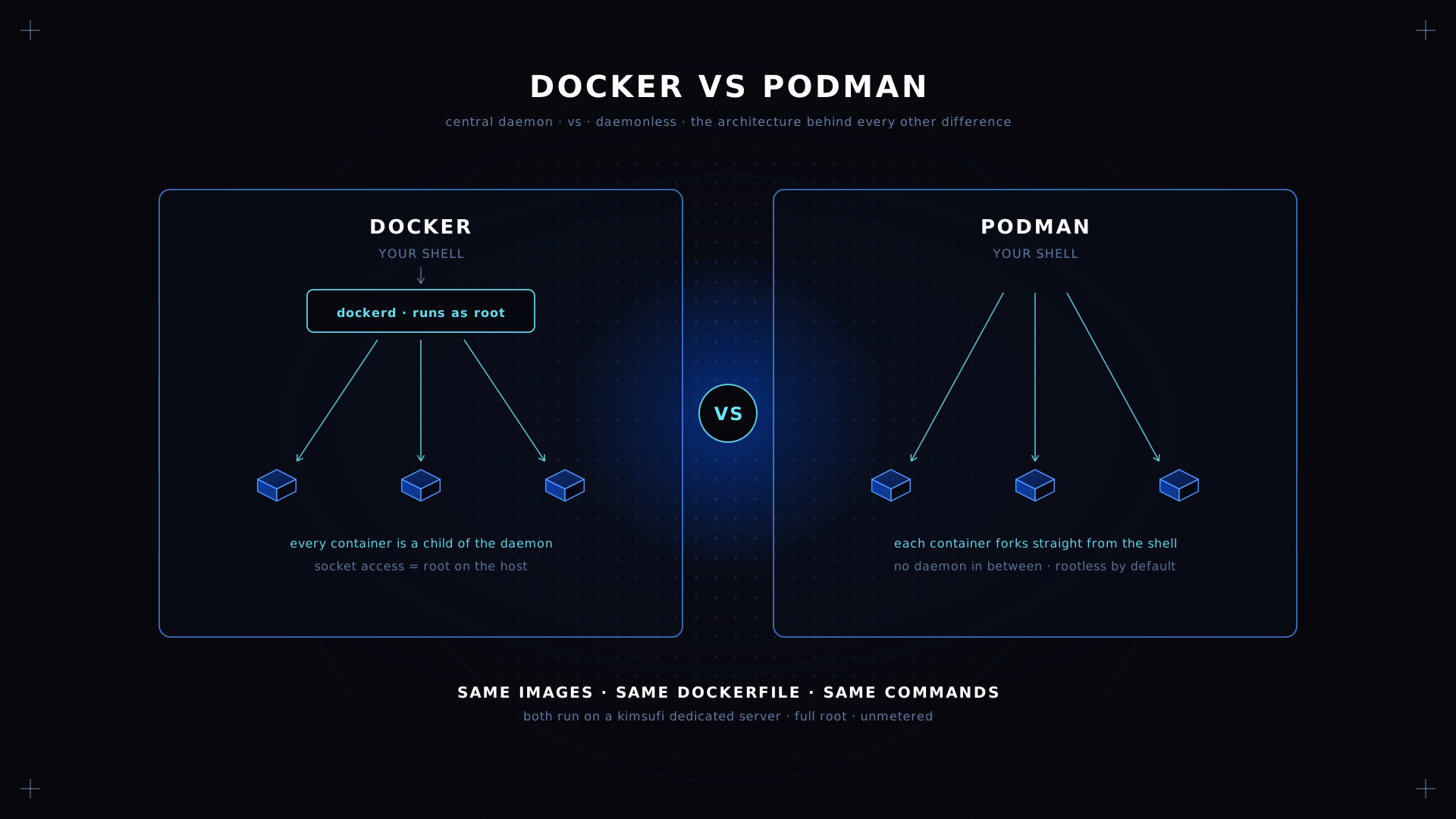
Docker and Podman run the same images, accept the same commands and build from the same Dockerfile. The difference is what sits underneath. Docker keeps a central daemon running as root; Podman forks each container straight from your shell. That one architectural choice ripples through security, CI, Kubernetes alignment and licensing. This comparison covers all of it, on bare metal from $11.10/month.
Key Takeaways
- Docker uses a client-server architecture with a central daemon. Podman is daemonless and forks containers as child processes.
- Podman is rootless by default. Docker offers a rootless mode, but it is opt-in and less common in the field.
- CLI compatibility is near total: Podman is command-compatible with Docker, a single shell alias covers most daily work, and it reads a Dockerfile unchanged.
- Docker Engine is free. Docker Desktop requires a paid subscription above a company size threshold, which is what pushes many teams to look.
- Podman speaks Kubernetes natively through pods and
podman generate kube. Docker Compose has the larger ecosystem.
Docker vs Podman at a Glance
| Aspect | With Docker | With Podman |
|---|---|---|
| Architecture | Central daemon, client-server | Daemonless, containers as child processes |
| Default privilege | Rootful; rootless is opt-in | Rootless by default |
| Multi-container | Docker Compose, the mature standard | Pods, plus Quadlet for long-lived workloads |
| Kubernetes | No direct YAML path | Emits a manifest from a running pod |
| Build tool | BuildKit, ahead on complex builds | Buildah, close and improving |
| Desktop licence | Paid above a company size threshold | Free, Apache 2.0 |
| Default on | Debian, Ubuntu, most CI images | RHEL, Fedora, Rocky, Alma |
| Best for | Compose-heavy teams, mature pipelines | Security review, Kubernetes parity |
Read Docker as the incumbent with the deeper ecosystem, and Podman as the compatible alternative with a safer default and a shorter path to Kubernetes. Neither is a cloud service: both run on any machine you control. The rest of this comparison is the detail behind each row.
What Is Docker and How Does It Work?
Docker popularised containers in 2013 and still defines the vocabulary everyone uses: images, layers, registries, Dockerfiles. Docker is the default tool in most development environments and the one every tutorial assumes, which matters when something breaks at midnight and you are searching for an answer.
Architecturally Docker is a client-server system. The docker command is a thin client that talks over a Unix socket at /var/run/docker.sock to dockerd, a long-running daemon owning every container on the machine. Every image pull, every network and every volume operation is handled there, and the Docker daemon supervises each process. Every operation you type goes through dockerd rather than straight to the kernel, so each one is a client call rather than a direct action.
Docker's design has real advantages, and the Docker daemon is the reason for most of them. One central daemon means one place to manage logging, one place to apply resource limits, and a stable API that tooling can target. Anything that needs to manage containers on that machine talks to the same endpoint, which is why the Docker ecosystem grew as fast as it did. Docker Compose, Docker Swarm, the extension ecosystem and thousands of CI integrations all speak to that API, which gives you one place to control the whole host.
The cost is concentration. The daemon runs as root by default, and anyone who can reach that socket can launch a privileged container and own the machine. Adding a user to the docker group is effectively granting root. If the daemon stops, every container it supervises stops with it. Our guide to installing Docker on a server covers that group setting and a safer non-root setup.
Introducing Podman: A Daemonless Container Engine
Red Hat released Podman in 2018 on a different premise: containers do not need a daemon. Podman runs as a normal command, starts the app as its own child process, and exits. There is no resident daemon, no root-owned socket, and nothing running between reboots unless you ask for it.
Podman offers the same command set, so day-to-day operation barely changes. podman run, podman pull, podman push and podman ps behave exactly as their Docker equivalents do, which is why migration from Docker is usually shallower than people expect.
Two things follow from being daemonless. Containers are ordinary child processes, so ps, systemd and whatever already monitors the machine can see them without a plugin, and you manage them with tools you already run. And because no privileged daemon is required, rootless is the default rather than a hardening exercise.
Podman is the default container platform on RHEL, Fedora, Rocky and Alma, where Docker is absent from the standard repositories. On those distributions it operates as the system default and the choice has already been made for you.
Architectural Differences: Docker Daemon vs Podman Daemonless Model
This is the difference everything else follows from.
| Aspect | With Docker | With Podman |
|---|---|---|
| Model | Client-server, central daemon | Daemonless, direct fork |
| Root process | Daemon runs as root | No resident privileged process |
| Socket | /var/run/docker.sock | Optional, on request |
| Container parent | The daemon | Your shell or systemd |
| Default privilege | Rootful | Rootless |
| Restart behaviour | Docker daemon restarts containers | systemd units restart containers |
The daemon as a single point. Under Docker, that process is the parent of every workload. Restarting it disrupts everything it supervises. Under Podman, each container is parented by whatever started it, so there is no shared process to take down.
Init and supervision. Docker reimplements restart policies inside its daemon, so Docker containers are managed by Docker. Podman delegates to systemd, which the machine already runs, so you manage a container the same way you manage any other service. That is less machinery, and a container failure surfaces in journalctl alongside everything else.
A socket on demand. Podman can expose a Docker-compatible endpoint when a tool requires one, through podman.socket as a systemd unit. It is opt-in and can run rootless, which is the important distinction: the capability exists without a permanently privileged daemon behind it.
Security Comparison: Rootless Containers, SELinux and User Namespaces
Security is where the architectural difference stops being academic.
Rootless as the default. Podman maps container UIDs into an unprivileged range using user namespaces. A process that believes it is root inside the container is an ordinary user outside it, with no way to escalate that alternative identity. Docker supports rootless mode too, and has since 20.10, but in Docker it is a deliberate installation choice with its own caveats around networking and cgroups.
The socket problem. The classic Docker escalation is not a bug, it is the design: mount /var/run/docker.sock into a container and that container can create a privileged sibling. Any CI job with that access has effective root on the machine. Podman's default exposes nothing to mount.
SELinux. Podman integrates with SELinux out of the box on Red Hat systems, labelling volumes correctly with the :Z and :z flags. Docker supports SELinux as well, but Podman's integration is the more maintained path on those distributions, and Docker is not packaged there anyway.
Attack surface. A resident root daemon is a permanent target that must be patched and monitored. Podman leaves nothing resident to attack between invocations.
None of this makes Docker insecure when configured properly. Plenty of organisations manage large Docker estates safely, with the socket locked down and rootless mode enabled. It means Podman's safe path is the default path, while Docker's requires you to choose it and keep choosing it. Whatever you run, the machine itself still needs hardening; our firewall configuration guide covers that side.
Performance Benchmarks: Build Speed, Memory Usage and CPU Overhead
Published benchmarks for these two age badly and rarely match anyone's workload, so treat the shape rather than any absolute figure. Run your own against your own images before deciding anything on performance grounds.
Runtime overhead. Both tools use the same underlying primitives, namespaces and cgroups, and both can run runc or crun. Once a container process is running, throughput is effectively identical, because neither Docker nor Podman is in the data path at that point. Anyone claiming a large steady-state gap between the two tools is measuring something else, usually the build or the image pull.
Idle memory. Here Podman genuinely wins. dockerd holds memory continuously whether or not anything is running. Podman consumes nothing at idle. On a machine running a handful of small apps that difference is visible; on one running thirty busy containers, it is noise.
Startup latency. Podman launches a single container marginally faster because no client-daemon round trip is involved. Docker's daemon amortises better across many simultaneous launches, since it keeps image metadata warm.
Build speed. Both tools consume a Dockerfile and produce an OCI image. Docker's BuildKit is the more mature build tool, with better parallelism and cache handling on complex multi-stage builds, so a large docker build often finishes first. Podman uses Buildah underneath and has closed much of the gap, but BuildKit still leads on large builds.
Storage matters more than either tool. Layer extraction and every image pull are I/O-bound, so disk type dominates both engines more than the engine choice does. Our guide to storage options for bare metal covers what NVMe changes here.
Dockerfile Compatibility and Podman Build Options
Podman reads Dockerfiles unchanged, so an image pull, a build and a push all behave the same way. There is no conversion step and no dialect to learn, because Docker and Podman follow the same OCI build specification.
podman build -t myapp:latest .
podman run -d --name myapp -p 8080:80 myapp:latest
Run docker build in place of the first line and the result is the same image and the same container. The two are compatible at the file level, not merely similar.
Podman adds flags Docker does not have, and the same configuration file format covers both. --userns=keep-id maps your user into the container so mounted files keep sane ownership, which removes the most common rootless annoyance. Buildah, the engine underneath, can also build without a Dockerfile at all, scripting each layer directly, which suits generated images.
Where Docker and Podman differ is the tooling around the build rather than the build configuration itself. Docker's BuildKit features such as cache mounts and SSH forwarding have Podman equivalents that are not always drop-in, so a complex Dockerfile using advanced BuildKit syntax may need attention.
Podman Pods vs Docker Compose: Managing Multi-Container Workloads
This is the most practical difference in daily work.
Docker Compose describes a multi-container application in a YAML file and starts every service with one operation. Compose is mature, universally understood, and the single biggest reason teams stay on Docker. Nothing in Podman matches its ecosystem, and any multi-service project you inherit will almost certainly ship a Compose file rather than anything else.
A pod in Podman groups containers that share a network namespace, and the pod can share others too. A pod is the same abstraction Kubernetes uses, which is the point: what you build with either tool locally maps directly onto a cluster, whether that cluster runs on bare metal or in a public cloud.
podman pod create --name web -p 8080:80
podman run -d --pod web --name api myapi:latest
podman run -d --pod web --name cache docker.io/library/redis:alpine
Both containers in that pod reach each other on localhost, exactly as an app would inside a Kubernetes pod.
For Compose files specifically there are two routes. The podman-compose tool reimplements the command in Python and covers common cases. Alternatively, enable the Podman socket and point real Docker Compose at it, which handles more complex multi-service files. Neither route is completely seamless, and this is the friction point people hit first when they leave Docker.
💡 Tip For anything long-lived, skip Compose entirely and use Quadlet. You write short systemd unit files describing a container or a pod, and systemd supervises them. It is more robust than Compose on a production host, and it is the direction Podman is moving.
Kubernetes Integration: Using Docker and Podman in Production Clusters
Kubernetes stopped using Docker as a runtime in version 1.24, when dockershim was removed. Clusters now talk to containerd or CRI-O directly, so neither Docker nor Podman is what actually runs your production workloads. Docker and Podman are build and development tools at that point, not runtimes. The split between Kubernetes and Docker is a division of roles: one host for Docker, a whole cluster for Kubernetes.
What matters is how well each tool matches the mental model you deploy into.
Podman aligns closely. Pods are the same primitive. podman generate kube emits a Kubernetes manifest from a running pod, and play kube replays that file locally. You can prototype a workload, emit the YAML, and hand it to a cluster.
Docker's path is less direct. A Compose file does not map onto Kubernetes YAML without a conversion tool, and Swarm is a separate orchestration model that has faded. Converting a Compose setup is an extra operation rather than a built-in path.
If Kubernetes is your destination, Podman shortens the distance between laptop and cluster in a way Docker does not. If you are not deploying to Kubernetes at all, this section does not affect the Docker versus Podman decision. Running the cluster itself is a separate question, and our bare-metal virtualisation and Kubernetes page covers the hardware side.
CI/CD Pipeline Integration: Docker vs Podman in GitHub Actions, GitLab CI and Jenkins
CI is where the daemon question becomes concrete, because the standard Docker pattern in a pipeline is the one security teams dislike most, and Podman exists partly to remove it.
The Docker-in-Docker problem. Building images inside a pipeline usually means either mounting the host endpoint into the job or running a privileged Docker-in-Docker service. The first grants the job root on the runner. The second requires privileged mode. Both are accepted practice and both are uncomfortable.
Podman in CI. Podman can build images rootless inside an unprivileged container, with no daemon endpoint and no privileged flag. On GitLab CI you swap the Docker image for a Podman one and the commands run unchanged. On GitHub Actions, Podman ships preinstalled on Ubuntu runners alongside Docker. Jenkins agents need Podman installed, after which the same shorthand covers most existing pipeline scripts.
The practical catch. Many published pipeline templates and marketplace actions assume Docker specifically, calling the binary by name or mounting the Docker socket. Auditing every one of them is where the real effort sits, not in the commands. A pipeline that only builds and pushes images moves in an afternoon; one that manages test containers, service containers and a registry cache takes longer.
Migration Guide: Steps to Switch from Docker to Podman
Migrating from Docker is shallower than the word suggests. Most teams are running Podman within a day.
Step 1: install Podman. It ships in every major distribution repository and operates as the default tool on RHEL and Fedora. Docker can stay installed alongside while you work through the rest.
sudo apt install -y podman
podman --version
Step 2: set an alias. Putting alias docker=podman in your shell profile covers the overwhelming majority of daily operations. That is the whole setup for most people.
Step 3: set up rootless. Confirm your subuid and subgid ranges exist, then run podman system migrate. Enable lingering so containers survive logout. That setup is a one-off per account, and after it every operation runs unprivileged.
Step 4: move your images. Push to a registry and pull each one back into Podman, or pipe them across from Docker directly:
docker save myapp:latest | podman loadStep 5: translate Compose files. Either install podman-compose, or enable the Podman socket and keep pointing Docker Compose at it. For anything long-lived, rewrite as Quadlet units instead.
Step 6: fix the edge cases. The recurring ones are hardcoded Docker socket paths, tooling that shells out to docker by name, scripts that parse Docker output formats, and ports below 1024 that rootless cannot bind. Each has a known answer, and finding them is the bulk of the work rather than fixing them.
⚠️ Warning Do not run both engines against the same storage. Docker and Podman keep separate image stores, and pointing them at one directory corrupts both. Migrate images deliberately with save and load.
Cost Implications, Licensing and Enterprise Support
This is why many teams start looking in the first place.
Docker Engine is free and open source, Apache 2.0, with no restriction on commercial use on Linux. Running Docker on a Linux machine costs nothing, whatever you install on it, and always has.
Docker Desktop is not. It requires a paid subscription for companies above Docker's published size and revenue thresholds. On a Linux host you do not need Desktop at all, but on developer laptops running macOS or Windows it is the standard path, and that is where the licence bill appears.
Podman is Apache 2.0 throughout, including Podman Desktop on macOS and Windows. Podman has no equivalent threshold and no per-seat cost.
Support. Red Hat provides commercial backing for Podman through its subscriptions. Docker sells business tiers with registry features, image scanning and organisation controls. Both are credible, and the difference is that Podman's free tier has no size ceiling attached while Docker Desktop's does. For a small team the practical cost of either platform is zero on Linux.
| Aspect | With Docker | With Podman |
|---|---|---|
| Engine licence | Apache 2.0, free | Apache 2.0, free |
| Desktop on macOS and Windows | Paid above a size threshold | Free |
| Commercial support | Docker business tiers | Red Hat subscriptions |
| Hidden cost | Desktop seats as the team grows | Compose and tooling migration effort |
On the infrastructure side neither Docker nor Podman changes the bill. An app running in a container costs the same either way, and a container host is a container host, and a budget bare metal machine runs either one.
Real-World Use Cases: When to Choose Docker or Podman
Choose Docker when your team already runs Compose across many projects, your CI templates assume Docker by name, your developers work on macOS and Windows and the licence threshold does not apply, or you depend on BuildKit in large multi-stage builds. Docker is also the safer bet when the people maintaining the system are not container specialists, because every answer they find online assumes it.
Choose Podman when you run RHEL, Fedora, Rocky or Alma, security review is part of your release process, you deploy to Kubernetes and want local parity, your CI must build images without privileged mode, or Docker Desktop licensing has become a line item on the budget.
Run both when developers stay on Docker locally and production machines standardise on Podman with systemd. The images are identical, so this works in practice, and it is a common transition state rather than a permanent arrangement. It also lets a security team manage the production side on Podman without forcing a tooling change on every developer at once.
For a single application on one machine, either is fine and the decision barely matters. Docker will be better documented for whatever you hit; Podman will use less memory while idle. It starts to matter at the point where a security review, a Kubernetes migration or a Docker Desktop licence renewal forces the question, and at that point the architecture is what you are actually choosing between.
Conclusion
Docker and Podman are close enough that the commands transfer, the images transfer and the Dockerfiles transfer. What does not transfer is the architecture underneath, and that is what should drive the decision: a central Docker daemon with a mature ecosystem around it, or no daemon at all with a safer default and cleaner Kubernetes alignment. Everything else in this comparison follows from that one choice.
Most teams do not need to pick one forever. Run Docker where its ecosystem helps, run Podman where the security model matters, manage each with the tooling that suits it, and let the images move between them. That is a supported arrangement, not a compromise. If you are comparing the hosting underneath as well, our dedicated hosting vs VPS comparison and our guide to high bandwidth vs unmetered cover the trade-offs.
Run your containers on bare metal Kimsufi bare metal from $11.10/month. Root access, unmetered bandwidth, built-in DDoS protection.
FAQ
Is Podman better than Docker?
Better at specific things, not overall. Podman wins on default security, idle memory, Kubernetes alignment, control over privilege and licensing. Docker wins on ecosystem maturity, Compose, BuildKit and the sheer volume of documentation that assumes Docker. For a new project with a security requirement, Podman is the stronger default. For a team with years of Docker Compose files behind them, Docker is still the pragmatic choice.
Is Docker still relevant in 2026?
Very. Docker remains the most widely used container tool by a wide margin, Docker Engine is free and actively developed, and Compose has no equal in its niche. What changed is that Docker is no longer the only serious option, and it stopped being the Kubernetes runtime back in version 1.24. Relevance and monopoly are different things, and only the second one ended.
What are the disadvantages of Podman?
A smaller ecosystem than Docker, Compose support that is close but not seamless, and fewer third-party integrations that name Podman explicitly. Rootless mode brings its own constraints: ports below 1024 need extra configuration, and some volume permission patterns behave differently. Documentation is thinner than Docker's, so unusual problems take longer to solve.
Why are people moving away from Docker?
Three reasons, in order. Docker Desktop licensing made the free path conditional on company size, which turned a tool into a line item. Security teams became less willing to accept a root daemon and socket mounting in CI. And Kubernetes removed Docker as a runtime, which weakened the argument that running Docker locally kept you consistent with production. None of those is a complaint about Docker as a piece of engineering.