
























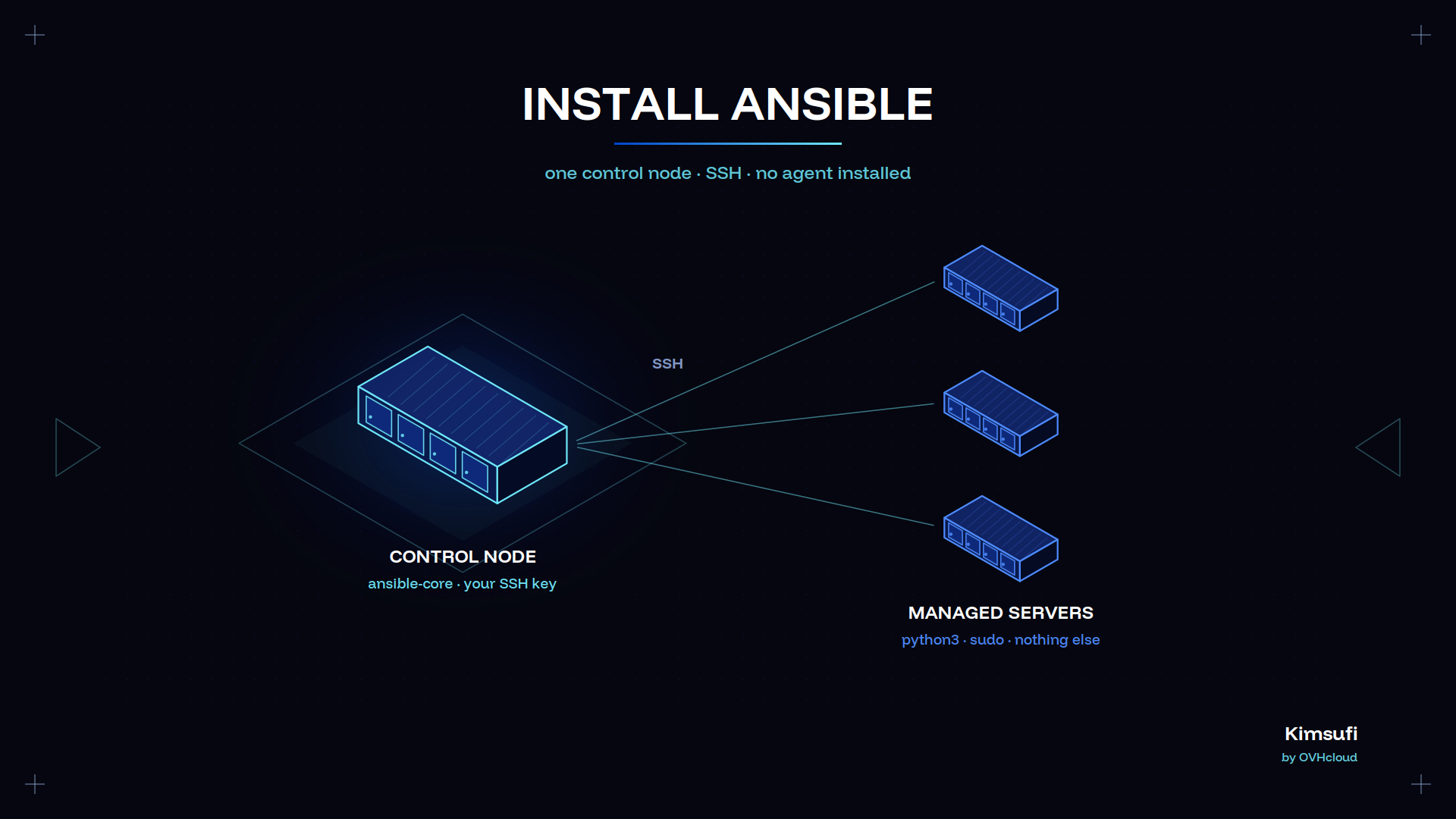
Ansible is an agentless automation tool that configures servers over SSH. This guide covers the Ansible install on RHEL and CentOS Stream, with pip and pipx, and in a container, then the inventory and first playbook. Kimsufi servers start at $11.10 USD/month.
Key takeaways
- Ansible is agentless. The control node needs Python and SSH; the target server only a Python interpreter.
- ansible-core is the engine. The full ansible package adds curated Ansible collections.
- Use the system package, or pipx install ansible for the newest release.
- One inventory.ini plus one playbook.yml is a working setup.
- Never run playbooks as root. Give an unprivileged user sudo on the target server instead.
Why choose Ansible for dedicated servers
No agent runs on the managed server. Nothing to deploy, nothing to keep current on each server Ansible manages.
Idempotence. A playbook describes the state you want, not the steps. Run it twice; the second run changes nothing.
One Ansible server, many machines. One Ansible server reaches every machine you operate over SSH, so provisioning ten servers costs what one does. Point the Ansible server at a new machine and it is managed the same day.
Readable configuration. Playbooks are YAML. A new administrator reads site.yml and knows what the application does. A shell script tells you nothing.
Our dedicated server maintenance guide covers the routine work Ansible automation replaces.
Control node and managed node requirements
| Role | Requirement |
|---|---|
| Control node | Python 3.11 or newer, any Linux or macOS. Not Windows. |
| Managed node | Python 3.8 or newer, SSH, sudo for privileged tasks |
| Network | Outbound SSH on port 22 from the Ansible server |
Those three requirements are the whole list. Windows machines can be managed nodes but never the control machine Ansible runs from: Ansible Windows support uses WinRM, not the standard Python connection.
If the Ansible server is a fresh box, our guide on how to host a dedicated server covers the base setup of that Ansible server.
Selecting the right Ansible package (core vs collection)
Two packages carry the Ansible install: ansible-core for the engine, and ansible for that engine plus 40 curated Ansible collections. Both give the same ansible command set, and both use the same Ansible collection format.
Pick the minimal ansible-core package when you know which Ansible collection you need and will pull it with ansible-galaxy. The minimal ansible-core package installs faster.
Pick the full ansible package for a first install. Every common module is present, so nothing blocks your first playbook.
The ansible-core package ships one module set and provides ansible, ansible-doc and seven other commands. The full ansible package ships thousands more. Distribution maintainers package both, usually one release behind whatever the upstream maintainer tagged; most repositories carry it by default. Either ansible package works here.
Installing Ansible via DNF/YUM on RHEL/CentOS
Ansible lives in the AppStream repository. Install Ansible with one command:
sudo dnf install ansible-coreFor the full package, enable EPEL first, then install Ansible packages from it:
sudo dnf install epel-release
sudo dnf install ansible
EPEL is community maintained, so its release tracks upstream. The trade-off is that an EPEL maintainer, not Red Hat, answers for that ansible package. Follow the maintainer instructions for that repository if a dependency conflicts.
Other distributions follow the same instructions with a different package manager: apt install ansible on Debian and Ubuntu, pacman -S ansible on Arch Linux. Arch carries the newest packages, which is why Arch Linux is common on control nodes and why Arch users rarely need pip.
Installing Ansible with pip or pipx
System packages lag. For the current Ansible version, install into an isolated Python environment.
pipx
pipx keeps each app in its own virtual environment and puts the commands on your PATH. It is the recommended route.
python3 -m pip install --user pipx
python3 -m pipx ensurepath
pipx install --include-deps ansible
Then manage it through pipx:
pipx upgrade --include-injected ansible
pipx inject ansible argcomplete
pipx list
For the engine alone, install the ansible-core package with pipx; to remove it, pipx uninstall ansible. Because pipx isolates the app, a bad upgrade never touches your system Python.
pip
If pipx is unavailable, pip with the user flag is the fallback. Every pip command below writes to your home directory:
pip install --user ansible
pip install --user argcomplete
pip install --user ansible-lint
pip install --user --upgrade ansible
pip cache purge
pip install --user ansible==11.*
pip show ansible
Use python3 -m pip when pip is not on your PATH. Packages land in ~/.local/bin, so add that to it. Pin a release when a playbook needs specific module behaviour.
Never run pip as root on a server that uses Python for its own tooling. The upstream Ansible installation guide gives the same instruction.
Installing Ansible in Docker or Podman containers
A container gives a pinned release with no changes to the host, which suits CI and one-off app deployment:
podman run --rm -it -v "$PWD:/work:Z" \
  -v "$HOME/.ssh:/root/.ssh:ro" -w /work \
  docker.io/alpine/ansible:latest \
  ansible-playbook -i inventory.ini playbook.yml
Swap podman for docker if that is your runtime. Mount the app directory read-write, the SSH key read-only, and never build a key into an image.
Verifying the installation and checking the version
Three commands confirm a working Ansible installation:
ansible --version
ansible-config dump --only-changed
ansible localhost -m ping
The output shows the release, the config file in use, the module search path, and the Python interpreter. If the ping module answers pong, the install is sound. Nothing else needs to answer.
Shell completion
Ansible ships bash completion through argcomplete. Register each ansible command once:
eval "$(register-python-argcomplete ansible)"
eval "$(register-python-argcomplete ansible-config)"
eval "$(register-python-argcomplete ansible-console)"
eval "$(register-python-argcomplete ansible-doc)"
eval "$(register-python-argcomplete ansible-galaxy)"
eval "$(register-python-argcomplete ansible-inventory)"
eval "$(register-python-argcomplete ansible-playbook)"
eval "$(register-python-argcomplete ansible-pull)"
eval "$(register-python-argcomplete ansible-vault)"
Put those lines in your bash profile to make the setting permanent. Completion covers flags and module names for every ansible command.
Basic configuration: inventory file and SSH access
The inventory lists what Ansible manages. Create inventory.ini:
[webservers]
web1 ansible_host=203.0.113.10
web2 ansible_host=203.0.113.11
[webservers:vars]
ansible_user=deploy
ansible_python_interpreter=/usr/bin/python3
Copy the key of the install user Ansible connects as to each server host, then confirm:
ssh-copy-id deploy@203.0.113.10
ansible all -i inventory.ini -m ping
Keep project settings in ansible.cfg beside that file, including the inventory path, so later commands on the application server need no flags. Port 22 must be reachable, which our firewall configuration guide covers.
Running your first playbook on a bare metal server
Save this as playbook.yml:
- name: Base configuration
  hosts: webservers
  become: true
  tasks:
    - name: Install nginx
      ansible.builtin.package:
        name: nginx
        state: present
    - name: Start and enable the service
      ansible.builtin.service:
        name: nginx
        state: started
        enabled: true
Run it, dry first:
ansible-playbook playbook.yml --check
ansible-playbook playbook.yml
Two modules do the work. As the playbook grows, move tasks into a playbook role so each app keeps its own tasks and variables. Repeat the run to automate the next machine. Serving a real application is covered in our website dedicated server guide.
Best practices for security, idempotence, and automation
Use a dedicated install user. Give it sudo, disable root SSH login, use keys only. For Ansible, sudo on the target server is the boundary that matters, and an administrator who skips it runs everything as root.
Encrypt application secrets with Ansible Vault. ansible-vault encrypt group_vars/all/secrets.yml keeps app credentials out of version control.
Trust --check first. A task reporting a change on every run is not idempotent, usually because it calls a shell command, not a module.
Pin your collections. A requirements.yml with explicit versions makes the deployment reproducible months later. Package maintainers move faster than your release cycle.
Automation does not replace recovery. Our backup guide covers that, and the same playbook builds a dedicated game server.
Conclusion
Installing Ansible takes one command. What matters is the configuration that follows: an inventory that reflects reality, a deploy user with scoped sudo, secrets in Vault, and playbooks that pass --check cleanly. One Ansible server then manages the whole estate.
Set up your control node today. The Kimsufi range starts at $11.10 USD/month, SYS at $33.20 USD/month, and Rise at $64.00 USD/month, with full root access and unlimited traffic.
Frequently asked questions
The instructions above cover the install; the instructions below answer what comes next.
Is Ansible still used in 2026?
Yes, widely. It remains the default automation tool for configuration management on Linux fleets, and Red Hat ships it in RHEL. The ecosystem moved to collections; the tool did not.
What is replacing Ansible?
Nothing has replaced it. Terraform provisions infrastructure and Ansible configures it, so most teams run both. Container-only shops answer the same need with Kubernetes manifests.
Does NASA use Ansible?
NASA has published case study material on using Ansible across its web application estate after a cloud migration.
How to set up an Ansible control node on a dedicated server?
Begin with ansible-core, create an unprivileged user with sudo, add your key, write inventory.ini, then ping one target server and check that it answers.
What are the minimum OS requirements for Ansible on a bare metal server?
Any current Linux with Python 3.11 or newer. Managed nodes need Python 3.8 plus SSH. No agent is required on the target server.
Can I install Ansible using pipx instead of the system package manager?
Yes, and usually better. pipx gives an administrator the current version in an isolated environment; the distribution package gives whatever that distribution's maintainers shipped. Most administrators keep both: pip for tooling, pipx for Ansible.