








MongoDB is a powerful document database that stores data as flexible, JSON-like documents instead of the rows and tables of a relational database like PostgreSQL. Installing MongoDB Community Edition on bare metal gives your application its own database engine, with all the memory, storage and CPU cores of the machine, and no per-node cloud billing. It is the self-managed alternative to a cloud database service from a cloud provider: you choose the release, the hardware and the security model. This tutorial follows the official MongoDB installation instructions for Ubuntu and Debian: you add the official repository, import the signing key, install the package, configure MongoDB security settings, then verify that MongoDB is running and connect with mongosh. Each step works the same on a local test box. New to bare metal? Our firewall configuration guide covers the network basics first. Plans begin at $11.10/month.
Key Takeaways
- Install MongoDB from the official MongoDB repository, not the distribution package, which is outdated or missing.
- The x86_64 build requires a CPU with AVX instructions. Every Kimsufi Intel model listed below supports them.
- Turn on authentication and keep
bindIpon localhost until you have a firewall rule for remote access.
- Tools required: SSH access with sudo, and about 20 minutes.
Prerequisites and System Requirements
Operating system. The current MongoDB 8.2 release supports Ubuntu 24.04 and 22.04 and Debian 12 on x86_64, and Ubuntu on ARM64. On the Red Hat family, the RedHat packages also cover AlmaLinux, Rocky Linux and CentOS Stream; MongoDB no longer builds for CentOS Linux 7, which is end of life. Pick the operating system from the control panel template before you start, and read the supported platform table in the MongoDB docs if you use another release; the documentation lists each platform and architecture.
CPU architecture. Since version 5.0, the x86_64 build needs AVX instructions, and the ARM build needs ARMv8.2-A or later, so check the CPU before you download the ARM build. An older or virtualized CPU without AVX makes mongod crash at start with an illegal instruction error, a common issue on low-cost VPS plans that a physical machine avoids.
Hardware. MongoDB's WiredTiger storage engine uses about half of the RAM minus 1 GB as its cache by default, so memory decides how much of your working set stays hot. Use SSD or NVMe storage, and keep the data directory on its own file system if you can.
| Kimsufi model | CPU | RAM | Storage | Good fit for |
|---|---|---|---|---|
| KS-B | Xeon E5-1620v2, 4 cores | 32 GB ECC | 1 x 120 GB SSD | Development, small production database |
| KS-C | Xeon E5-1650v2, 6 cores | 32 GB ECC | 1 x 120 GB SSD | More concurrent operations |
| KS-A | Core i7-6700K, 4 cores | 32 GB | 1 x 480 GB SSD | Larger data sets on one disk |
| KS-GAME | Core i7-7700K, 4 cores | 32 GB | 2 x 450 GB NVMe | Fast storage with software RAID |
ECC memory protects data in RAM from silent corruption, a real plus for a production database. On the two-disk KS-GAME, a RAID 1 mirror keeps the database online if one NVMe drive fails. On single-disk models, plan off-machine backups from day one. Note that 120 GB fills quickly once indexes and the journal grow, so check your data growth before you choose, and see our database server comparison for cost and scale trade-offs.
Access. A user with sudo rights, the server's public IP address or hostname, and a terminal with SSH.
Add the Official MongoDB Repository
MongoDB publishes its own APT repository with one channel per release, so you control which version you install. Install the tools the next step needs, then add the repository list file for your distribution.
sudo apt-get update
sudo apt-get install -y gnupg curl
Ubuntu 24.04 (noble):
echo "deb [ arch=amd64,arm64 signed-by=/usr/share/keyrings/mongodb-server-8.2.gpg ] https://repo.mongodb.org/apt/ubuntu noble/mongodb-org/8.2 multiverse" | sudo tee /etc/apt/sources.list.d/mongodb-org-8.2.listDebian 12 (bookworm):
echo "deb [ signed-by=/usr/share/keyrings/mongodb-server-8.2.gpg ] https://repo.mongodb.org/apt/debian bookworm/mongodb-org/8.2 main" | sudo tee /etc/apt/sources.list.d/mongodb-org-8.2.listAlmaLinux, Rocky Linux and CentOS Stream use a yum repository file instead. Create /etc/yum.repos.d/mongodb-org-8.2.repo with this content, then install with sudo dnf install -y mongodb-org:
[mongodb-org-8.2]
name=MongoDB Repository
baseurl=https://repo.mongodb.org/yum/redhat/9/mongodb-org/8.2/x86_64/
gpgcheck=1
enabled=1
gpgkey=https://www.mongodb.org/static/pgp/server-8.2.asc
Which release to choose. MongoDB 9.0 reached general availability on September 28, 2026 and is rolling out to the Community packages. Once its channel appears in the repository, replace 8.2 with 9.0 in these lines and in the file path. Check the release notes before an upgrade: each major release changes some defaults.
Import the MongoDB GPG Signing Key
APT refuses unsigned packages, so import the public key that the signed-by option above points to:
curl -fsSL https://www.mongodb.org/static/pgp/server-8.2.asc | sudo gpg -o /usr/share/keyrings/mongodb-server-8.2.gpg --dearmorRun this command before apt-get update; if you skip it, apt reports a NO_PUBKEY error and ignores the repository.
Install MongoDB Community Edition
Refresh the package index and install the mongodb-org metapackage:
sudo apt-get update
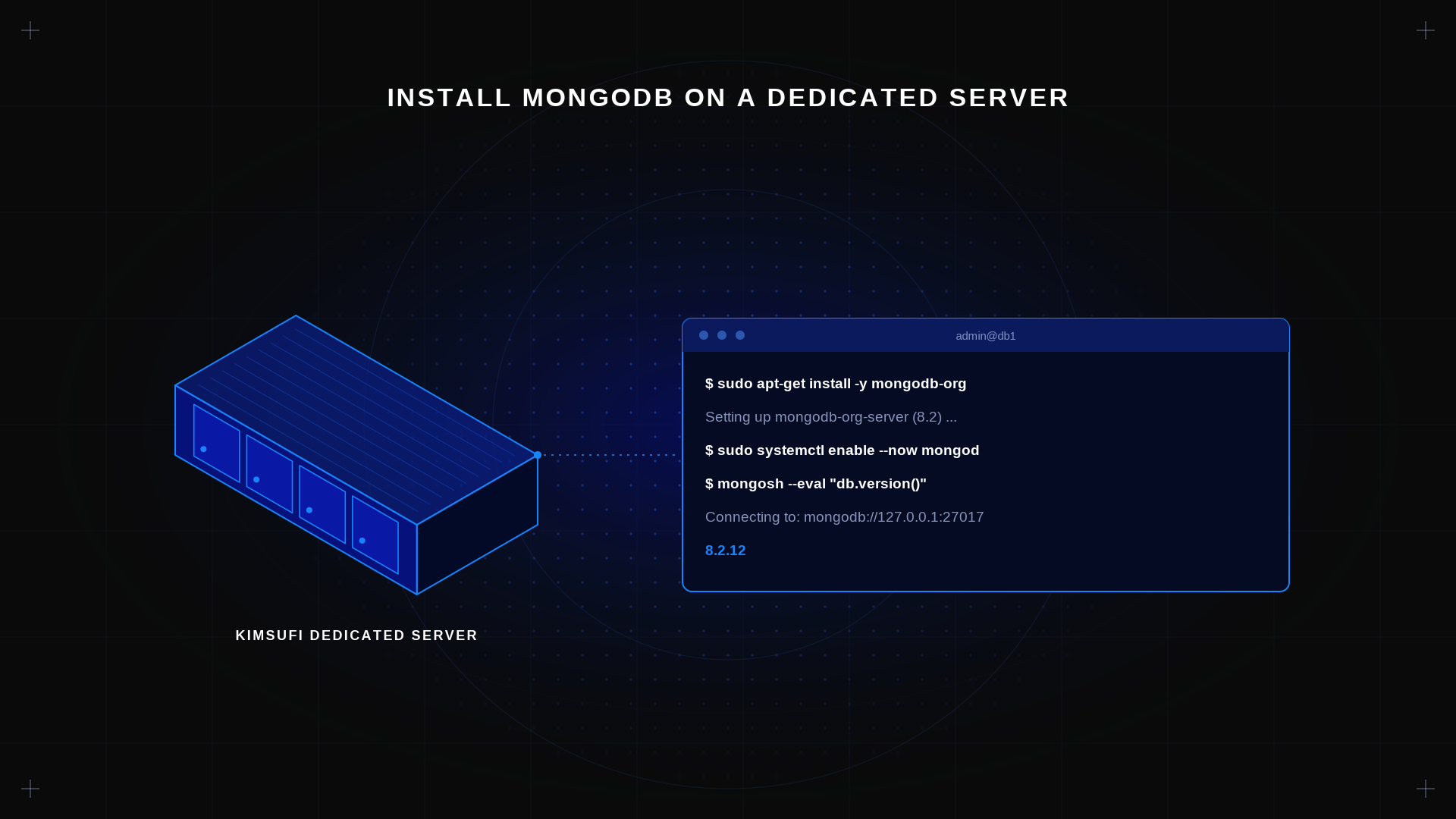
sudo apt-get install -y mongodb-org
The metapackage includes the server daemon, the mongosh shell and the MongoDB Database Tools: mongodump, mongorestore, mongoexport, mongoimport, mongostat and mongotop, each a separate command-line tool. The Database Tools also exist for macOS and Windows, so you can run a backup from a workstation. The legacy mongo shell was removed in version 6.0, so old tutorials that type mongo at the prompt need mongosh instead. To stop an unattended upgrade from changing the version behind your back, hold the packages:
echo "mongodb-org hold" | sudo dpkg --set-selections
echo "mongodb-org-server hold" | sudo dpkg --set-selections
MongoDB Enterprise Advanced, the commercial edition, adds features such as LDAP authentication, auditing and an in-memory storage engine, and includes commercial support plus advanced management resources such as Ops Manager and its monitoring agent, a backup agent and an automation agent. The Community Edition used here is free under the Server Side Public License (SSPL) and covers most self-managed deployments.
Configure mongod Service and Security Settings
The main configuration file is /etc/mongod.conf, in YAML, and every configuration change needs a restart. Each setting has a type and a default; three options matter on a machine with a public IP:
storage:
  dbPath: /var/lib/mongodb
net:
  port: 27017
  bindIp: 127.0.0.1
security:
authorization: enableddbPathis the data directory. Point it at your fastest disk.
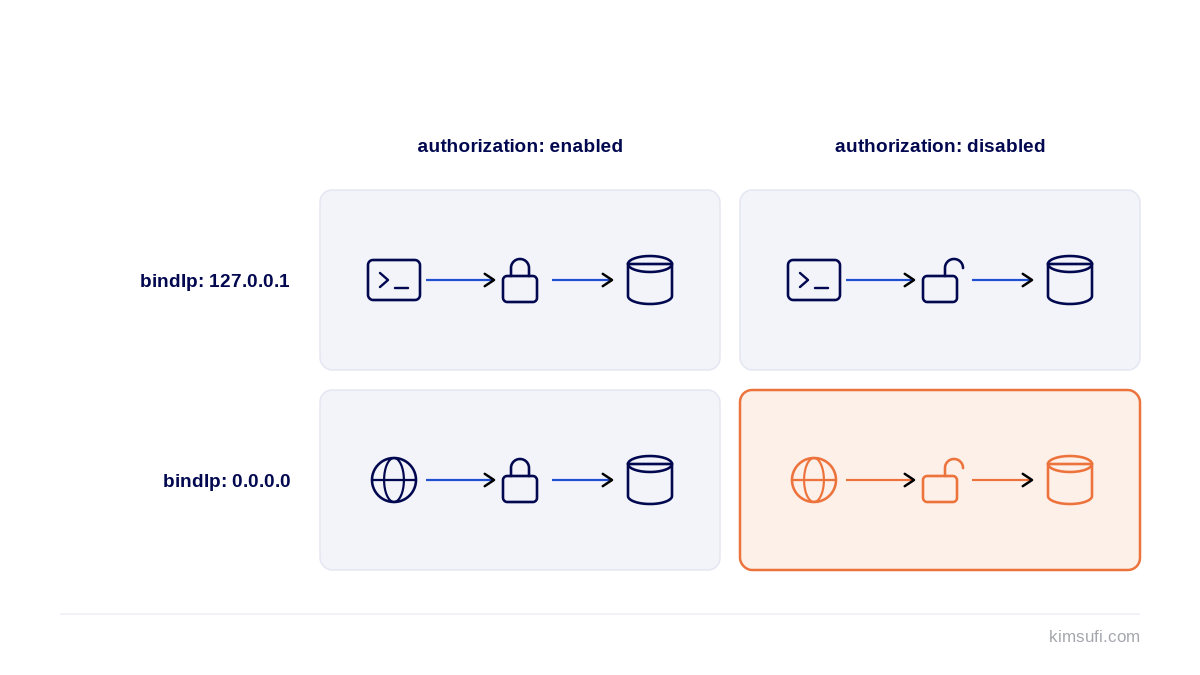
bindIpcontrols which network address the server listens on; each address you add is an address clients can reach. Keep127.0.0.1while your application runs on the same machine. For remote access, add the server's private or public address, and open port 27017 to your application hosts only.
authorization: enabledforces every user to authenticate. Without it, anyone who reaches the port can read and write your data.
Create an admin user with the root role before you turn authorization on, or right after with the localhost exception: connect from the machine itself and run, in mongosh:
use admin
db.createUser({ user: "admin", pwd: passwordPrompt(), roles: ["root"] })
Choose a strong password and store it in a password manager. Then create a separate user per application with only the roles it needs, such as readWrite on one database, so each password grants the minimum access. For a replica set, members also authenticate to each other with a shared key file or X.509 certificates.
Start and Verify the MongoDB Instance
Start the service and check its status:
sudo systemctl start mongod
sudo systemctl status mongod
✅ Expected result active (running): the server is running and listening on port 27017. The log file at /var/log/mongodb/mongod.log shows Waiting for connections.
If the service fails, check the log first. The most common causes are a typo in the YAML file, wrong ownership on the data directory, which must belong to the mongodb user, and another process already bound to the port.
Enable Automatic Startup on Boot
To enable MongoDB to start on boot:
sudo systemctl enable mongodAfter any change to mongod.conf, restart the service with sudo systemctl restart mongod to apply the new settings.
Connect to MongoDB with mongosh
mongosh is the official MongoDB shell. Connect with the admin user:
mongosh "mongodb://admin@127.0.0.1:27017/?authSource=admin"Then try a few commands: show dbs, use shop, db.orders.insertOne({ item: "book", qty: 1 }) and db.orders.find(), which returns the document as output. Your application opens a connection with the same connection string format, using its own user, through the official driver for its language. Store the connection string in an environment variable rather than in code, since it contains the password.
Connection string anatomy. A string such as mongodb://app:<password>@db.example.com:27017/shop?authSource=admin names the user, the password, the hostname, the port, the default database and connection options. For a replica set, list several hosts and add replicaSet=rs0, so the driver follows the primary node on failover. Use a hostname rather than an IP in production, so a server move does not break every connection.
Remote access. For a GUI client such as MongoDB Compass on your workstation (Windows, Linux or macOS), use an SSH tunnel rather than opening the port to read and inspect data: ssh -L 27017:127.0.0.1:27017 user@server, then connect Compass to localhost:27017.
Performance Tuning for Dedicated Servers
- File system: use XFS for the data directory, as recommended in the MongoDB production notes for operational deployments.
- CPU cores: WiredTiger uses every core for concurrent operations, so more cores mean more parallel reads and writes; a 6-core KS-C handles more concurrent clients than a 4-core model.
- Transparent huge pages: MongoDB 8.0 and later run best with THP enabled; earlier versions wanted it off. Follow the production notes for your version.
- Swap: keep a small swap and set
vm.swappiness=1, so the kernel only swaps under real pressure.
- ulimit: the package's systemd unit already raises open files to 64,000.
- Indexes: most slow operations come from a missing index. Use
explain()and the profiler to find the queries behind them; the profiler records slow operations by type.
On bare metal, no other tenant competes for the disk or the CPU cache in your stack, which keeps latency predictable for read and write operations alike. Check the results with mongostat: it reports operations per second, so you can compare before and after each change.
Backup, Monitoring, and Scaling Options
Backup and restore. For a single host in your stack, mongodump and mongorestore from the Database Tools are the simplest option. Schedule a nightly dump, copy it off the machine as part of a full server backup plan, and test a restore. For large data sets, a file system snapshot of the data directory is faster, but take it with journaling on and the data on one volume.
Monitoring. db.serverStatus() and the mongostat and mongotop tools show live operations, connections and memory use. For dashboards and alerts, use the Prometheus MongoDB exporter, an open-source tool on GitHub, with Grafana.
Scaling. Before you add nodes, Redis as a cache layer in front of MongoDB can absorb the most frequent reads. A replica set of three nodes adds high availability to a production deployment: if the primary node fails, a secondary takes over within seconds. A sharded cluster spreads data across several replica sets when one server is no longer enough; each cluster needs config servers and mongos routers in front. On Kubernetes, the MongoDB Controllers for Kubernetes Operator deploys the same replica sets and sharded clusters as native Kubernetes objects. It replaces the two older MongoDB operators.
FAQ
How to install MongoDB server?
Add the official MongoDB repository and its GPG key, install the mongodb-org package, then start and enable the service with systemctl. The sections above give every command for Ubuntu, Debian and the RedHat family.
Is MongoDB still relevant in 2026?
It is. MongoDB 9.0 shipped in September 2026, and the document model remains a common choice for applications with changing schemas, catalogs, user profiles and event data. Full-text and vector search are now available for the Community Edition through mongot, the same search engine that powers the managed cloud service.
Is it possible to run MongoDB locally?
It is. The same Community Server runs on a laptop with Linux, macOS or Windows. Many teams develop locally, then deploy to a dedicated server for production.
How do I install MongoDB locally on my computer?
On macOS, use Homebrew: brew tap mongodb/brew then brew install mongodb-community; macOS on Apple silicon and Intel are both supported. On Windows, download and run the MSI installer from the MongoDB download page, which can also register MongoDB as a Windows service. On Linux, follow the same steps as this guide. Docker is another option: docker run -d -p 27017:27017 mongo starts a local container from the official mongo image, the fastest way to get started. The image tags follow each release, so pin a version tag in production. Use a named volume for the data path, or the container loses its data when you remove it.
Run MongoDB on bare metal Kimsufi dedicated servers from $11.10/month. Root access, fixed monthly pricing, built-in DDoS protection.