



This guide answers one question, how to install PostgreSQL dedicated server hosting from scratch. PostgreSQL is a relational database management system that rewards hardware you control: the page cache, the disk and every core go to one database.
You will enable the official Postgres repo, run the installation of PostgreSQL 18, create a database and the role that owns it, then configure PostgreSQL and secure the PostgreSQL server. Once you have installed PostgreSQL the work is configuration, not capacity, on a database server you own outright from $11.10/month.
Why Choose a Dedicated Server for PostgreSQL?
The database leans on the operating system cache as much as its own buffers, and on a contended platform that cache is never yours. Work here is I/O-bound first, so local NVMe keeps a query plan reproducible. A cloud instance bills per hour and per GB; bare metal bills a flat rate whatever you store. No cloud provider policy sits between you and the configuration, no cloud upgrade window is imposed, and no cloud region limits where the data sits. If you are still weighing the engine itself, our MySQL vs PostgreSQL comparison sets out the trade-offs, and our MySQL installation guide covers the other path.
Prerequisites and Supported Operating Systems
- RHEL, CentOS Stream, Rocky, Alma, Ubuntu or Debian, with root or sudo over SSH.
- The IP address your provider sent, needed again for the firewall rules. Ensure that IP is reachable first.
- 4 GB RAM minimum, plus storage for data and backups.
- Version 18 is the current stable release; 19 is in beta, so keep it off production.
1️⃣ Install PostgreSQL on RHEL / CentOS
sudo dnf install -y https://download.postgresql.org/pub/repos/yum/reporpms/EL-9-x86_64/pgdg-redhat-repo-latest.noarch.rpm
dnf -qy module disable postgresql && dnf install -y postgresql18-server
/usr/pgsql-18/bin/postgresql-18-setup initdb
That repository carries every Postgres release in parallel, so a 17 and an 18 database run side by side.
2️⃣ Install PostgreSQL on Ubuntu / Debian
The official script pulls in PGDG and its signing key, and creates the cluster for you:
sudo apt install -y postgresql-common
sudo /usr/share/postgresql-common/pgdg/apt.postgresql.org.sh -y
sudo apt install -y postgresql-18
3️⃣ Verify Installation and Start the Service
systemctl enable --now postgresql-18
sudo -u postgres psql -c "SELECT version();"
✅ Expected result psql prints the release string, confirming you have installed PostgreSQL correctly.
Configure PostgreSQL: listen_addresses, pg_hba.conf, and authentication
The PostgreSQL server listens on localhost port 5432 by default, so no outside connection succeeds. To configure PostgreSQL for remote access, put your server IP in listen_addresses, then name the clients allowed to connect, using scram-sha-256 and never trust. The DB owner follows the same rule for every connection:
host appdb appuser 10.0.0.0/24 scram-sha-256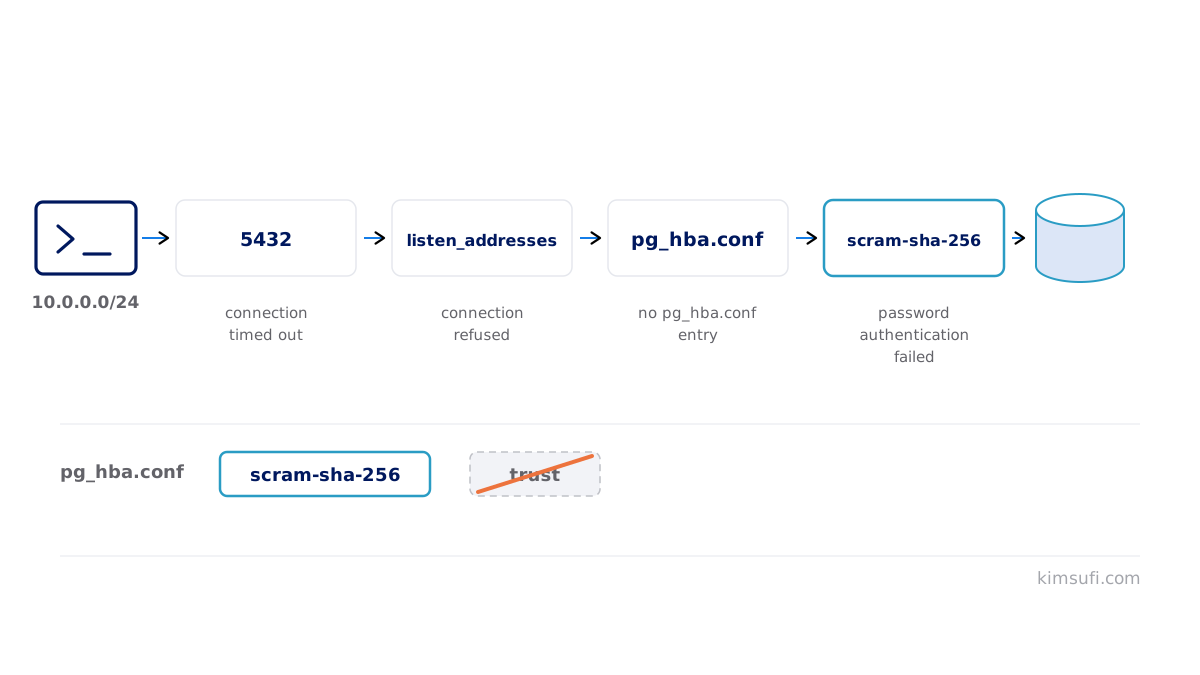
Create a database and its owner, then reload:
sudo -u postgres createuser --pwprompt appuser
sudo -u postgres createdb -O appuser appdb
systemctl reload postgresql-18
⚠️ Warning Never open listen_addresses = '*' on a public IP without a firewall. Scanners find 5432 within hours.
Secure the Server: firewall rules, SSL/TLS, and password policies
Allow the database port only from the application IP, never from any IP, and ensure the rule survives a reboot. Turn ssl = on with real certificate and key files, then require hostssl so every session is encrypted. Apply every minor release, because they are security releases. Our firewall guide covers rule design.
Performance Tuning Basics: shared_buffers, work_mem, and autovacuum
| Parameter | Begin at |
|---|---|
| sharedbuffers | 25% of RAM |
| effectivecachesize | 50–75% of RAM |
| workmem | 16–64 MB, per sort |
| autovacuum | on, never disable it |
Reload covers all but the first value, which needs a bounce.
Set Up Automated Backups with pg_dump and pg_basebackup
A backup you have never restored is a hypothesis, so run both kinds:
pg_dump -U appuser -Fc appdb > /backup/appdb.dump
pg_basebackup -D /backup/base -Ft -z -P
The logical backup writes one PostgreSQL database as portable SQL, loaded after you create a database to receive it. The physical backup copies the whole database cluster, which point-in-time recovery needs. Schedule a nightly backup, send one backup copy off the box, and ensure backup storage sits on a different disk from the data. Rehearse the restore with the same SQL tooling you use daily.
Monitoring & Metrics: pg_stat_statements, pgbouncer, and systemd alerts
Put pg_stat_statements in the preload libraries and reload: it records every statement shape with timing, the fastest route to a slow query on a busy database. pgAdmin shows the same data graphically. Reach for pgbouncer once the connection count climbs, since one process per connection means pooling keeps hundreds of app sessions on a few backends.
Managing the Service with systemctl (enable, start, restart)
systemctl status postgresql-18
systemctl reload postgresql-18
journalctl -u postgresql-18 -n 50
Reach for a full restart only when a parameter demands it.
Optional: Deploy PostgreSQL with Docker on a Dedicated Host
Deploy a container to create a throwaway test database, or for local development:
docker run -d --name pg18 -e POSTGRES_PASSWORD=secret \
  -v /srv/pgdata:/var/lib/postgresql/data -p 5432:5432 postgres:18
Always mount a volume, or removing the container destroys the data.
Comparison: Self-Managed vs. Managed PostgreSQL Hosting Options
| col1 | Bare metal | Cloud |
|---|---|---|
| Cost | Flat monthly rate | Per hour plus per GB |
| Releases | Any, when you choose | The provider's schedule |
| Tuning | Every parameter | The provider's groups |
A cloud offer buys back time; running it yourself buys control. Our SaaS guide goes wider.
Common Pitfalls and Troubleshooting Tips
| Symptom | Fix |
|---|---|
| could not connect to server | Edit listenaddresses, reload |
| no pghba.conf entry | Add the matching line, reload |
| password authentication failed | Use scram-sha-256, reset it |
| Sessions exhausted | Put pgbouncer in front |
| Disk filling steadily | Check autovacuum and archiving |
More in our guide to common errors.
Next Steps: Scaling, Replication, and High-Availability
Scale vertically first; it goes further than most teams expect. Then streaming replication gives read replicas and a standby, and logical replication makes major upgrades less disruptive. Patroni automates failover.
FAQ
How do I install a PostgreSQL server?
Enable the PGDG repository, pull the postgresql server package, initialise the cluster on RHEL-family systems, then switch the postgresql server on. The whole installation of PostgreSQL takes four commands, after which you create a database and the SQL is yours.
Can PostgreSQL be self-hosted?
Yes, and that is the normal deployment for a database server you control. Postgres carries a permissive licence: no fee, no user cap, no vendor.
Can I install PostgreSQL on Windows 11?
Yes. The EDB installer gives a graphical setup and WSL 2 runs the Linux build. Either suits development; production belongs on Linux.
How much RAM does a PostgreSQL server need?
4 GB for a small workload, 16 GB for a busy PostgreSQL database, 32 GB or more once the working set grows. Frequently accessed data should fit in RAM.
What is the best way to secure PostgreSQL on a dedicated server?
Keep listen_addresses restricted, allow 5432 only from known addresses, require scram-sha-256 and TLS, and apply every minor patch. Our ecommerce guide and website guide cover the app side.
Run PostgreSQL on bare metal Kimsufi machines from $11.10/month. Full root access, built-in DDoS protection.